Configuring Security
To ensure that the implementation of the API is secure, implement the authentication and configure SSL on the application server.
Configuring JWT Token-based Authentication
In IRIS, to enable the JWT token based authentication, the following configuration should be done in the war-file.
 Enabling Class-path Source
spring-jwt-iris-authenticator.xml is used to define spring beans and should get loaded as part of the configuration.
By default, IRIS is shipped with this configuration disabled, and the user must enable it. In web.xml inside the <context-param>, un-comment the below lines.
<param-value>classpath:spring-jwt-iris-authenticator.xml</param-name>
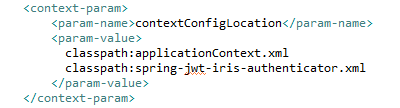
Enabling Spring Security Filter
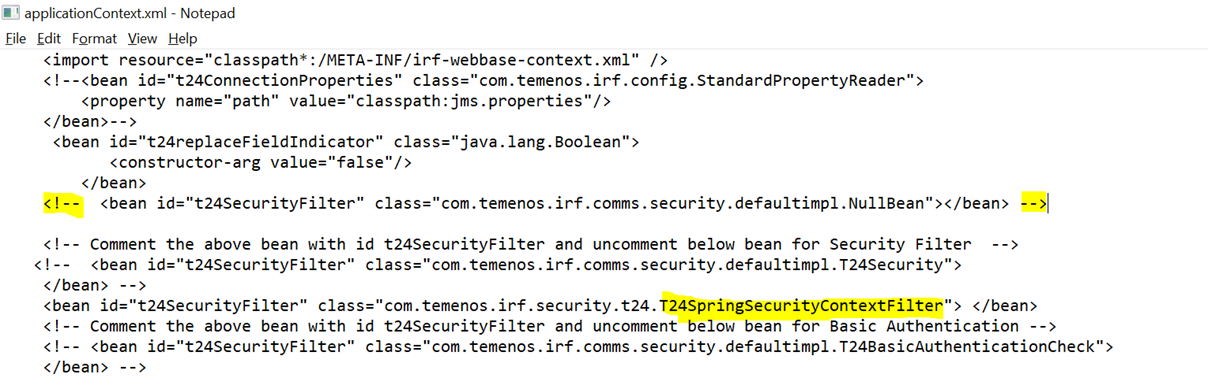
The following bean needs to be enabled, and all other "t24SecurityFilter" need to be disabled in the \WEB-INF\classes\applicationContext.xml file.

Enabling Spring Security in ApplicationContext.xml
IRIS T24 Processors use T24 Security Context to construct OFS messages with the respective user credentials. T24SecurityFilter derives the user principal from the Spring Spring Security Context and constructs a user’s T24 security context.
Temenos provides "com.temenos.irf.comms.security.AuthImpl.T24SpringSecurityContextFilter", a T24 Security filter, to retrieve the user principal from the spring security context and construct the T24 Security context used for constructing the OFS message.
Enable the following bean in the applicationContext.xml file and disable all other ‘t24SecurityFilter’ files.

Configuring Spring-jwt-iris-authenticator.xml
Spring-jwt-iris-authenticator.xml allows banks to configure the IRIS infrastructure based on their token validation requirements.
The section below helps configure the Spring Security Authentication Provider and Token Validation filter based on the client’srequirements.
Temenos provides a validation filter and authentication provider to validate the JWT token. The validation filter uses this XML configuration to perform the algorithm, claim, and signature validations.
AlgorithmValidator
The token is validated against the algorithm provided in the configuration and the original value available in the JWT token. If there is a mismatch in these two values, IRIS ignores this request and send an unauthorised response back.
<beans:property name="idTokenSignedAlg" value="RS256" />
In the above example, the token is Algorithm RS256. However, this value can be changed according to your token type.
SignatureValidator
To enable signature validation, set the below property to true. By default, this is set to false.
<beans:property name="idTokenSigned" value="" />
Every JWT token is signed by the token provider using their private key, and this signature can be validated only with the public key provided by the token provider. The public key is configured to validate the signature of the JWT token in IRIS. IRIS supports four ways to obtain the public key, and anyone of the below four properties is mandatory for IRIS to validate the signature.
- <beans:property name="pkEncoded" value="" /> - use this property if the client has the public key as a String , which can be base64 encoded and added here.
- <beans:property name="pkCertEncoded" value="" /> - use this property if the client has the key certificate as a String, which can be base64 encoded and added here.
- <beans:property name="pkCertFilePath" value="" /> - use this property if the client has the key certificate as a certificate file (.cer or .pem), and that location can be directly configured here.
- <beans:property name="pkJwksUri" value="" /> - use this property if the client can expose the JWKS URI to obtain the public key.
<beans:property name="idTokenSigned" value="false" />
ClaimValidator
ClaimValidator is a generic validator for different claims in the token. Each instance of the ClaimValidator validates one specific claim. The claim that needs to be validated is injected into an instance.
Following are the mandatory claims in any JWR token:
- exp
- iss
- iat
CustomClaimValidator
The user can use the following configurations to perform any claim validations other than the default claim validations.
<beans:bean id="customClaim" class="com.temenos.irf.web.security.jwt.validator.CustomClaimValidator">
<beans:property name="customClaims">
<beans:map>
<beans:entry key="" value="" />
<beans:entry key="" value="" />
</beans:map>
</beans:property>
</beans:bean>
The user can add any number of keys and values in the above property. All the values must be validated against the values present in the JWT token, and if any validation fails, then IRIS sends an un-authenticated response to the user.
Field for further Processing
The client or support development can extract the values from the JWT token and use them later in the published or /provider services. The following bean is configured to extract those values from the token and set them in the request context header.
<beans:bean id="requiredFields" class="com.temenos.irf.web.security.jwt.parser.RequiredFieldsExtractor">
<beans:property name="claimsToExtract">
<beans:list>
<beans:value></beans:value>
<beans:value></beans:value>
</beans:list>
</beans:property>
</beans:bean>
The user can add any number of values in the above property to extract. The below screen shot is an example.

User Principal for Authentication
After the token is validated, the validation filter builds and propagates the authenticated principal and invokes the remaining filter change as usual.
Spring Security uses org.springframework.security.core.userdetails. UserDetails to manage user information across the application. After authenticating the requests, spring security makes userDetails available as a part of the Spring Authentication object.
IRISAuthenticatedUser is the iris-authenticated user object used to carry user data as part of the Spring Authentication object.
After the token is authenticated, the successfulAuthentication callback sets the Spring Authentication object references in the Spring Security Context. The Security Context holds the user information (IRISAuthenticatedUser), which is available across the IRIS Version and Enquiry processors.
To get this user principle, the user or client needs to configure the claim where the user principle is available, which is configured in the below property. The default value is "sub".
<beans:property name="principalClaim" value="sub" />
OFS.SOURCE should be set to the PREAUTHENTICATED value. The value in 'iss' must correspond to a record in the T24 USER table.Adding Clock Skewness or Adjusting Clock Difference
In certain scenarios, the time difference between the JWT token provider and the server in which IRIS runs is some seconds, advanced, or delayed. In those cases, IRIS can be configured to ignore a specific amount of time difference in seconds. It can be configured using the below property, where the value is in seconds.
<beans:property name="expiryDelayAllowance" value="0" />
Skipping JWT Validation for Static Resources and Healthz APIs
A few endpoints in the war file should be excluded from the JWT validation, such as healthz APIs and static resources. Those endpoints can be configured using the below property tag so that IRIS ignores the JWT validation and skips this filter. The user can define more than one endpoint using a comma-separated value.
<beans:property name=”skipUrls” value=”/v1/healthz , /v1/anyOtherUrl” />

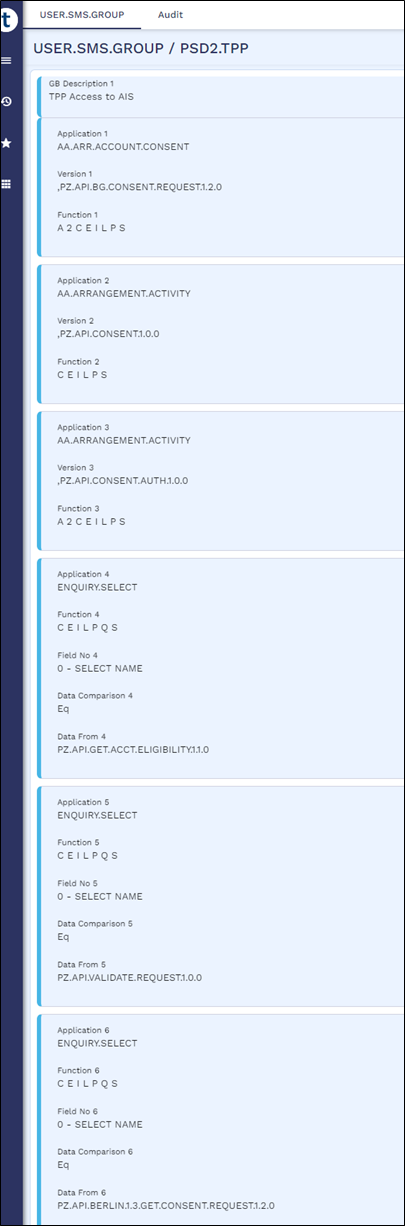
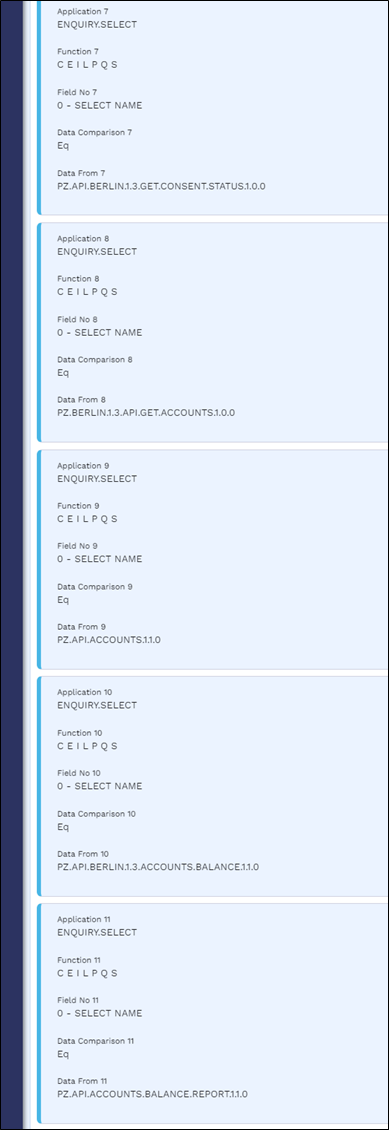
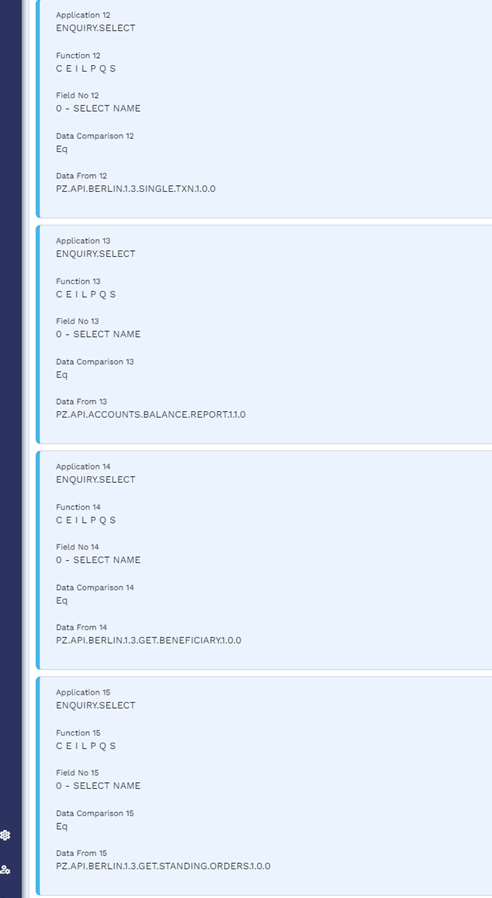
USER.SMS.GROUP Profiles for TPP Gateway Users
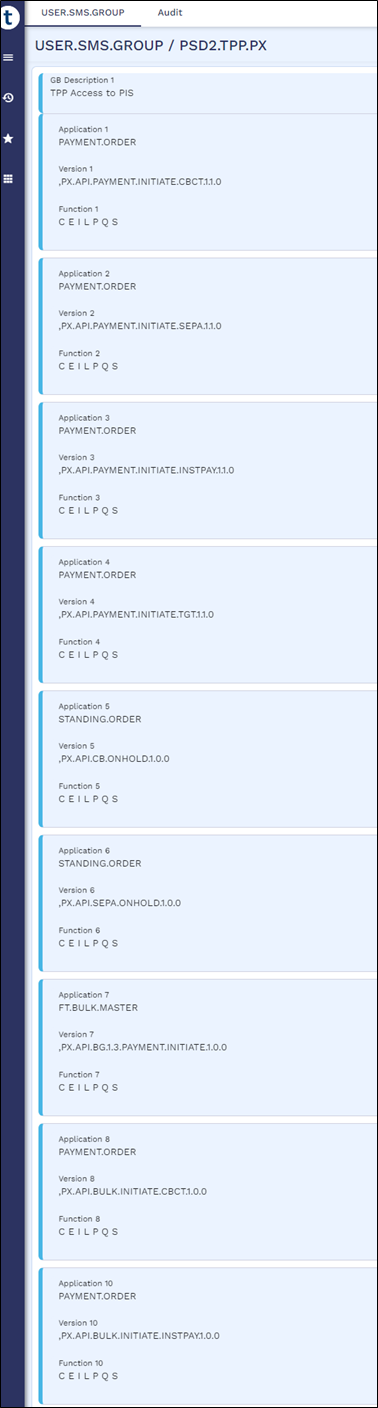
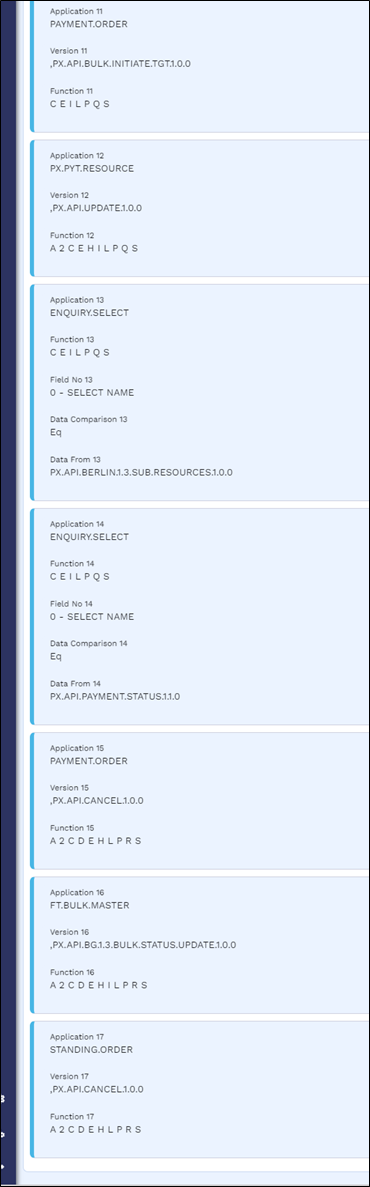
A user's role determines what they can and cannot access in Transact. The role rights (for example, the application, version or enquiry that a role can access) are defined in the USER.SMS.GROUP application in Temenos Transact, and this configuration must be manually created by the client for the TPP/Gateway to access.
Below are the USER.SMS.GROUP profiles with all the versions, enquiries, applications and functions that are used for AIS, CBPII and PIS implementations. When the client introduces a local artefact which is to be accessed from the TPP/Gateway, it must be included in the respective profiles.
 IAM Configuration
Identity and Access Management (IAM) assigns different access levels to users based on their roles. This feature allows a greater control for gateway and user access. To implement IAM configuration, the below must be configured.
Configuring IRIS War
Configure the below setup in the psd2 iris war files:
Configuring JWT token
To configure the JWT token,
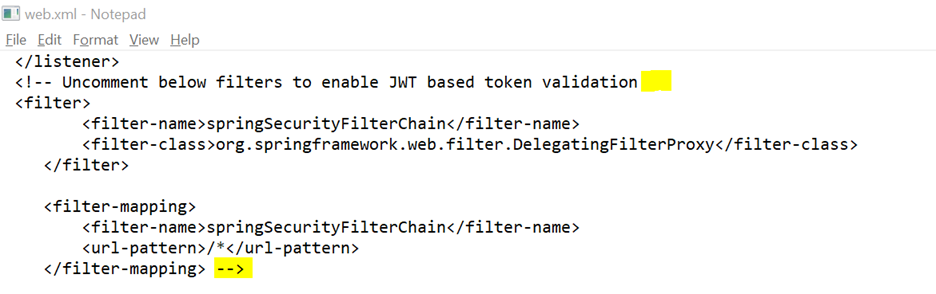
- Uncomment springSecurityFilterChain using web.xml located in the WEB-INF folder.
- For t24SecurityFilter, instead of using the null bean class, assign the SpringSecurityContextFilter class using the applicationContext.xml file located in the WEB-INF\classes folder.
- Validate the signature and claims extraction using the spring-jwt-iris-authenticator.xml file located in the WEB-INF\classes folder.
- Configure the algorithm as shown below.

- To validate the signature, set the value for Signature Validation as true.

- Encode the public key in base64 and configure it under the pkEncoded tag.
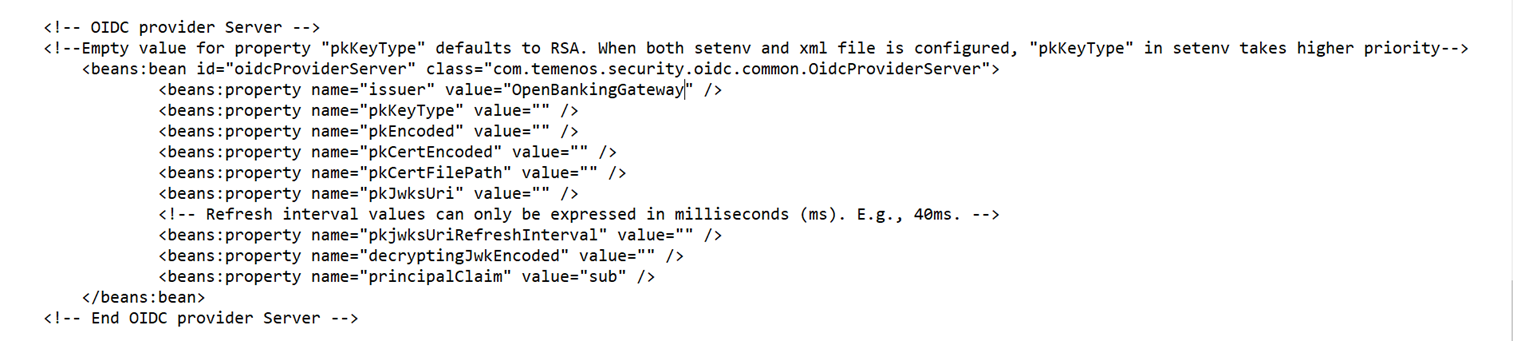
- Configure the algorithm as shown below.
- The user can configure the claims to be extracted from the token. The user ID and role ID are taken from the claims and passed to the next step in the configuration.

Configuring IAM
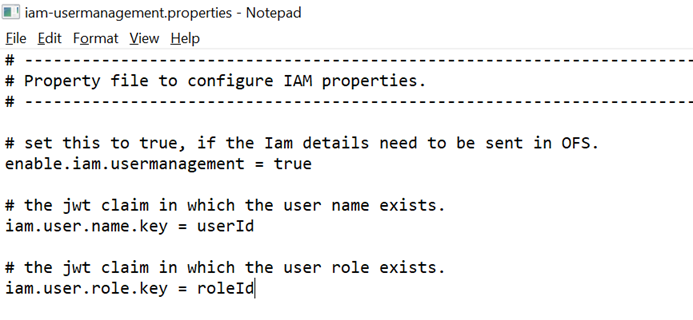
Map the user ID and role ID from claims to IAM properties. This mapping must be configured in the iam-usermanagement.properties from WEB-INF\classes\irf-config folder.
Configuring Transact
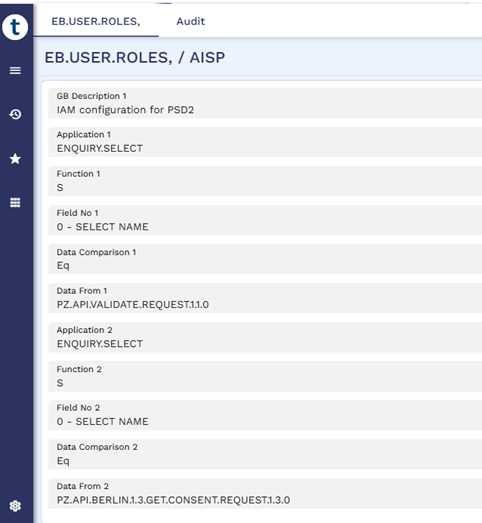
The value in 'roleId' must correspond to a record in the EB.USER.ROLE table. Only the enquiries and available versions associated with this record will be accessible. A sample is shown in the screenshot below.
Configuring JWT
After creating the consent or payment, the gateway generates a token with the below payload structure and sends it to Temenos Transact for further processing.
{
"iss": "OpenBankingGateway",
"aud": "PSD2",
"sub": "IB100404",
"exp": 2162243203,
"iat": 1562243203,
"scp": "AISP",
"referenceId": "AAACT231083Q8T2RBL",
"tppId": "TeePee",
"tppName": "TeePee",
"registeredCompanyName": "Temenos"
}
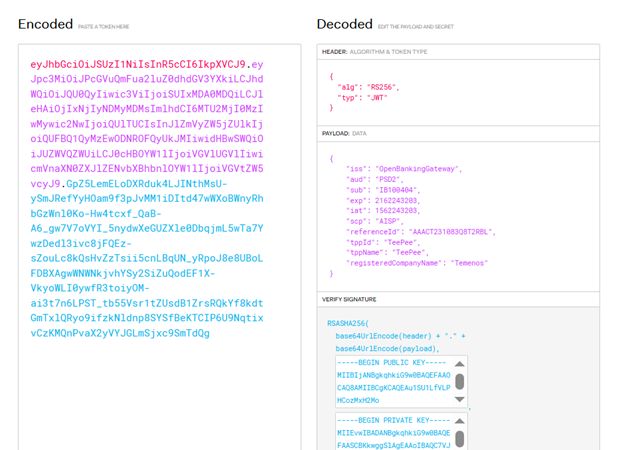
EB.USER.ROLES should be created containing the allowed applications.
This can also be configured with a different claim, ensuring the corresponding value should be recorded in EB.USER.ROLES.
In this topic