Enabling Authentication using JWT-MS
This section helps you to enable the authentication using JWT-MS.
JWT signature allows to verify that the token is signed by the sender and not altered in any way. The signature is created using the Header and Payload segments, a signing algorithm, and a secret or public key.
To enable JWT authorisation, you should set ms.security.tokencheck.enabled to Y.
XACML Configuration
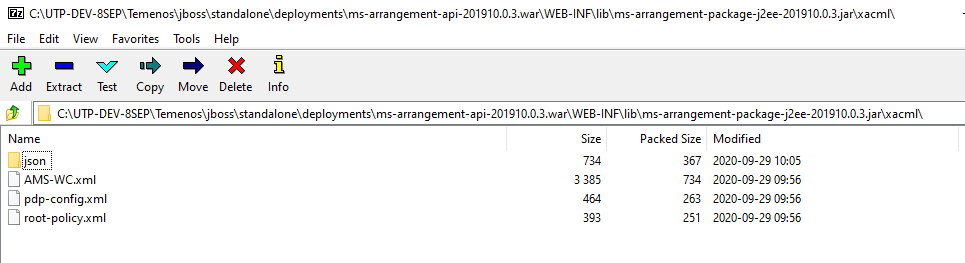
The XACML files are available in the ms-arrangement-api.war\WEB-INF\lib\ms-arrangement-package-j2ee-201910.0.3.jar\xacml\ path.
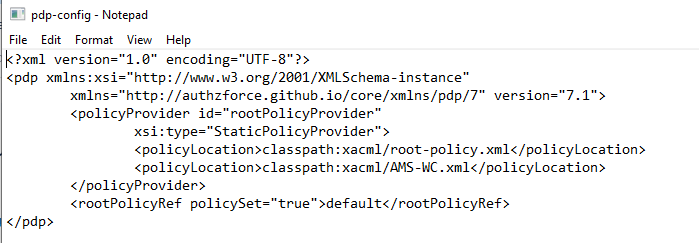
 pdp-config.xml
In this file, you can configure the root policy and role based policy file locations.
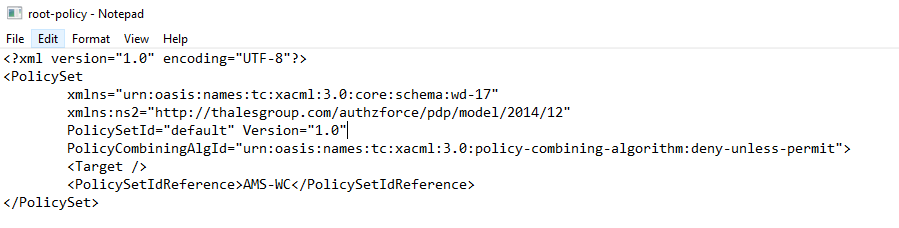
root-policy.xml
In this file, you can configure the ID of the role based policy.
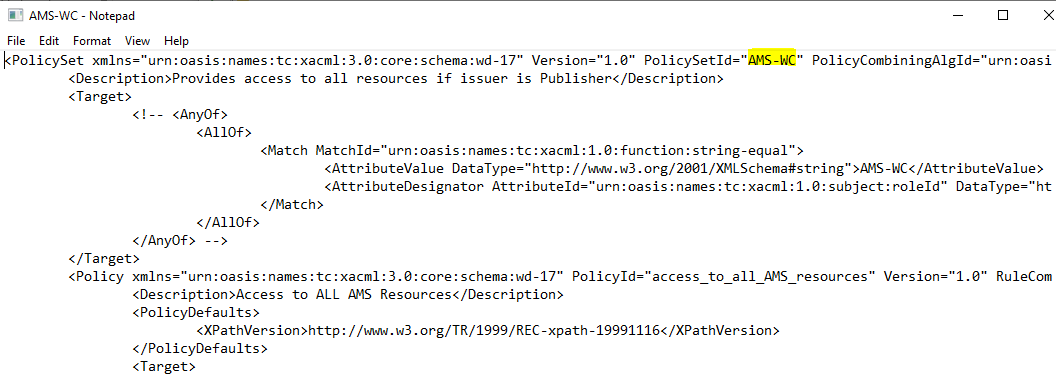
AMS-WC.xml
This file holds the actual authorization configuration.
JWT Token Payload
Below is the JWT token payload used in AMS,
{
"iss": "Publish",
"aud": " temenos.com",
"sub": "USER",
"exp": 1619170555,
"iat": 1587547106,
"roleId": [
"cba_LSM_getArrangementList"
]
}
Set Environment Variables
AWS
For AWS deployment, set the below-mentioned JWT authentication and XACML configuration properties as Environment Variables in the install-aws.sh.
install-aws.sh
#--- JWT & XACML PDP Configuration ---
temn.msf.security.authz.enabled: "true"
PDP_CONFIG: classpath:xacml/pdp-config.xml
temn.msf.pdp.resource.type: API
temn.msf.pdp.resource.manager: ARRANGEMENT
ms.security.tokencheck.enabled: Y
# To validate the JWT token with Entitlement MS, userId should be present in Entitlement MS with roleId used in XACML policy and
# temn.entitlement.service.enabled should be set to "true"
temn.entitlement.service.enabled: "false"
temn.entitlement.service.base.path: http://localhost:8095/ms-entitlement-api/api/v1.0.0
temn.entitlement.service.resource.path: system/entitlements/users/{userId}/roles
temn.entitlement.stubbed.service.enabled: "false"
#If Entitlement MS is deployed on AWS/Azure, pass the API key in below variable
temn.entitlement.service.api.key: <x-api-key here>
ID_TOKEN_SIGNED: "false"
JWT_TOKEN_ISSUER: Fabric
JWT_TOKEN_PRINCIPAL_CLAIM: FABRICUSER
JWT_TOKEN_PUBLIC_KEY: TUlJQklqQU5CZ2txaGtpRzl3MEJBUUVGQUFPQ0FROEFNSUlCQ2dLQ0FRRUFzYjJubnNMMzkycjNpd1JmYUdaUzFsVXRkYitFeXZ2OUZmZlhNR2NSNHJmTm5ITHkvRUlHbFFvNWh0NUNwUG91ODYwZkhnREpHZHk1ckVKWEJXVVdEUGI5OGkxMitQMkJGY1FyVnhmM3BWODM0ME10U0NEY3RwYmY2R2x3SkZZRHBjSVZSYWttWWpva0R2VEljanAxWnd2MHQvV2k5SjhHeERXWWhpNmhyd3VGY0c5SUdBSEJQWk8vY2dMR2pmYW9oYUY5OFhFOUtYTGMvV0NxQ1QycUIraEZjeWNlQTVMWU4vdURkRnZHbW5DOHUycWRIWDRoRW96bU8wTmpUaFBhRndiSm9NSXhENEtQa1VGN0Q1VXRkSWRYNUdIcXFOd1RSWnU4S0NEWWJUT1RvN2s3a2syeTB6SytkMllXQWdhWWw4djRTeEtCbVZzMVliZGRwUk1TVFFJREFRQUI
Azure
For Azure deployment, set the below-mentioned JWT authentication and XACML configuration properties as Environment Variables in the install.bat/install.sh
azure/install.bat
REM --- JWT & XACML PDP Configuration ---
SET temn_msf_security_authz_enabled="false"
SET PDP_CONFIG="classpath:xacml/pdp-config.xml"
SET temn_msf_pdp_resource_type="API"
SET temn_msf_pdp_resource_manager="ARRANGEMENT"
SET ms_security_tokencheck_enabled="Y"
REM To validate the JWT token with Entitlement MS, userId should be present in Entitlement MS with roleId used in XACML policy and
REM temn_entitlement_service_enabled should be set to "true"
SET temn_entitlement_service_enabled="true"
SET temn_entitlement_service_base_path="http://localhost:8095/ms-entitlement-api/api/v1.0.0"
SET temn_entitlement_service_resource_path="system/entitlements/users/{userId}/roles"
REM If Entitlement MS is deployed on AWS/Azure, pass the API key in below variable
SET temn_entitlement_service_api_key="<x-api-key here>"
SET temn_entitlement_stubbed_service_enabled="false"
SET ID_TOKEN_SIGNED="false"
SET JWT_TOKEN_ISSUER="Fabric"
SET JWT_TOKEN_PRINCIPAL_CLAIM="FABRICUSER"
SET JWT_TOKEN_PUBLIC_KEY=TUlJQklqQU5CZ2txaGtpRzl3MEJBUUVGQUFPQ0FROEFNSUlCQ2dLQ0FRRUFzYjJubnNMMzkycjNpd1JmYUdaUzFsVXRkYitFeXZ2OUZmZlhNR2NSNHJmTm5ITHkvRUlHbFFvNWh0NUNwUG91ODYwZkhnREpHZHk1ckVKWEJXVVdEUGI5OGkxMitQMkJGY1FyVnhmM3BWODM0ME10U0NEY3RwYmY2R2x3SkZZRHBjSVZSYWttWWpva0R2VEljanAxWnd2MHQvV2k5SjhHeERXWWhpNmhyd3VGY0c5SUdBSEJQWk8vY2dMR2pmYW9oYUY5OFhFOUtYTGMvV0NxQ1QycUIraEZjeWNlQTVMWU4vdURkRnZHbW5DOHUycWRIWDRoRW96bU8wTmpUaFBhRndiSm9NSXhENEtQa1VGN0Q1VXRkSWRYNUdIcXFOd1RSWnU4S0NEWWJUT1RvN2s3a2syeTB6SytkMllXQWdhWWw4djRTeEtCbVZzMVliZGRwUk1TVFFJREFRQUI
K8
For K8 deployment, set the below-mentioned JWT authentication and XACML configuration properties as Environment Variables in arrangement-api-config.yaml
arrangement-api-config.yml
#--- XACML & PDP Configuration related---
temn.msf.security.authz.enabled: "true"
PDP_CONFIG: classpath:xacml/pdp-config.xml
temn.msf.pdp.resource.type: API
temn.msf.pdp.resource.manager: ARRANGEMENT

#--- JWT token authentication related---
ms.security.tokencheck.enabled: Y
# To validate the JWT token with Entitlement MS, userId should be present in Entitlement MS with roleId used in XACML policy and
# temn.entitlement.service.enabled should be set to "true"
temn.entitlement.service.enabled: "false"
temn.entitlement.service.base.path: http://localhost:8095/ms-entitlement-api/api/v1.0.0
temn.entitlement.service.resource.path: system/entitlements/users/{userId}/roles
temn.entitlement.stubbed.service.enabled: "false"
#If Entitlement MS is deployed on AWS/Azure, pass the API key in below variable
temn.entitlement.service.api.key: <x-api-key here>
ID_TOKEN_SIGNED: "false"
JWT_TOKEN_ISSUER: Fabric
JWT_TOKEN_PRINCIPAL_CLAIM: FABRICUSER
JWT_TOKEN_PUBLIC_KEY: TUlJQklqQU5CZ2txaGtpRzl3MEJBUUVGQUFPQ0FROEFNSUlCQ2dLQ0FRRUFzYjJubnNMMzkycjNpd1JmYUdaUzFsVXRkYitFeXZ2OUZmZlhNR2NSNHJmTm5ITHkvRUlHbFFvNWh0NUNwUG91ODYwZkhnREpHZHk1ckVKWEJXVVdEUGI5OGkxMitQMkJGY1FyVnhmM3BWODM0ME10U0NEY3RwYmY2R2x3SkZZRHBjSVZSYWttWWpva0R2VEljanAxWnd2MHQvV2k5SjhHeERXWWhpNmhyd3VGY0c5SUdBSEJQWk8vY2dMR2pmYW9oYUY5OFhFOUtYTGMvV0NxQ1QycUIraEZjeWNlQTVMWU4vdURkRnZHbW5DOHUycWRIWDRoRW96bU8wTmpUaFBhRndiSm9NSXhENEtQa1VGN0Q1VXRkSWRYNUdIcXFOd1RSWnU4S0NEWWJUT1RvN2s3a2syeTB6SytkMllXQWdhWWw4djRTeEtCbVZzMVliZGRwUk1TVFFJREFRQUI
In this topic