Microservices
Updated On 24 March 2024 |
Min(s) read
Installing MongoDB
To install MongoDb, follow these steps.
- Download and install the MongoDB server.
- Create a folder named Mongodb in your system.
- In the Mongodb folder, create three new folders named data, log, and conf.

- In the data folder, create three new folders named dbnode1, dbnode2, and dbnode3.

- Copy the following configuration file into the conf folder:
- Change the path of the systemLog > path and storage > dbPath in configuration file to the path where the data and log folders are available.
mongod_node1.conf | mongod_node2.conf | mongod_node3.conf
# where to write logging data. systemLog: destination: file logAppend: true path: C:/Database/Mongo/log/mongodnode1.log #Where and how to store data storage: dbPath: C:/Database/Mongo/data/dbnode1 journal: enabled: true - After the configuration is done, start the Mongodb nodes by using the following commands in Command Prompt.
Starting Mongo DB Nodes
>"C:\Program Files\MongoDB\Server\4.2\bin\mongod" --port 27017 --config C:\Database\Mongo\conf\mongod_node1.conf
>"C:\Program Files\MongoDB\Server\4.2\bin\mongod" --port 27018 --config C:\Database\Mongo\conf\mongod_node2.conf
>"C:\Program Files\MongoDB\Server\4.2\bin\mongod" --port 27019 --config C:\Database\Mongo\conf\mongod_node3.conf
- Each command should be executed separately in a new command prompt window.
- Specify the path of the config file before executing the mentioned commands.
- In the Command Prompt, go to the path where MongoDB is installed and run the following commands. The following commands are only for the one-time setup.
Mongo Primary Node Setup
> mongo --host localhost:27017 > config ={"_id" : "rs1","members" : [{"_id" : 0,"host" : "localhost:27017","priority": 2},{"_id" : 1,"host" : "localhost:27018","priority": 0},{"_id" : 2,"host" : "localhost:27019","priority": 0}]}; > rs.initiate(config) - After the setup is done, localhost: 27017 is set as the primary node.
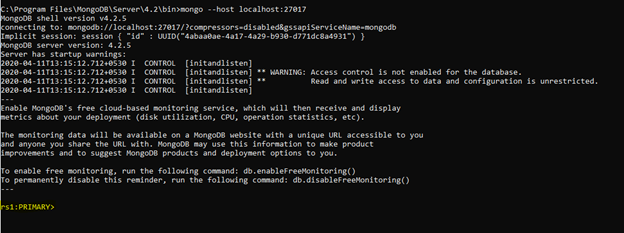
- Start the MongoDB server.
- After the MongoDB server is started, the database and the tables can be created by using the MongoDB Compass.
- Connect the MongoDB Compass to the MongoDB server by using the following URL:
mongodb://localhost:27017
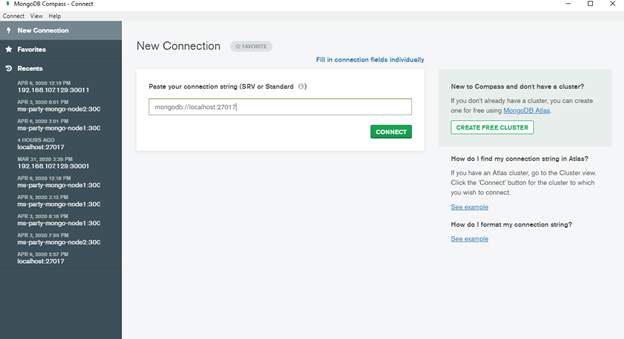
- After the connection is done, create the databases and collections as required.
In this topic