Deploying Service Request Microservice on AWS
This section explains how to deploy the Service Request Microservice on the AWS cloud. To do so, you need to perform the following tasks:
Deployment Artefacts
Service Request Microservices for AWS deployment is available as single release bundle. For example, ms-servicerequest-package-aws-<release_number>.zip. It consists of ms-servicerequest-package-aws-<release_number>.jar file and AWS script files.
AWS script files
- The install-aws-ms.sh script is used to deploy the Service Request Microservices in AWS.
- Use the destroy-aws-ms.sh script to undeploy and remove the resources.
Deploying Service Request Microservice on AWS
Prerequisites
Before deploying Service Request Microservice on AWS, ensure that you meet the following prerequisites:
- Install Python 2.7, and ensure it's not python 3 by running py --version
- Install aws-cli 1.19.79
- Install JQ
DB connectivity from Temenos Network may not happen, in that case ddl scripts will not be executed. Execute the ddl scripts outside the Temenos network, if it fails.
DynamoDB
To deploy the Service Request Microservice on AWS, follow these steps.
Use the below line, in your AWS CLI to default a region, if its not available in the script, export AWS_DEFAULT_REGION="eu-west-2".
AWS Properties
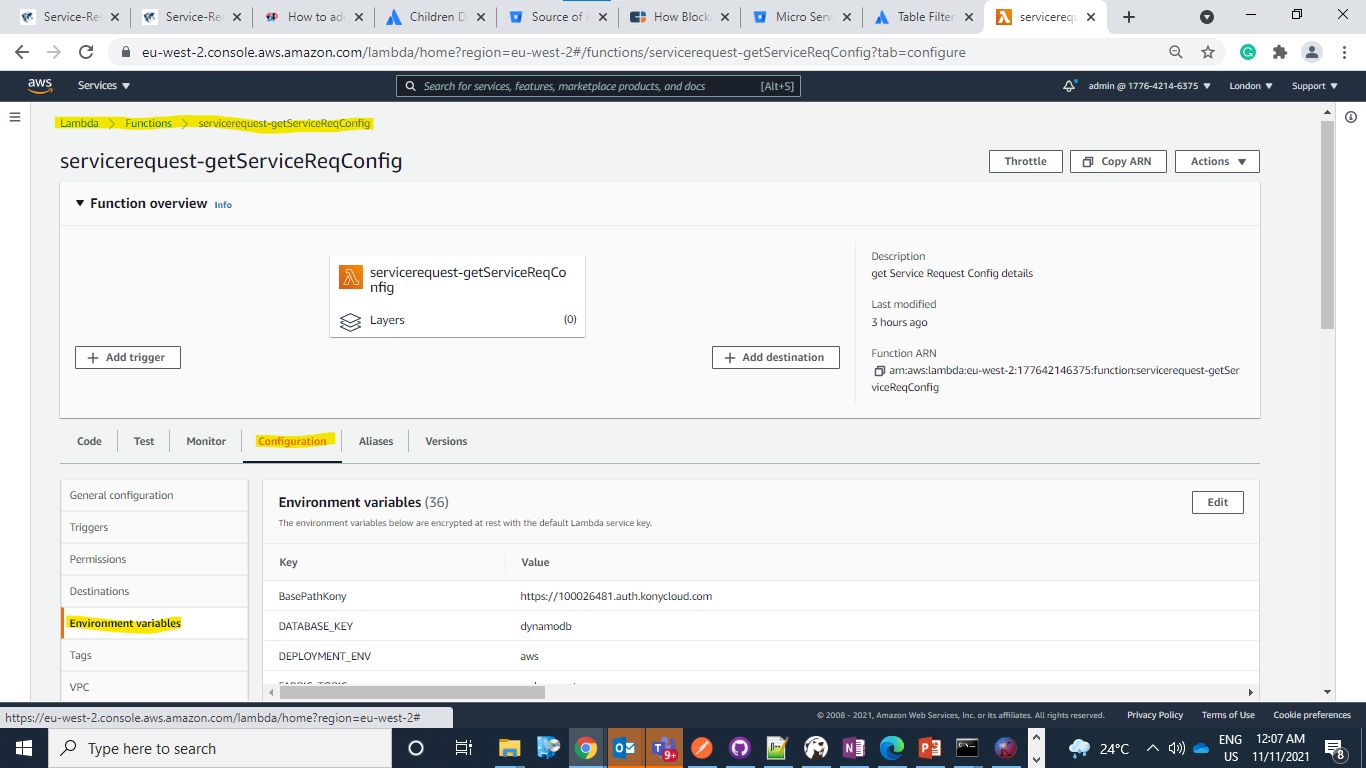
AWS properties can be validated based on the database against the sample values mentioned in Service-Request AWS Configuration.During the service request deployment, the user can find the Environment variables tab in the respective lambda function.
- Download the generated zip file from the target folder to the installation folder.
- Extract the zip file.
- In the AWS Command Line, navigate to the installation directory.
- For multiple instances deployment, provide unique value to DEPLOYMENT_ENVIRONMENT property in
install-aws-dynamo.shfile, which creates API Gateway, Lambda Function, DB Instances, S3 Bucket, and Kinesis. - If the DEPLOYMENT_ENVIRONMENT property is not provided with any value, the default value of API Gateway, Lambda Function, DB Instances, S3 Bucket, Kinesis will be considered.
- For the Microservice to be up and running, set up the AWS environment by executing the install-aws.sh shell file.
- Modify the region information that is specific to your installation in the
install-aws.shscript. For example,- --region us-west-2,
- --event-source-arn arn:aws:kinesis:us-west-2
- --uri arn:aws:apigateway:us-west-2:lambda:path/2015-03-31/functions/arn:aws:lambda:us-west-2.
- Once the installation is complete, you will receive a base URL to test the API.
- After successful deployment, sign in into AWS portal and verify if the lambda and API gateways are created correctly.
Postgre SQL
To deploy the Service Request Microservice on AWS, follow these steps.
Use the below line, in your AWS CLI to default a region, if its not available in the script, export AWS_DEFAULT_REGION="eu-west-2".
- Download the generated zip file from the target folder to the installation folder.
- Extract the zip file.
- In the AWS Command Line, navigate to the installation directory.
- For multiple instances deployment, provide unique value to DEPLOYMENT_ENVIRONMENT property in
install-aws-postgresql.shfile, which creates API Gateway, Lambda Function, DB Instances, S3 Bucket, and Kinesis. - If the DEPLOYMENT_ENVIRONMENT property is not provided with any value, the default value of API Gateway, Lambda Function, DB Instances, S3 Bucket, Kinesis will be considered.
- For the microservice to be up and running, set up the AWS environment by executing the install-aws-postgresql.sh shell file.
- Modify the region information that is specific to your installation in the
install-aws-postgresql.shscript. For example,- --region us-west-2,
- --event-source-arn arn:aws:kinesis:us-west-2
- --uri arn:aws:apigateway:us-west-2:lambda:path/2015-03-31/functions/arn:aws:lambda:us-west-2.
- Once the installation is complete, you will receive a base URL to test the API.
- After successful deployment, sign in into AWS portal and verify if the lambda and API gateways are created correctly.
In this topic