Health Check
Health Check provides the ability to monitor the health of the Marketing Catalog application. This is useful not only to test the internal health of an application but also it’s external dependencies (such as a third party API) on which Marketing Catalog application relies to function correctly.
Microservices health check helps to monitor the health of Marketing Catalog Microservice APIs and ingester as classified below:
- API health check
- Database check
- Third-party API check
- Ingester health check
- Stream check
- Database check
Follow the steps below to configure health check for MarketingCatalog Microservice in ms-marketingcatalog-mongo.yml,ms-marketingcatalog-postgresql.yml,ms-marketingcatalog-mongo-pit.yml and ms-marketingcatalog-postgresql-pit.yml (Configurations are enabled by default from the Product Team)
API CONTAINER
To configure health check for Marketing Catalog Microservice in ms-marketingcatalog-mongo.yml, ms-marketingcatalog-postgresql, and lmarketingcatalog-configmap.yml
- Set the className_getHealthCheck environment variable in API container to enable API health check.
 Enabling Health Check for API Container
api: ports: - "8002:8080" - "8003:40500" environment: #--- API Health Check --- className_getHealthCheck: com.temenos.Microservice.framework.core.health.GetHealthCheckImpl - Enable a port for health check API in Ingester (For example, 12004 as shown below).Setting Port for Health Check in Ingester
ingester: build: context: ${INGESTER_CONTEXT} dockerfile: Dockerfile args: BASE_IMAGE: ${INGESTER_APP_BASE_IMAGE} artifactid: ${ingester_artifactid} java_options: ${java_options} ${REMOTE_DEBUG} image: ${INGESTER_IMAGE} depends_on: - db-service1 - db-service2 - db-service3 ports: - "12004:8080" - "12005:40500" environment: #--- API Health Check --- healthcheck.base.path: ms-party-data-ingester - Set the healthcheck.base.path environment variable in the ingester container.Setting healthcheck.base.path
 ingester:
  build:
    context: ${INGESTER_CONTEXT}
    dockerfile: Dockerfile
    args:
      BASE_IMAGE: ${INGESTER_APP_BASE_IMAGE}
      artifactid: ${ingester_artifactid}
      java_options: ${java_options} ${REMOTE_DEBUG}
  image: ${INGESTER_IMAGE}
  depends_on:
    - db-service1
    - db-service2
    - db-service3
  ports:
    - "12004:8080"
    - "12005:40500"
  environment:
    healthcheck.base.path: ms-marketingcatalog-data-ingester
API Health Check
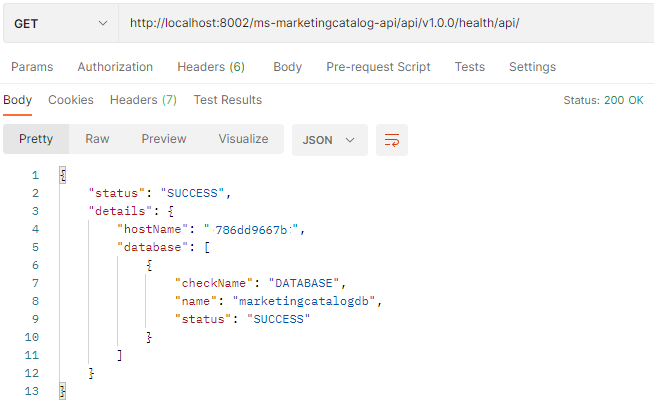
Marketing Catalog microservices expose API health check endpoint to monitor the health of Microservice APIs.
Pattern: http://<host>:<port>/<context-root>/api/health/api
Sample: http://localhost:8002/ms-marketingcatalog-api/api/v1.0.0/health/api/
K8:
Ingester Health Check
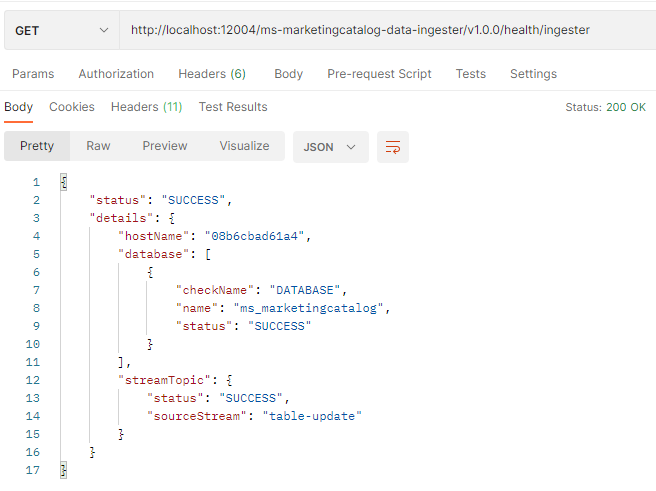
Marketing Catalog microservices expose ingester health check endpoint to monitor the health of ingester to consume and process incoming messages from Kafka or kinesis topic.
Pattern: http://<host>:<port>/<Ingester-base-path>/api/health/ingester
Sample: http://localhost:12004/ms-marketingcatalog-data-ingester/v1.0.0/health/ingester
K8:
In this topic