Loan Simulator
This section explains the architecture, limitations, configuration of loan simulator.
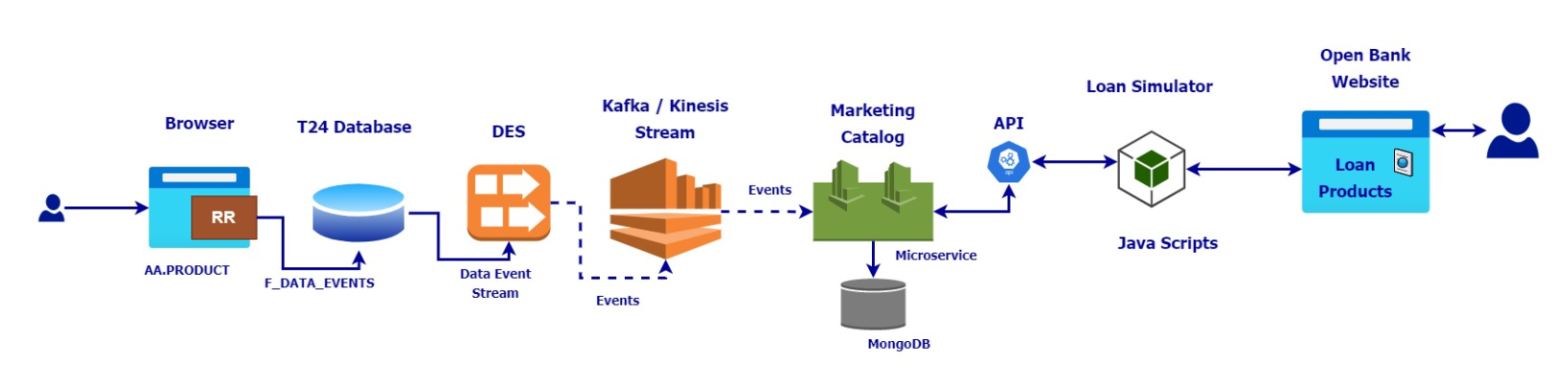
The Loan simulation architecture is shown below, where it has been shown how the end-to-end flow of data and all different components proposed are interconnected.
The different components are:
- Transact (AA Product)
- Marketing Catalog Microservice (Temenos Digital Distribution Service)
- Streaming using Kafka/Kinesis
- Loan Simulator JAVASCRIPT
Assumptions and Limitations
The assumptions and limitations of marketing catalog Microservice are given below:
- Only the products configured for simulation through the purpose field is allowed for simulation.
- The simulation expects the interest details of the principal interest to be passed.
- The simulation supports a repayment calculator for the single-tier type of Interest and not a multi-tier type namely BAND/LEVEL.
- Only the loans with CONSTANT payment types are supported for simulation.
- Only FIXED type of charges are considered for simulation, where
- The adhoc charges refer to the Opening Fees and are added to the loan start date
- The scheduled charges are added up with the repayment amounts on their scheduled dates.
- The start and end dates in the first position of payment dates and the exclude property for the first APR type is considered only in case there are more than one APR type defined.
- It is considered that the payFrequency, startDate, and endDate in payment schedules are always provided with the proper values. Hence, the values in these fields are not validated.
Configuring Java Script File
The configurations necessary for the loan simulation should be carried out in the loan_simulator_config.js file. The following are configuration parameters for loan simulator.
|
Parameter |
Description |
Example value |
|---|---|---|
|
basePath |
The base path of the MS API endpoint used for simulation |
http://localhost:8002/ms-marketingcatalog-api/api |
|
resourcePath |
Resource path of simulation API along with a custom name |
[{
  "name": "loanSimulation",
  "apiversion": "v2.0.0",
  "path":
 "/product/marketingCatalogue/products/{productId}/loansimulations"
  }]
|
|
baseCurrency |
Default currency used for simulation incase of no currency is provided |
EUR |
|
amountRoundOff |
The factor by which the repayment and cashflow amounts are rounded off |
2 |
|
aprRoundOff |
The factor by which the APR is rounded off in the final output |
4 |
Simulation and Business Functions
This section lists the simulation and business functions along with the respective parameters, description and examples.
Simulation Function
The simulation function should be called by the external scripts with the below parameters, which will internally call the business functions to perform the simulation. Refer the Technical Information of Simulation Function for the sample javascript code that can be used to send the required parameters for the simulation function.
|
Function |
Parameter |
Details |
Description |
Example |
|---|---|---|---|---|
|
LoanSimulator |
IN |
Request Name |
The endpoint name provided in configuration (resourcePath) to get the product data for simulation (Read the configuration in Configuring Java Script File section) |
loanSimulation |
|
IN |
urlParams |
URL parameters that need to be replaced with the appropriate values in runtime before requesting for the product data from marketing catalog Microservice. |
Consider the resource path, /product/marketingCatalogue/products /{productId}/loansimulations In which, {productId} has to be replaced with the product reference, hence URL params should be productId = "HOME.EQUITY.LOAN" |
|
|
IN |
queryParams |
Query Parameters that need to be appended to the resource path while sending request. The required query parameters are currencyId, branchRef, principalAmount, term, and group. |
When, currencyId=USD branchRef=GB0010001 is provided as query parameters, the end point URL will be framed as, /product/marketingCatalogue/products /{productId}/loansimulations? currencyId=USD&branchRef=GB0010001 |
|
|
IN |
headers |
Headers that have to be included as a part of request to get the product data for simulation |
Any headers that needs to be part of the HTTP Request. Authorization="{token}" |
|
|
IN |
productConditions |
Product Conditions contains the data which overrides the conditions at the product level. Below are the parameters that can be overridden, Repayment Frequency Interest Maturity Date Type |
"interest": 2.12345, "repaymentFrequency": "e0Y e1M e0W e0D e0F", "matDateType": "PAYMENT.END.DATE" |
|
|
OUT |
repaymentDetails |
Repayment details of a simulated loan. Returns three parameters, 1 - Repayment date from the when the repayment amount is applicable 2 - Repayment amount for the corresponding repayment date 3 - All the repayment dates. |
repaymentDetails: [(RepaymentDate), (RepaymentAmount), (All the possible repayment dates)] |
|
|
OUT |
cashflowDetails |
Cash flow dates and amounts. Fixed and Scheduled Charges are included and embedded in the cash flow details array. Returns two parameters, 1 - Cash flow dates. 2 - Cashflow amount for each date corresponding to the first array. |
cashflowDetails: [(cashflow dates), (cashflow amounts)] |
|
|
OUT |
aprCalculated |
Final APR Calculated |
aprCalculated: "3.4722" |
 Technical Information of Simulation Function
All the IN parameters requires an empty map or object, incase of no value is provided. Null values are not accepted.
|
Function |
Parameter |
Details |
Sample Code |
|---|---|---|---|
|
LoanSimulator |
IN |
Request Name |
loanSimulation |
|
IN |
urlParams |
For example, in the resource path, /product/marketingCatalogue/products /{productId}/loansimulations {productId} has to be replaced with the runtime value, hence URL params should be var urlParams = new Map(); urlParams.set("productId", "HOME.EQUITY.LOAN"); |
|
|
IN |
queryParams |
var queryParams= new Map(); queryParams.set("currencyId", "USD"); queryParams.set("branchRef", "GB0010001"); In this case, the end point URL will be framed as /product/marketingCatalogue/products /{productId}/loansimulations? currencyId=USD&branchRef=GB0010001 |
|
|
IN |
headers |
var headers = new Map(); |
|
|
IN |
productConditions |
var productConditionsData = { "interest": 2.12345, "repaymentFrequency": "e0Y e1M e0W e0D e0F", "matDateType": "PAYMENT.END.DATE" } |
The sample output returned by the Loan Simulation Function is given below.
{repaymentDetails: Array(3), cashflowDetails: Array(2), aprCalcualted: "3.4722"}
aprCalculated: "3.4722"
repaymentDetails: Array(3)
0: [Wed Dec 16 2020 00:00:00 GMT+0530 (India Standard Time)]
1: [66075.87]
2: (25) [Thu Dec 17 2020 00:00:00 GMT+0530 (India Standard Time), Wed Dec 16 2020 00:00:00 GMT+0530 (India Standard Time), Sat Jan 16 2021 00:00:00 GMT+0530 (India Standard Time), Sun Jan 17 2021 00:00:00 GMT+0530 (India Standard Time), Tue Feb 16 2021 00:00:00 GMT+0530 (India Standard Time), Wed Feb 17 2021 00:00:00 GMT+0530 (India Standard Time), Tue Mar 16 2021 00:00:00 GMT+0530 (India Standard Time), Wed Mar 17 2021 00:00:00 GMT+0530 (India Standard Time), Fri Apr 16 2021 00:00:00 GMT+0530 (India Standard Time), Sat Apr 17 2021 00:00:00 GMT+0530 (India Standard Time), Sun May 16 2021 00:00:00 GMT+0530 (India Standard Time), Mon May 17 2021 00:00:00 GMT+0530 (India Standard Time), Wed Jun 16 2021 00:00:00 GMT+0530 (India Standard Time), Thu Jun 17 2021 00:00:00 GMT+0530 (India Standard Time), Fri Jul 16 2021 00:00:00 GMT+0530 (India Standard Time), Sat Jul 17 2021 00:00:00 GMT+0530 (India Standard Time), Mon Aug 16 2021 00:00:00 GMT+0530 (India Standard Time), Tue Aug 17 2021 00:00:00 GMT+0530 (India Standard Time), Thu Sep 16 2021 00:00:00 GMT+0530 (India Standard Time), Fri Sep 17 2021 00:00:00 GMT+0530 (India Standard Time), Sat Oct 16 2021 00:00:00 GMT+0530 (India Standard Time), Sun Oct 17 2021 00:00:00 GMT+0530 (India Standard Time), Tue Nov 16 2021 00:00:00 GMT+0530 (India Standard Time), Wed Nov 17 2021 00:00:00 GMT+0530 (India Standard Time), Thu Dec 16 2021 00:00:00 GMT+0530 (India Standard Time)]
cashflowDetails: Array(2)
0: (25) [Thu Dec 17 2020 00:00:00 GMT+0530 (India Standard Time), Wed Dec 16 2020 00:00:00 GMT+0530 (India Standard Time), Sat Jan 16 2021 00:00:00 GMT+0530 (India Standard Time), Sun Jan 17 2021 00:00:00 GMT+0530 (India Standard Time), Tue Feb 16 2021 00:00:00 GMT+0530 (India Standard Time), Wed Feb 17 2021 00:00:00 GMT+0530 (India Standard Time), Tue Mar 16 2021 00:00:00 GMT+0530 (India Standard Time), Wed Mar 17 2021 00:00:00 GMT+0530 (India Standard Time), Fri Apr 16 2021 00:00:00 GMT+0530 (India Standard Time), Sat Apr 17 2021 00:00:00 GMT+0530 (India Standard Time), Sun May 16 2021 00:00:00 GMT+0530 (India Standard Time), Mon May 17 2021 00:00:00 GMT+0530 (India Standard Time), Wed Jun 16 2021 00:00:00 GMT+0530 (India Standard Time), Thu Jun 17 2021 00:00:00 GMT+0530 (India Standard Time), Fri Jul 16 2021 00:00:00 GMT+0530 (India Standard Time), Sat Jul 17 2021 00:00:00 GMT+0530 (India Standard Time), Mon Aug 16 2021 00:00:00 GMT+0530 (India Standard Time), Tue Aug 17 2021 00:00:00 GMT+0530 (India Standard Time), Thu Sep 16 2021 00:00:00 GMT+0530 (India Standard Time), Fri Sep 17 2021 00:00:00 GMT+0530 (India Standard Time), Sat Oct 16 2021 00:00:00 GMT+0530 (India Standard Time), Sun Oct 17 2021 00:00:00 GMT+0530 (India Standard Time), Tue Nov 16 2021 00:00:00 GMT+0530 (India Standard Time), Wed Nov 17 2021 00:00:00 GMT+0530 (India Standard Time), Thu Dec 16 2021 00:00:00 GMT+0530 (India Standard Time)]
1: (25) [-850000, 66075.87, 66075.87, 500, 66075.87, 500, 66075.87, 500, 66075.87, 500, 66075.87, 500, 66075.87, 500, 66075.87, 500, 66075.87, 500, 66075.87, 500, 66075.87, 500, 66075.87, 500, 66075.87]
Business Functions
The following functions are available in javascript to simulate the loan.
|
Function |
Parameter |
Details |
Description |
|---|---|---|---|
|
BuildRepaymentDates |
IN |
Start Date |
Builds the repayment date based on the start date till the end of the term based on the frequency. |
|
IN |
Frequency |
||
|
IN |
Term in months |
||
|
IN |
Schedule Type - Interest / Charge |
||
|
OUT |
Repayment dates |
||
|
DaysCalculator |
IN |
Start Date |
Calculates the number of days between two given dates based on the day basis. |
|
IN |
End Date |
||
|
IN |
Day Basis |
||
|
OUT |
Number of days |
||
|
OUT |
Days In Year |
||
|
PaymentCalculator |
IN |
Start Date |
Calculates the repayment amount for the contract. Includes the forward dated interest conditions if any. The output will be repayment dates and its repayment amount. |
|
IN |
Interest Details |
||
|
IN |
Repayment Dates |
||
|
IN |
Day Basis |
||
|
OUT |
Repayment dates |
||
|
OUT |
Repayment Amount |
||
|
OUT |
List of all repayment dates |
||
|
GetCashflowContributors |
IN |
Request Name |
Requests the marketing catalog Microservice, based on the endpoint configured to retrieve the product data required for simulation of the contract. |
|
IN |
URL Parameters |
||
|
IN |
Query Parameters |
||
|
IN |
Headers |
||
|
OUT |
Product Details |
||
|
GetCashflowDetails |
IN |
Opening/Adhoc Fees |
Calculates the cashflow dates and amounts based on repayment details and charges. |
|
IN |
Scheduled Fees |
||
|
IN |
Repayment Details |
||
|
OUT |
Cashflow Dates |
||
|
OUT |
Cashflow Amounts |
||
|
CalculateAPR |
IN |
Cashflow Dates |
Calculates the APR for the provided cashflow details. |
|
IN |
Cashflow Amounts |
||
|
IN |
Current Rate |
||
|
IN |
Day Basis |
||
|
OUT |
APR Calculated |
In this topic