Installing Aggregation Microservice in Docker
This section helps you to install the Aggregation Microservice in Docker.
Deployment of Account Aggregation Microservice in Docker
Follow the steps below to deploy the Account Aggregate Catalog in docker:
MySQL Database
- Unzip the ms-accountaggregation-package-docker-<release_number>.zip.
- The extracted package contains the configuration files for the docker and the respective bat and sh files.
- To get your Microservice up and running, execute the below command which creates an image and docker container for the image:
- For Windows: accountaggregation.bat up --build -d
- For Linux: accountaggregation.sh up --build –d
- Once the accountaggregation microservice is up and running in docker, check the APIs in the package by running the below command.
- Post running the above command, use docker "ps –a" to check if the containers are running.
URL of API's follows the below structure:
 Base Path
http://<IP_ADDRESS>:<PORT>/<context-root>/api/<version>/
For example,
http://localhost:8306/ms-accountaggregation-api/api/v1.0.0/
The resource path of the endpoint can be found in the swagger document.
Below is a sample endpoint of the marketing catalog:
http://localhost:8306/ms-accountaggregation-api/api/v1.0.0/party/profiles/GB0010001-100100
Undeployment
To stop and remove the existing container, execute the below command from the location where the accountaggregation docker is started.
- For Windows: accountaggregation.bat down
- For Linux: accountaggregation.sh down
MSSQL Database
- Unzip the ms-accountaggregation-package-docker-<release_number>.zip.
- The extracted package contains the configuration files for the docker and the respective bat and sh files.
- To get your Microservice up and running, execute the below command which creates an image and docker container for the image:
- For Windows: accountaggregation-mssql.bat up --build -d
- For Linux: accountaggregation-mssql.sh up --build –d
- Once the accountaggregation microservice is up and running in docker, check the APIs in the package by running the below command.
- Post running the above command, use docker "ps –a" to check if the containers are running.
URL of API's follows the below Installing Notifications Microservice in Azure structure:
Base Path
http://<IP_ADDRESS>:<PORT>/<context-root>/api/<version>/
For example,
http://localhost:8306/ms-accountaggregation-api/api/v1.0.0/
The resource path of the endpoint can be found in the swagger document.
Below is a sample endpoint of the marketing catalog:
http://localhost:8306/ms-accountaggregation-api/api/v1.0.0/party/profiles/GB0010001-100100
Undeployment
To stop and remove the existing container, execute the below command from the location where the accountaggregation docker is started.
- For Windows: accountaggregation-mssql.bat down
- For Linux: accountaggregation-mssql.sh down
Oracle Database
- Unzip the ms-accountaggregation-package-docker-<release_number>.zip.
- The extracted package contains the configuration files for the docker and the respective bat and sh files.
- Build docker image for oracle db.
- Add the Database properties in accountaggregation-oracle.yml file. Host can be host.docker.internal or the host_Ip.
E xample: jdbc:oracle:thin:@host.docker.internal:51521/ORCLPDB1 or, jdbc:oracle:thin:@//10.94.2.28:51521/ORCLPDB1
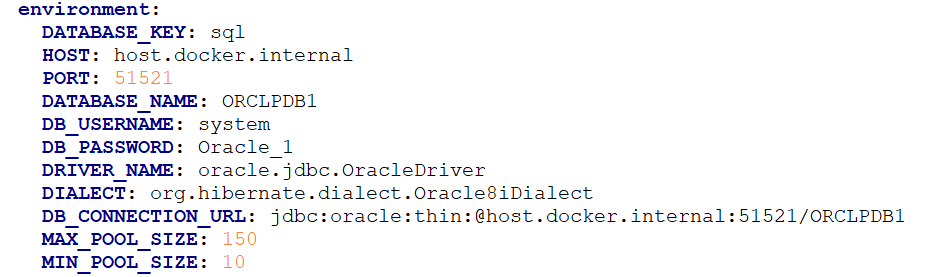
- To get your Microservice up and running, execute the below command which creates an image and docker container for the image:
- For Windows: accountaggregation-oracle.bat up --build -d
- For Linux: accountaggregation-oracle.sh up --build –d
- Once the accountaggregation microservice is up and running in docker, check the APIs in the package by running the below command.
- Post running the above command, use docker "ps –a" to check if the containers are running.
URL of API's follows the below structure:
Base Path
http://<IP_ADDRESS>:<PORT>/<context-root>/api/<version>/
For example,
http://localhost:8306/ms-accountaggregation-api/api/v1.0.0/
The resource path of the endpoint can be found in the swagger document.
Below is a sample endpoint of the marketing catalog:
http://localhost:8306/ms-accountaggregation-api/api/v1.0.0/party/profiles/GB0010001-100100
Undeployment
To stop and remove the existing container, execute the below command from the location where the accountaggregation docker is started.
- For Windows: accountaggregation-oracle.bat down
- For Linux: accountaggregation-oracle.sh down
PostgreSQL Database
- Unzip the ms-accountaggregation-package-docker-<release_number>.zip.
- The extracted package contains the configuration files for the docker and the respective bat and sh files.
- To get your Microservice up and running, execute the below command which creates an image and docker container for the image.
- For Windows: accountaggregation-postgresql.bat up --build -d
- For Linux: accountaggregation-postgresql.sh up --build –d
Once the accountaggregation microservice is up and running in docker, check the APIs in the package by running the below command:
Use “docker ps –a” to check if the containers are running.
URL of API's follows the below structure:
Base Pathhttp://<IP_ADDRESS>:<PORT>/<context-root>/api/<version>/
For example,
http://localhost:8306/ms-accountaggregation-api/api/v1.0.0/
The resource path of the endpoint can be found in the swagger document.
Below is a sample endpoint of the marketing catalog:
A sample endpoint of the marketing catalog can be http://localhost:8306/ms-accountaggregation-api/api/v1.0.0/party/profiles/GB0010001-100100
Undeployment
To stop the Microservice and remove the docker containers, execute the below command:
- For Windows: accountaggregation-postgresql.bat down
- For Linux: accountaggregation-postgresql.sh down
In this topic