Azure EventHub Configuration for Holdings MS
 HMS Account Aggregation EventHub Configuration
Once HMS Azure is deployed under a particular Resource Group, you can check the configurations of the AccAgg ingester of AMS functionApp. This is done as follows:
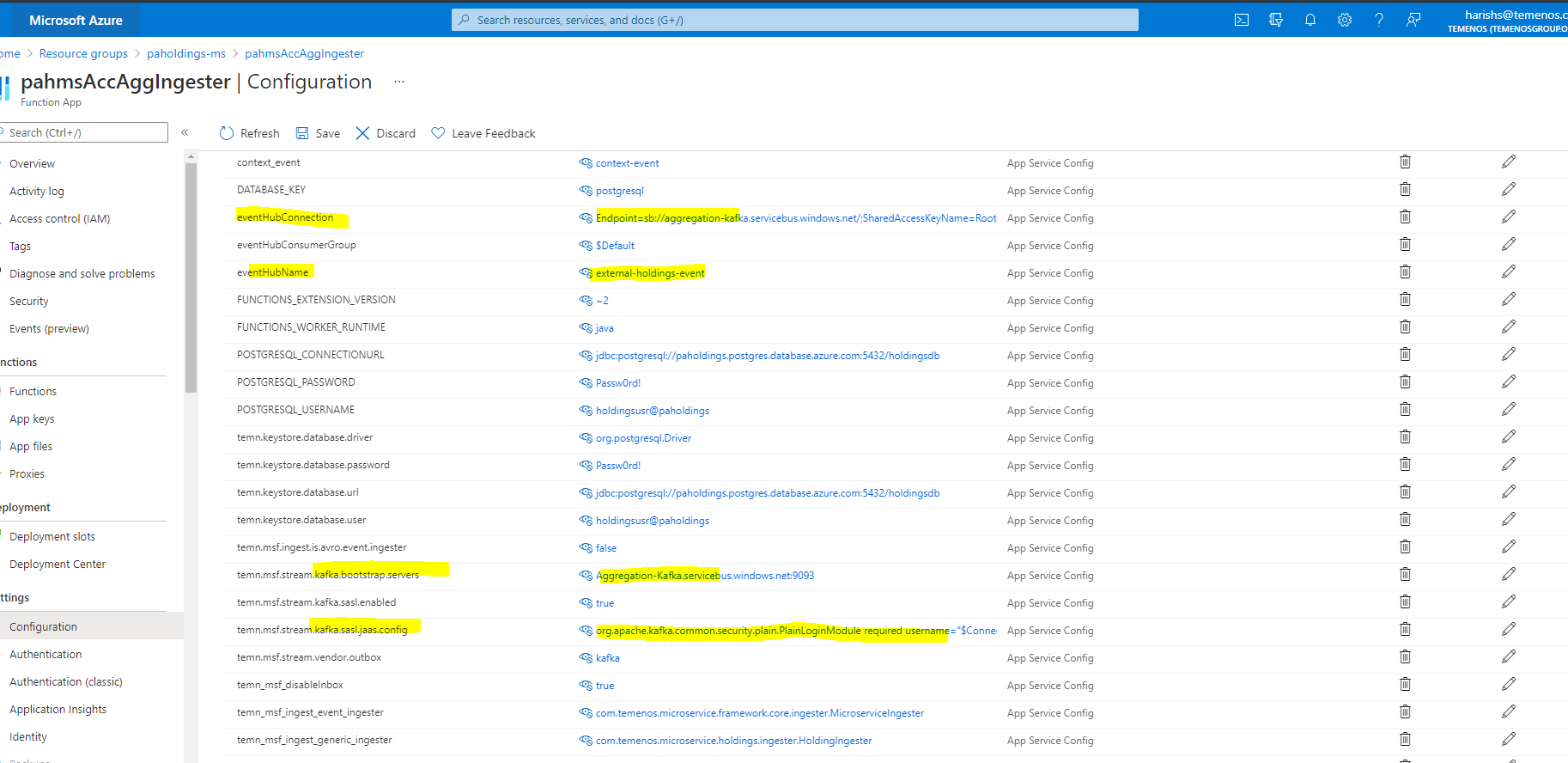
HMS Account Aggregation EventHub Creation
Method 1:
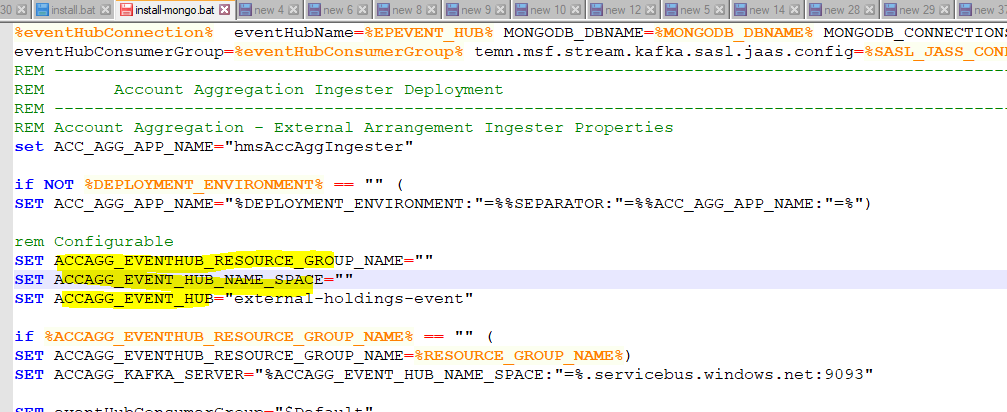
If the Account Aggregation EventHub is already created & working, then change the following configuration in install-mongo.bat / install-mongo.sh / install-postgresql.bat / install-postgresql.sh as follows:
(refer it from the account aggregation ms install.bat/install.sh scripts)
Here,
- ACCAGG_EVENTHUB_RESOURCE_GROUP_NAME - is the Resource Group Name where Account Aggregation EventHub is created.
- ACCAGG_EVENT_HUB_NAME_SPACE - is the Event Hubs Name Space.
- ACCAGG_EVENT_HUB - is the Event Hub running in Event Hubs.
Method 2:
If the Account Aggregation EventHub is not present in Azure Environment then create using the following steps:
In command prompt execute the following commands:
- call az group create --name AccountAggregationGroup --location northeurope
here AccountAggregationGroup is the Resource Group Name
- az eventhubs namespace create --name Aggregation-Kafka --resource-group AccountAggregationGroup -l northeurope --enable-kafka true
here AccountAggregationGroup is the Resource Group Name and Aggregation-Kafka is the event hub name
- az eventhubs eventhub create --name context-event --resource-group AccountAggregationGroup --namespace-name Aggregation-Kafka
- az eventhubs eventhub create --name external-holdings-event --resource-group AccountAggregationGroup --namespace-name Aggregation-Kafka
- az eventhubs eventhub create --name external-account-event --resource-group AccountAggregationGroup --namespace-name Aggregation-Kafka
here AccountAggregationGroup is the Resource Group Name and Aggregation-Kafka is the event hub name
In portal azure it will be as follows:
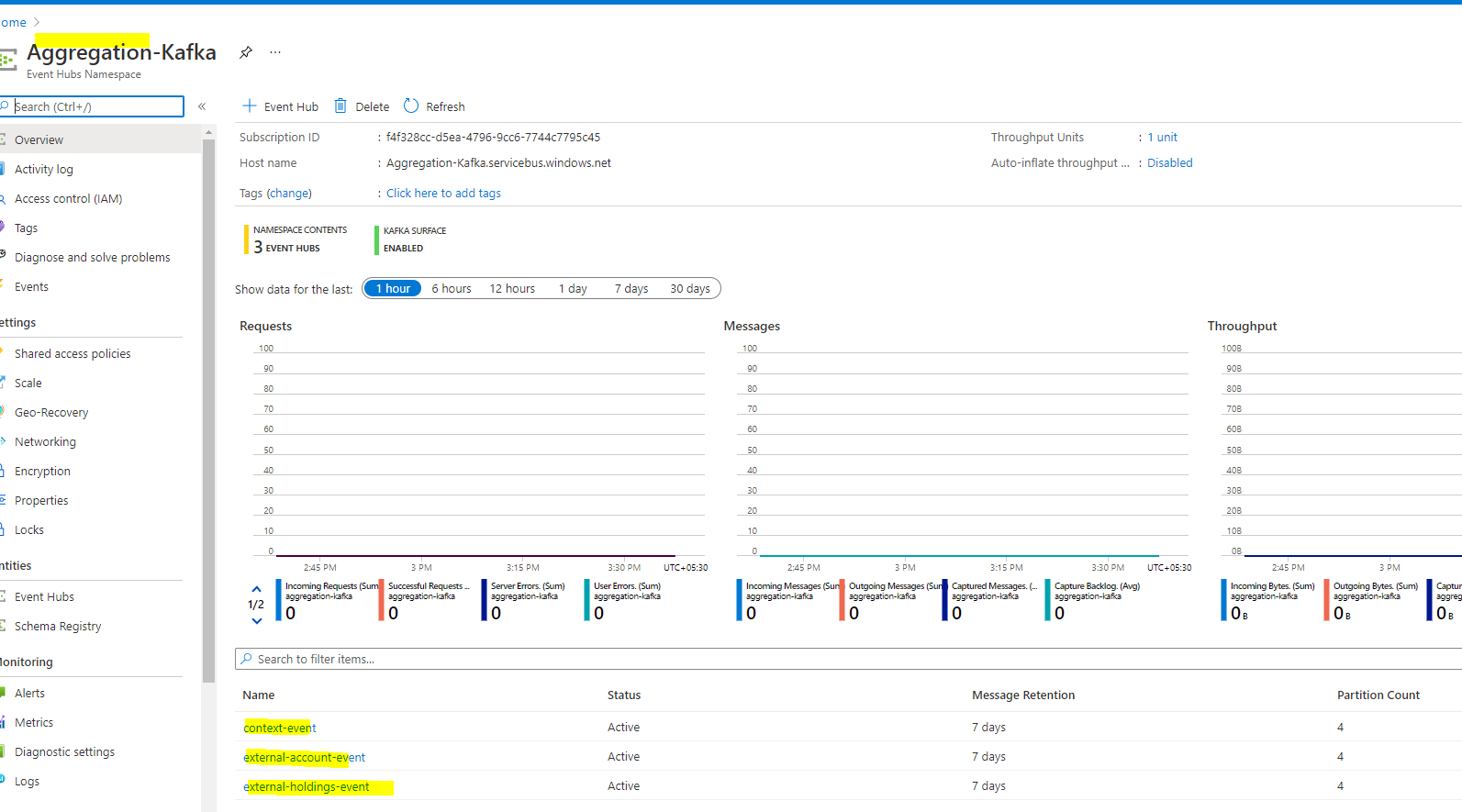
Once Created, configure the same in install.bat / install.sh as follows:
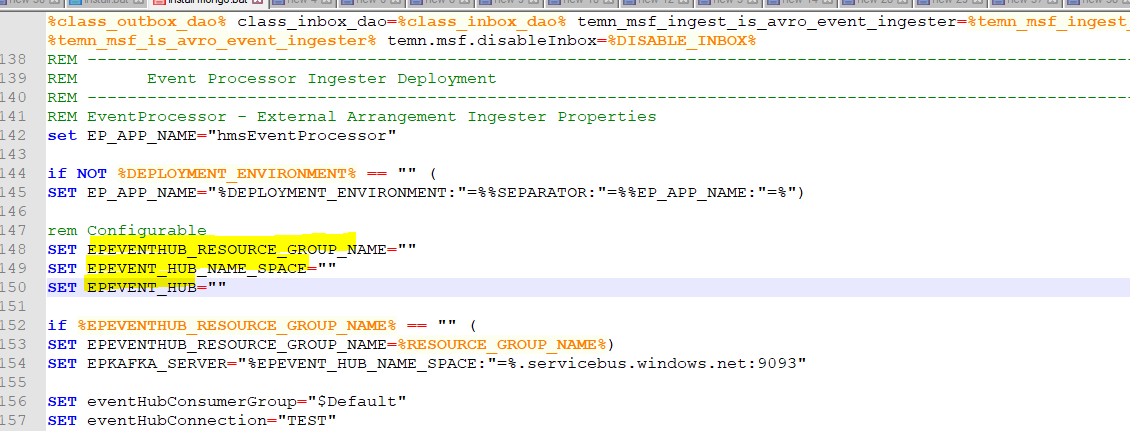
Here,
- ACCAGG_EVENTHUB_RESOURCE_GROUP_NAME - is the Resource Group Name where Account Aggregation EventHub is created.
- ACCAGG_EVENT_HUB_NAME_SPACE - is the Event Hubs Name Space.
- ACCAGG_EVENT_HUB - is the Event Hub running in Event Hubs.
HMS EventProcessor EventHub Configuration
Once HMS Azure is deployed under a particular Resource Group, you can check the configurations of the Event processor ingester of AMS functionApp. This is done as follows:
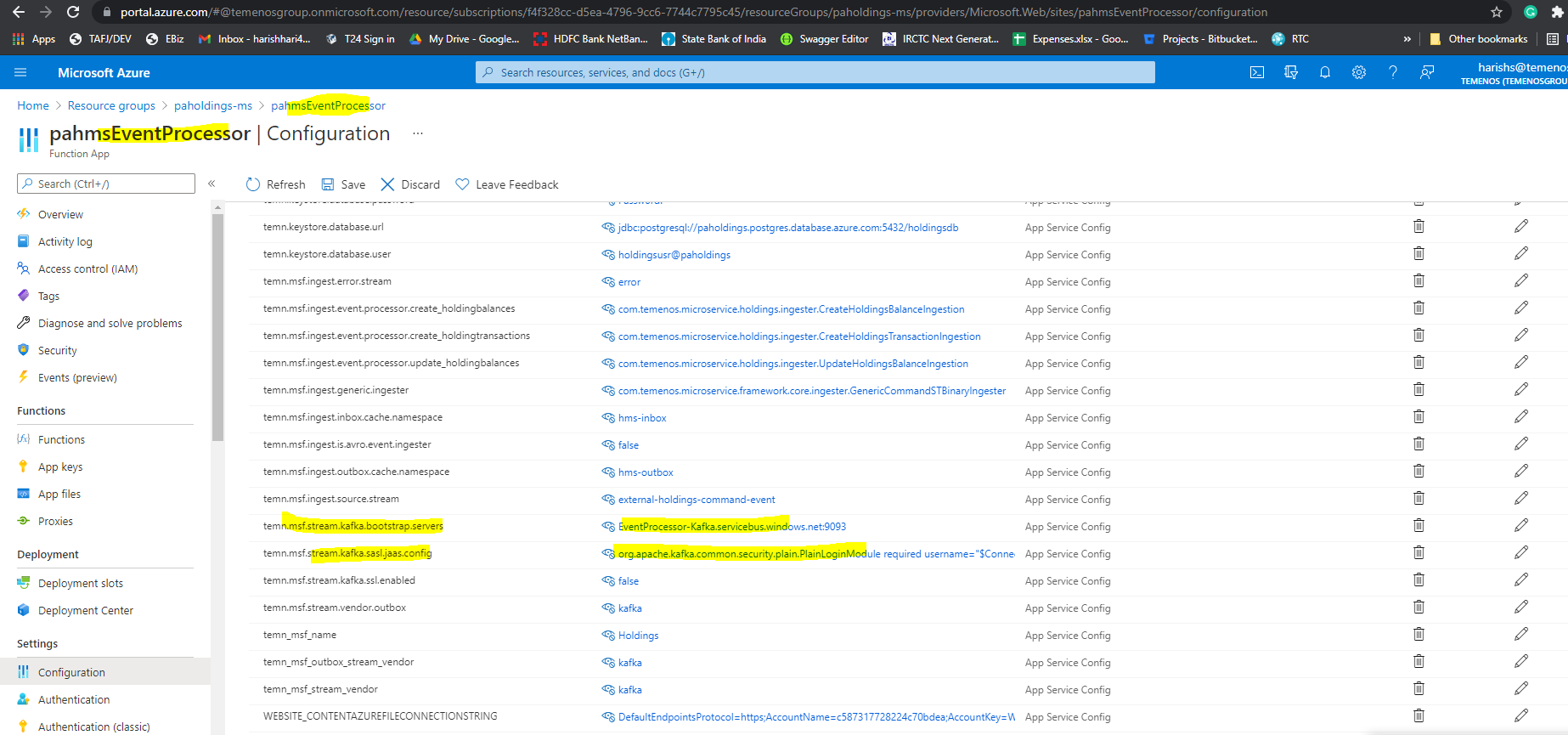
HMS EventProcessor EventHub Creation
Method 1:
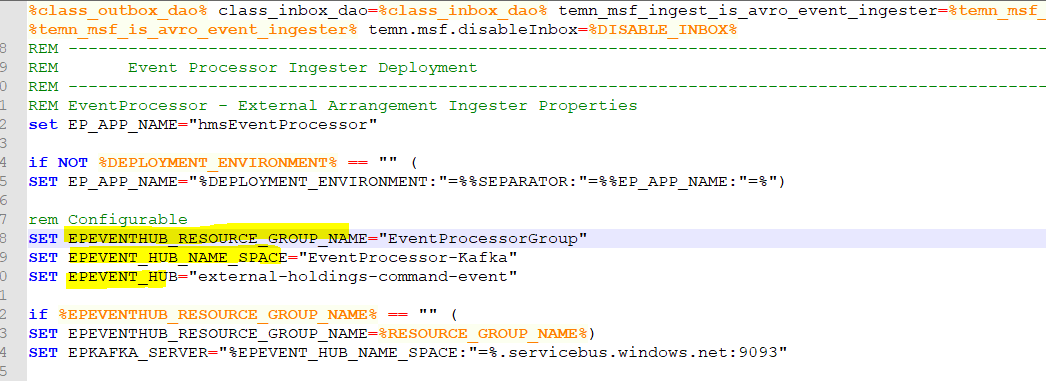
If the EventProcessor EventHub is already created & working, then change the following configuration in install-mongo.bat / install-mongo.sh / install-postgresql.bat / install-postgresql.sh as follows:
Here,
- EPEVENTHUB_RESOURCE_GROUP_NAME - is the Resource Group Name where Event Processor EventHub is created.
- EPEVENT_HUB_NAME_SPACE - is the Event Hubs Name Space.
- EPEVENT_HUB - is the Event Hub running in Event Hubs.
Method 2:
If the Event Processor EventHub is not present in Azure Environment then create using the following steps,
In command prompt execute the following commands:
- call az group create --name EventProcessorGroup --location northeurope
here EventProcessorGroup is the Resource Group Name - az eventhubs namespace create --name EventProcessor-Kafka --resource-group EventProcessorGroup -l northeurope --enable-kafka true
here EventProcessorGroup is the Resource Group Name and EventProcessor-Kafka is the EventHub name - az eventhubs eventhub create --name external-holdings-command-event --resource-group EventProcessorGroup --namespace-name EventProcessor-Kafka
here EventProcessor-Kafka is the EventHub Name and external-arrangement-command-event are the events name. In portal azure it will be as follows:

Once Created, configure the same in install.bat / install.sh as follows:
- EPEVENTHUB_RESOURCE_GROUP_NAME - is the Resource Group Name where Event Processor EventHub is created.
- EPEVENT_HUB_NAME_SPACE - is the Event Hubs Name Space.
- EPEVENT_HUB - is the Event Hub running in Event Hubs.
HMS Transact EventHub Configuration
Once HMS Azure is deployed under a particular Resource Group, you can check the configurations of the t24 ingester of AMS functionApp. This is done as follows:
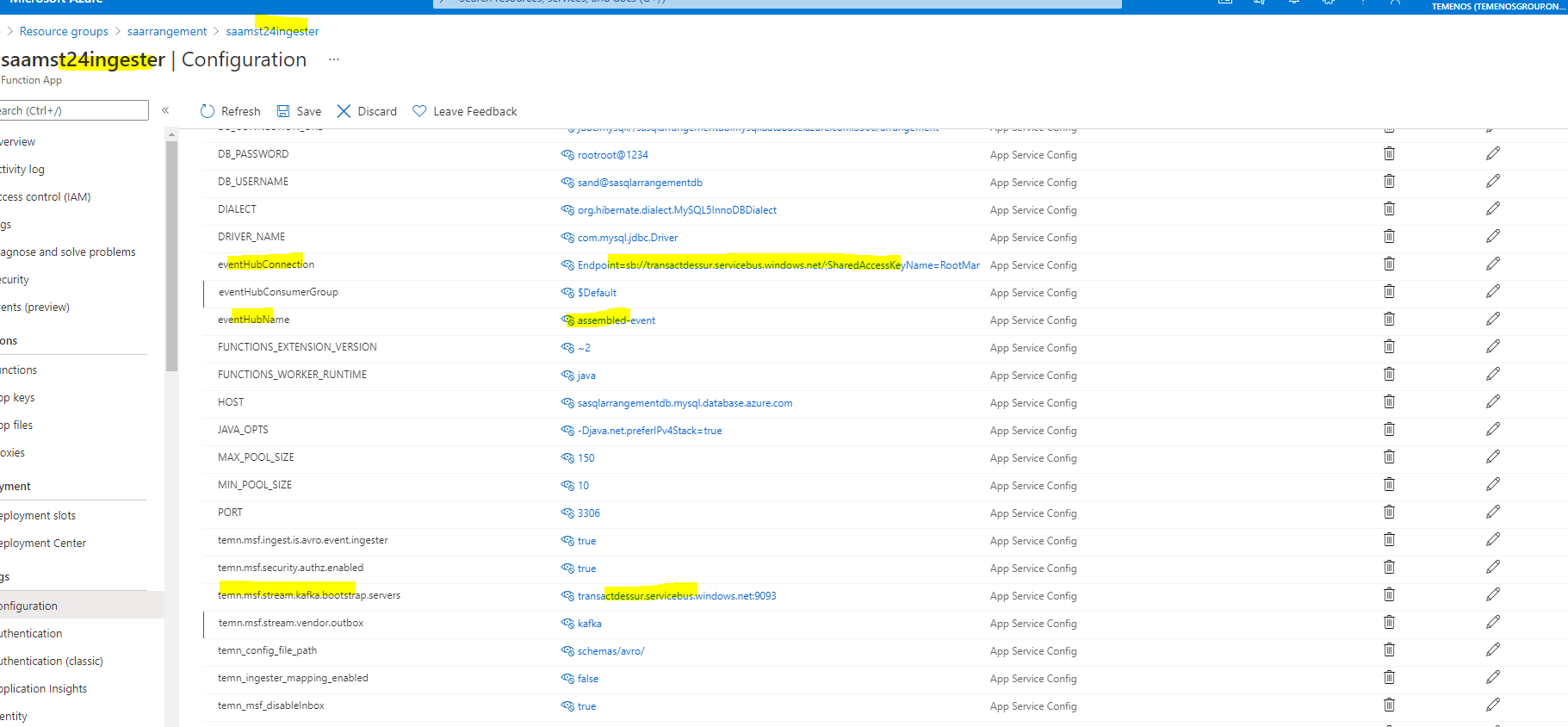
AMS Transact EventHub Creation
Method 1:
If the Transact EventHub is already created & working, then change the following configuration ininstall-mongo.bat / install-mongo.sh / install-postgresql.bat / install-postgresql.sh as follows:
Here,
- T24EVENTHUB_RESOURCE_GROUP_NAME - is the Resource Group Name where Transact EventHub is created.
- T24EVENT_HUB_NAME_SPACE - is the Event Hubs Name Space.
- T24EVENT_HUB - is the Event Hub running in Event Hubs.
- REGISTRY_URL - is the URL where localhost/subjects for DES is running.
Method 2:
If the Transact EventHub is not present in Azure Environment then create using the following steps,
In command prompt execute the following commands:
- call az group create --name TransactResourceGroup --location northeurope
here TransactResourceGroup is the Resource Group Name - az eventhubs namespace create --name transactdessur --resource-group TransactResourceGroup -l northeurope --enable-kafka true
- az eventhubs namespace create --name transactdessurschema --resource-group TransactResourceGroup -l northeurope --enable-kafka true
here TransactResourceGroup is the Resource Group Name and transactdessur, transactdessurschema are the eventhub name - az eventhubs eventhub create --name pull-event --resource-group TransactResourceGroup --namespace-name transactdessur
- az eventhubs eventhub create --name pull-event-multi-part --resource-group TransactResourceGroup --namespace-name transactdessur
- az eventhubs eventhub create --name pull-metadata --resource-group TransactResourceGroup --namespace-name transactdessur
- az eventhubs eventhub create --name table-update --resource-group TransactResourceGroup --namespace-name transactdessur
- az eventhubs eventhub create --name if-raw --resource-group TransactResourceGroup --namespace-name transactdessur
- az eventhubs eventhub create --name if --resource-group TransactResourceGroup --namespace-name transactdessur
- az eventhubs eventhub create --name eot --resource-group TransactResourceGroup --namespace-name transactdessur
- az eventhubs eventhub create --name error --resource-group TransactResourceGroup --namespace-name transactdessur
- az eventhubs eventhub create --name multi-part --resource-group TransactResourceGroup --namespace-name transactdessur
- az eventhubs eventhub create --name assembled-event --resource-group TransactResourceGroup --namespace-name transactdessur
- az eventhubs eventhub create --name des-schema --resource-group TransactResourceGroup --namespace-name transactdessurschema
- az eventhubs eventhub create --name des-install --resource-group TransactResourceGroup --namespace-name transactdessurschema
here TransactResourceGroup is the Resource Group Name and transactdessur, transactdessurschema are the eventhub name
In portal azure it will be as follows:
Once Created, configure the same in install.bat / install.sh as follows:
- T24EVENTHUB_RESOURCE_GROUP_NAME - is the Resource Group Name where Transact EventHub is created.
- T24EVENT_HUB_NAME_SPACE - is the Event Hubs Name Space.
- T24EVENT_HUB - is the Event Hub running in Event Hubs.
- REGISTRY_URL - is the URL where localhost/subjects for DES is running.
In this topic