Azure Deployment - Account Aggregation MicroService
Configuration
Follow the instructions in the page - Account Aggregation with notification delivery feature in order to enable the notification feature.
Setting up Azure Command Line
This section describes how to set up the Azure Command Line Interface.
- Download and install AZURE CLI from, https://docs.microsoft.com/en-us/cli/azure/install-azure-cli?view=azure-cli-latest.
- After installation azure login into azure portal from cli by using the below cli command: az login -u <username> -p <password>.
Azure Deployment Artefacts
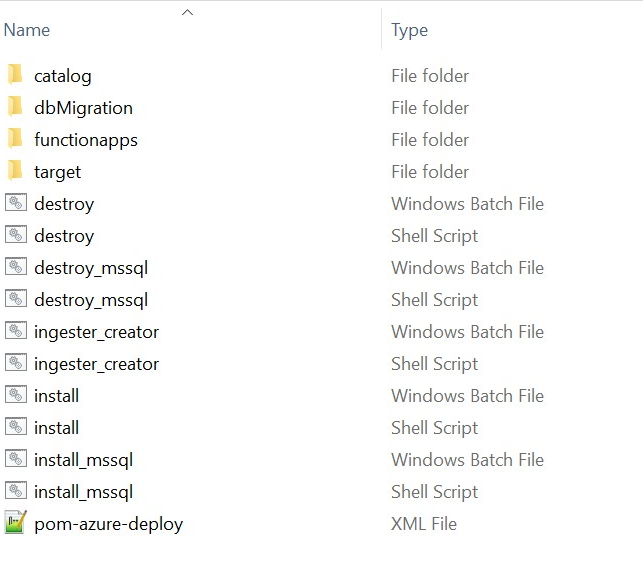
This section shows the folder structure of Aggregate package. The Account Aggregation Microservice for Azure deployment is available as a single release bundle—ms-accountaggregation-package-azure-<release.xxx>.zip.It consists of the ms-accountaggregation-package-azure-<release.xxx>.jar file and the installation related files.
For MySQL Database:
For Windows:
- The install.bat script is used to deploy the AccountAggregation Microservices in the Azure environment
- The destroy.bat script to stop Azure services and delete those services in the Azure environment.
For Linux:
- The install.sh script is used to deploy the AccountAggregation Microservices in the Azure environment
- The destroy.sh script to stop Azure services and delete those services in the Azure environment.
For MSSQL Database:
For Windows:
- The install_mssql.bat script is used to deploy the AccountAggregation Microservices in the Azure environment
- The destroy_mssql.bat script to stop Azure services and delete those services in the Azure environment.
For Linux:
- The install_mssql.sh script is used to deploy the AccountAggregation Microservices in the Azure environment
- The destroy_mssql.sh script to stop Azure services and delete those services in the Azure environment.
For Oracle Database:
- Build Oracle Database server by following the steps in the page Oracle Database Creation - Azure.
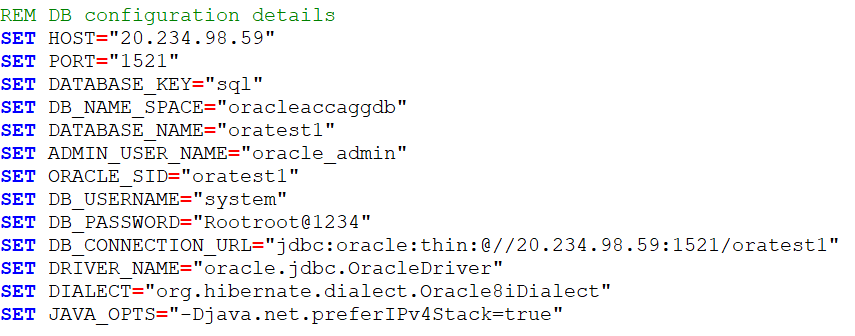
For Windows:
- The install_oracle.bat script is used to deploy the AccountAggregation Microservices in the Azure environment
- The destroy_oracle.bat script to stop Azure services and delete those services in the Azure environment.
For Linux:
- The install_oracle.sh script is used to deploy the AccountAggregation Microservices in the Azure environment
- The destroy_oracle.sh script to stop Azure services and delete those services in the Azure environment.
For PostgreSQL Database:
For Windows:
- The install_postgresql.bat script is used to deploy the AccountAggregation Microservices in the Azure environment
- The destroy_postgresql.bat script to stop Azure services and delete those services in the Azure environment.
For Linux:
- The install_postgresql.sh script is used to deploy the AccountAggregation Microservices in the Azure environment
- The destroy_postgresql.sh script to stop Azure services and delete those services in the Azure environment.
The folder structure for the ms-accountaggregation-package-azure-<release.xxx>.zip is shown below:
In this topic