AMS Transact Ingestion
Internal Ingestion is the feature that is used to ingest the Internal Accounts (that is, Temenos Transact Accounts) into the Arrangement MS. To configure AMS Transact ingestion,
- Configuration DES - Used to configure some of the DES properties as per the streaming vendor such as:
- Kafka - K8 deployment
- EventHub - Azure deployment
- Kinesis - AWS deployment
RR.PARAMand ILP Configuration - Used to insert the data from T24 to Microservices.
Arrangements MS will always consume the latest data from DES which compares the processing time of the latest data with the existing data in the database.
You can check the configuration for the Transact Ingester at:
- Azure: AMS Configuration > Azure Configuration AMS > amst24ingester (tab)
- AWS: AMS Configuration > AWS Configuration AMS > INTERNAL_INGESTER_CONFIG and LAMDA_CONFIG
Configuring DES
Arrangement MS uses full data event.
 Kafka - K8/J2EE
To configure Kafka - K8/J2EE,
- Navigate to F:\UTP-DEV-RET-2021.03.04-01-1064-saf-retailsuite-developer-s08\Temenos\TAFJ\conf\tafj.properties.
- Set
temn.tafj.runtime.use.df.cacheto True.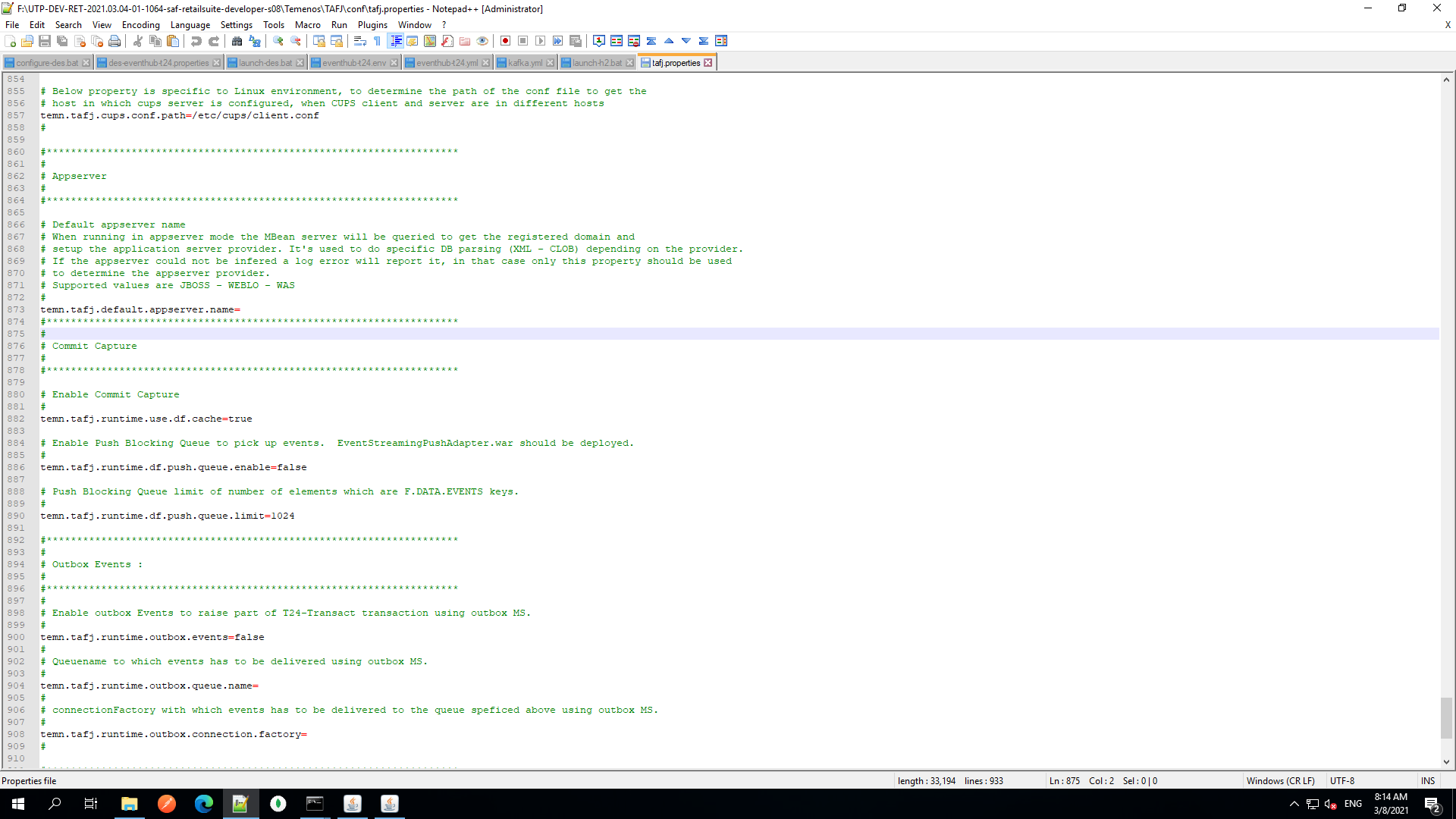
- Navigate to F:\UTP-DEV-RET-2021.03.04-01-1064-saf-retailsuite-developer-s08\Temenos\DES\des-docker\src\main\resources\des-config\des-kafka-t24.properties.
- Update the below property in the Event Pull Adapter section, for DES to understand from where Temenos Transact tables must pull data and post it into Kafka.
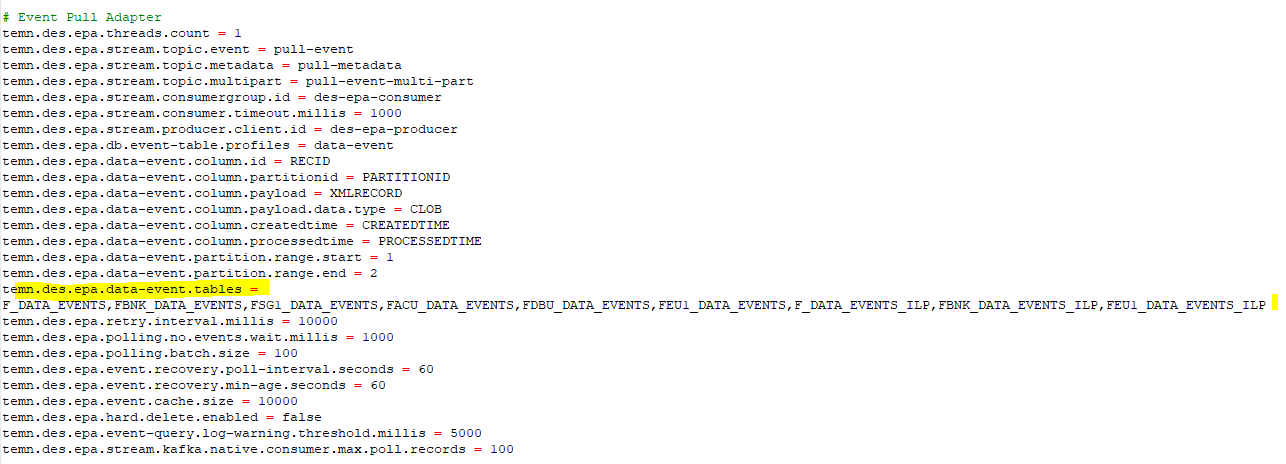
The file name changes based on the company mnemonic.
- Update the Event Processor section, and add new assembly definition for Arrangement MS, for DES to understand from the regex pattern which event must be posted into the assembled-event topic.
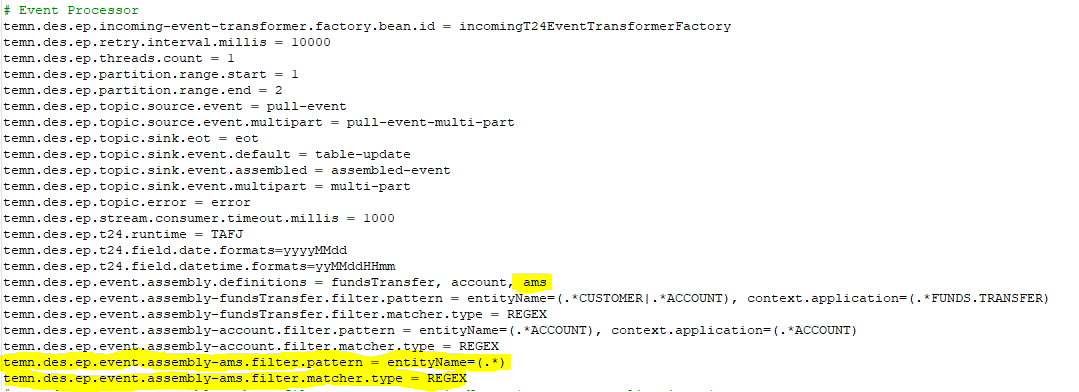
EventHub - Azure
To configure EventHub - Azure,
- Navigate to F:\UTP-DEV-RET-2021.03.04-01-1064-saf-retailsuite-developer-s08\Temenos\TAFJ\conf\tafj.properties.
- Set
temn.tafj.runtime.use.df.cacheto true.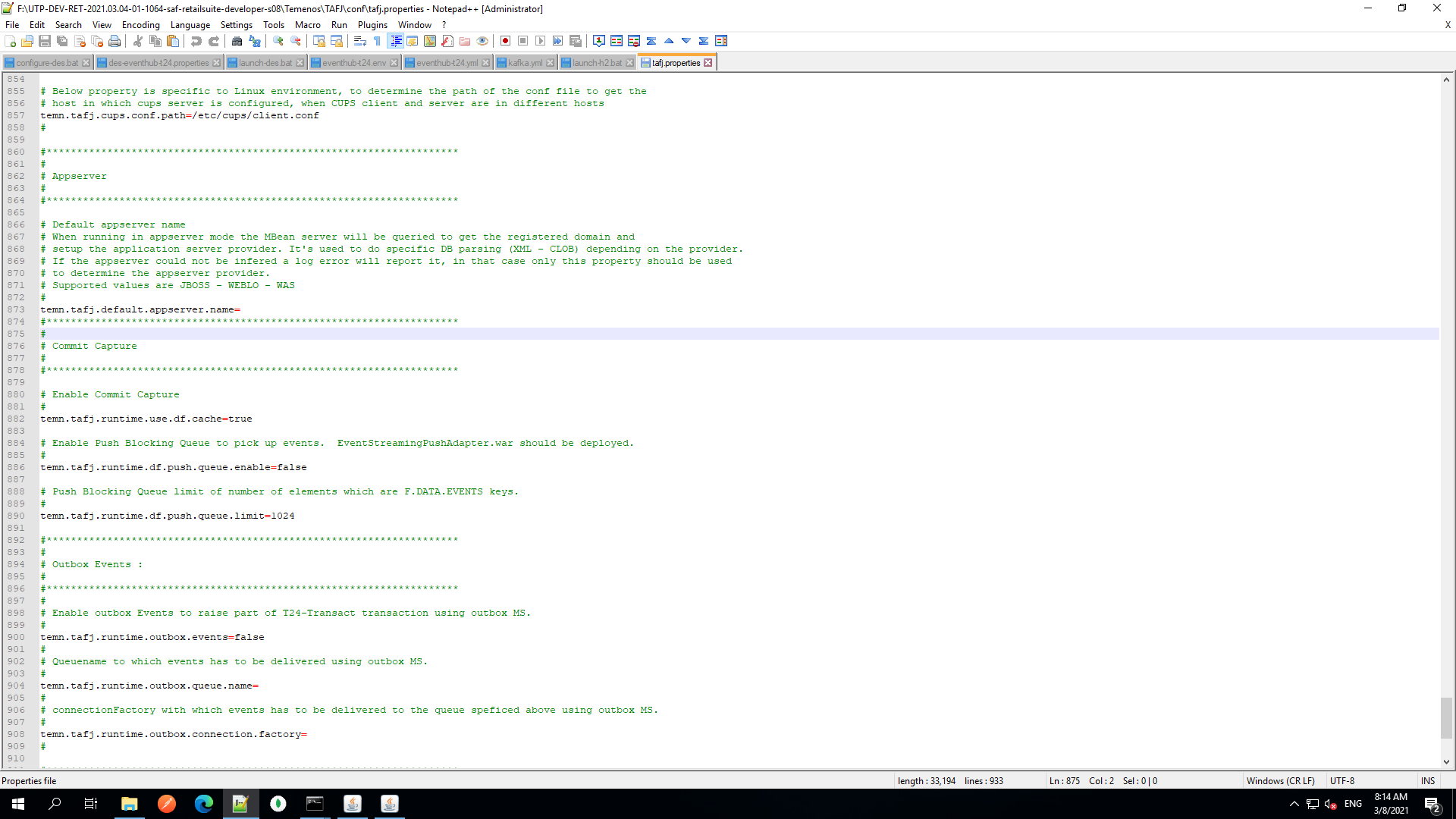
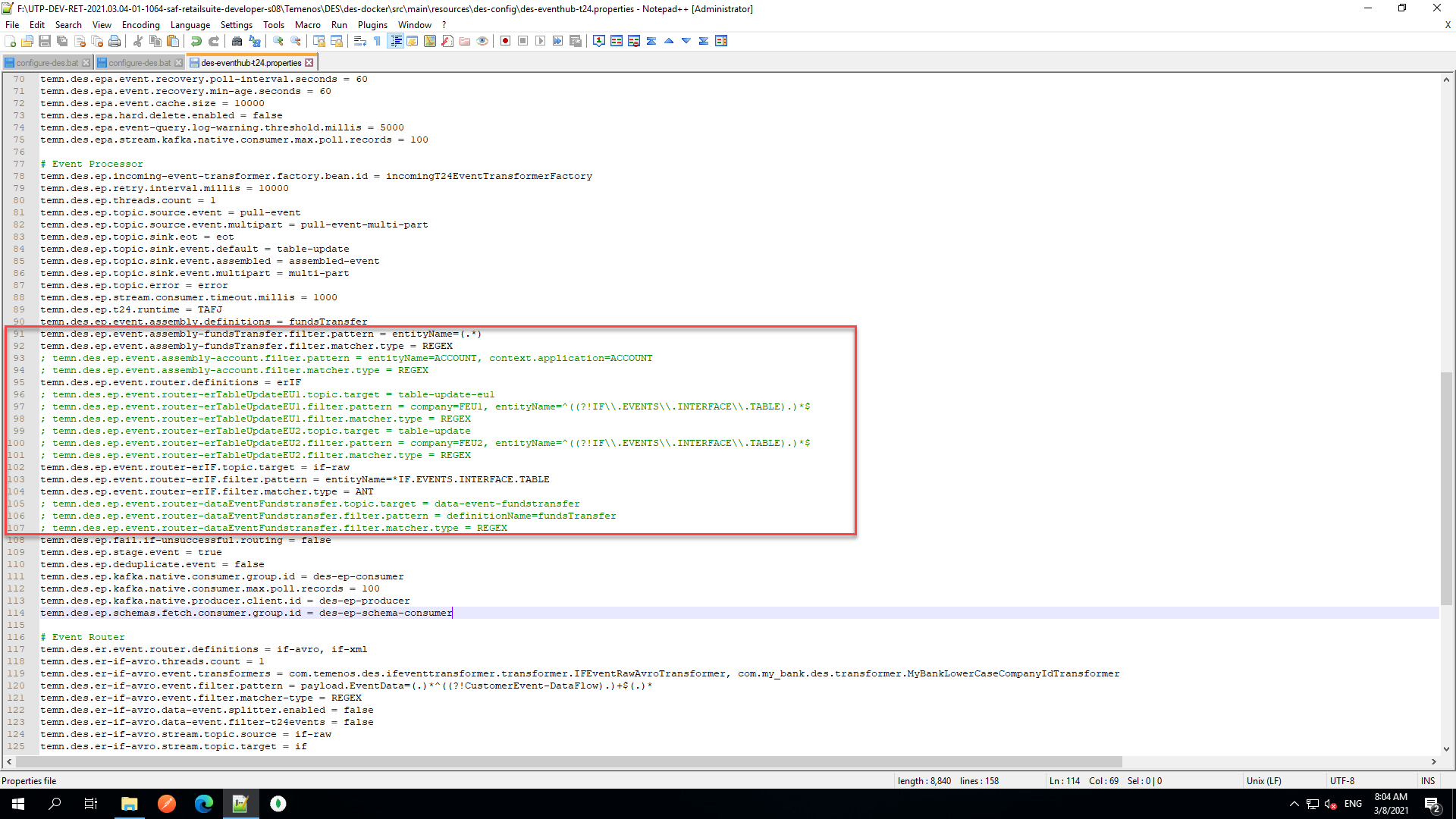
- Navigate to F:\UTP-DEV-RET-2021.03.04-01-1064-saf-retailsuite-developer-s08\Temenos\DES\des-docker\src\main\resources\des-config\des-eventhub-t24.properties.
- In the Event Processor block, set the DES event properties as shown below.
- Navigate to F:\UTP-DEV-RET-2021.03.04-01-1064-saf-retailsuite-developer-s08\Temenos\DES\des-docker\config\eventhub-t24.env.
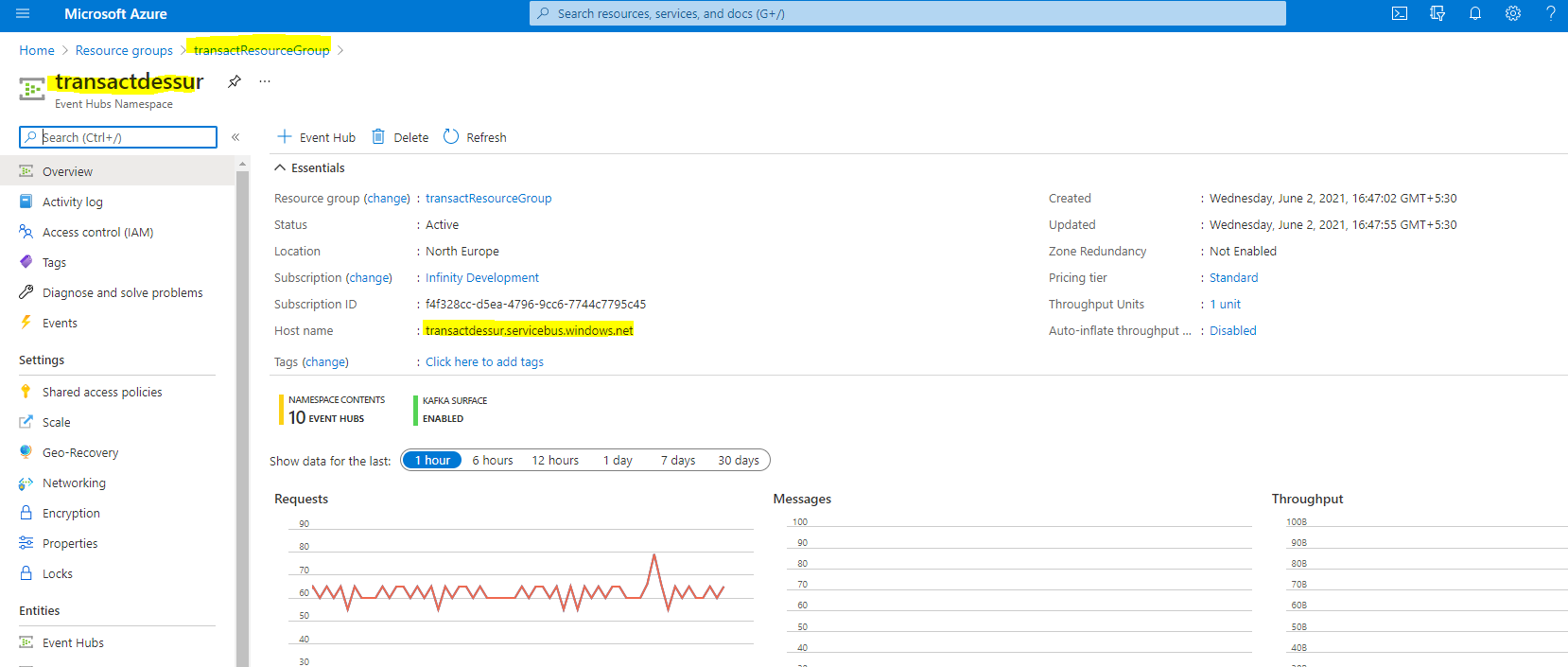
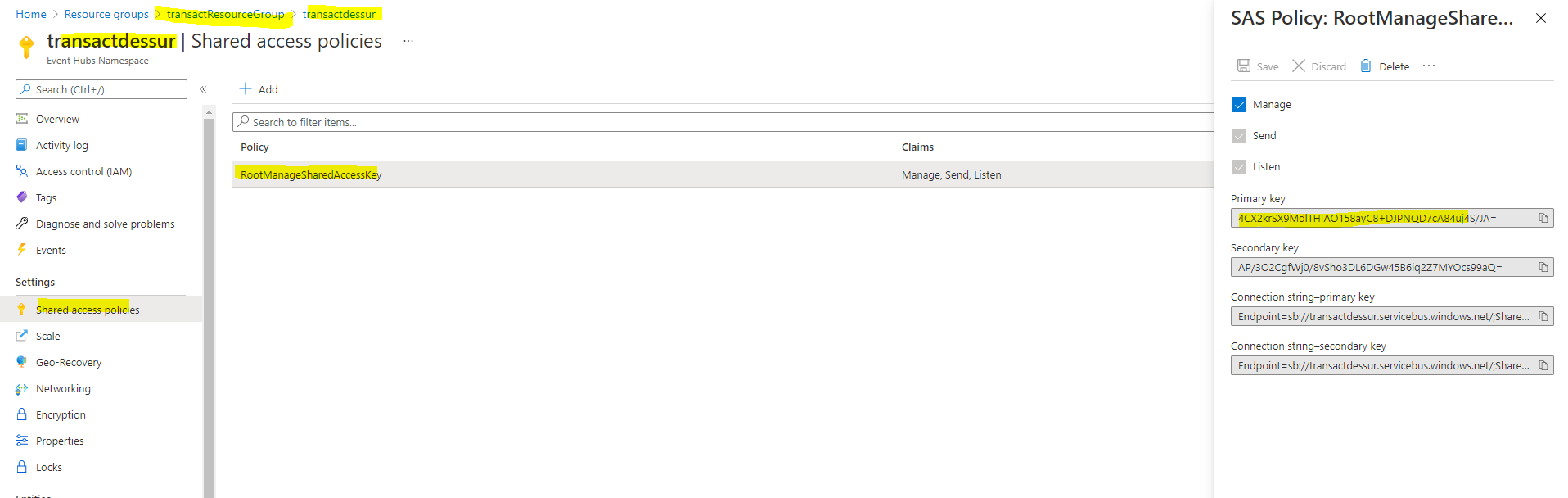
- Add the following event hub properties as per your configuration in Azure.
#Event Hub Properties
EVENT_HUB_RESOURCE_GROUP_HOST=transactdessur.servicebus.windows.net
EVENT_HUB_RESOURCE_GROUP_PORT=9093
EVENT_HUB_SHARED_ACCESS_KEY=4CX2krSX9MdlTHIAO158ayC8+DJPNQD7cA84uj4S/JA=
#Since Event hub supports only 10 eventhubs per name space so we seperate the config-installer
EVENT_HUB_CI_RESOURCE_GROUP_HOST=transactdessurschema.servicebus.windows.net
EVENT_HUB_CI_RESOURCE_GROUP_PORT=9093
EVENT_HUB_CI_SHARED_ACCESS_KEY=gHDAsboJCRgPo++/87SGWcDPxeUHJci/3ULS0kIEKKU=
#Event hub config for demo webapp, since webapp is using spring config
EVENT_HUB_JASS_CONFIG=-DeventHubPassword="Endpoint=sb://transactdessur.servicebus.windows.net/;SharedAccessKeyName=RootManageSharedAccessKey;
SharedAccessKey=4CX2krSX9MdlTHIAO158ayC8+DJPNQD7cA84uj4S/JA="
EVENT_HUB_DWA_RESOURCE_GROUP_HOST=-Devent.hub.resource.group.host=transactdessur.servicebus.windows.net
EVENT_HUB_DWA_RESOURCE_GROUP_PORT=-Devent.hub.resource.group.port=9093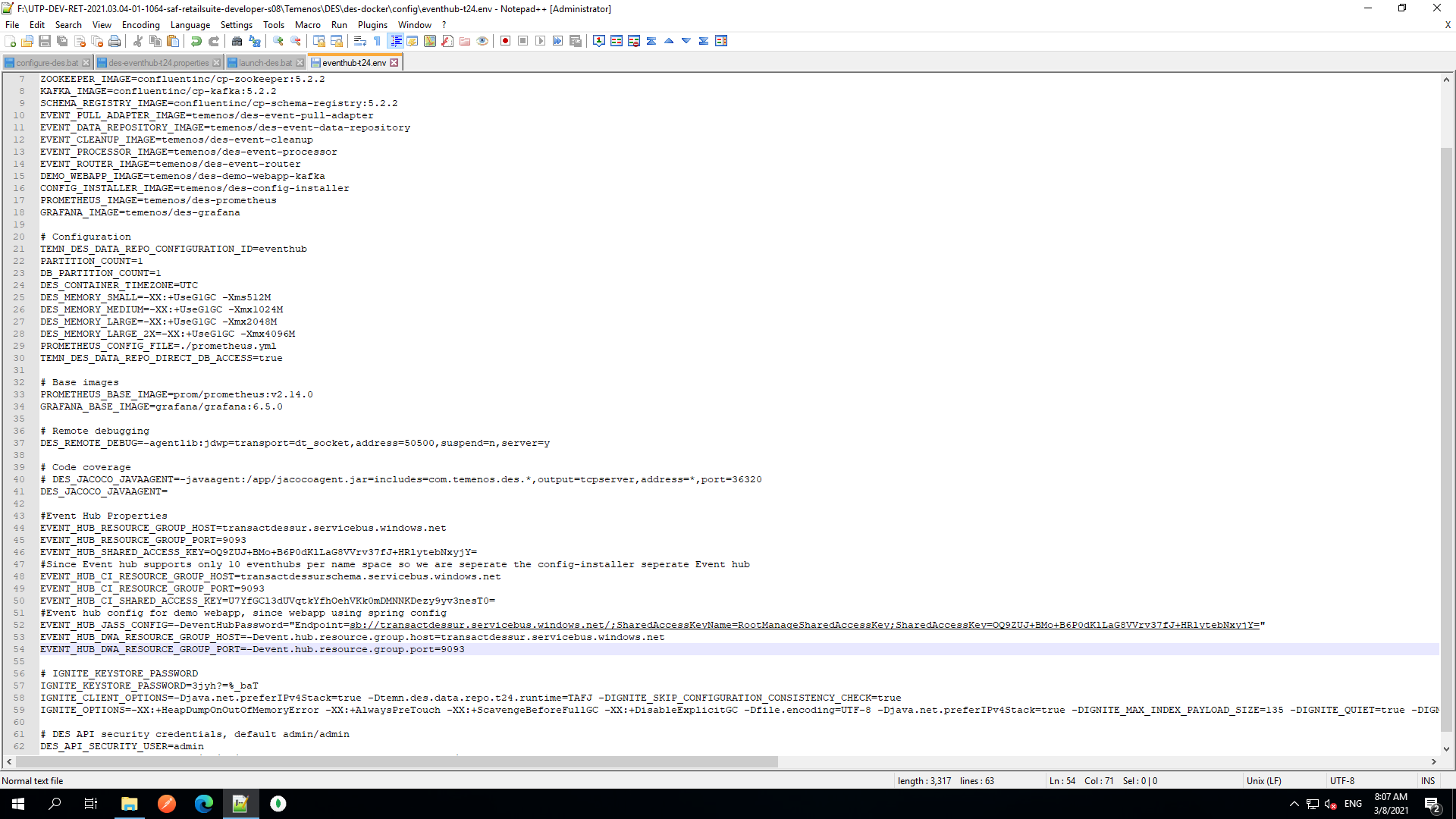
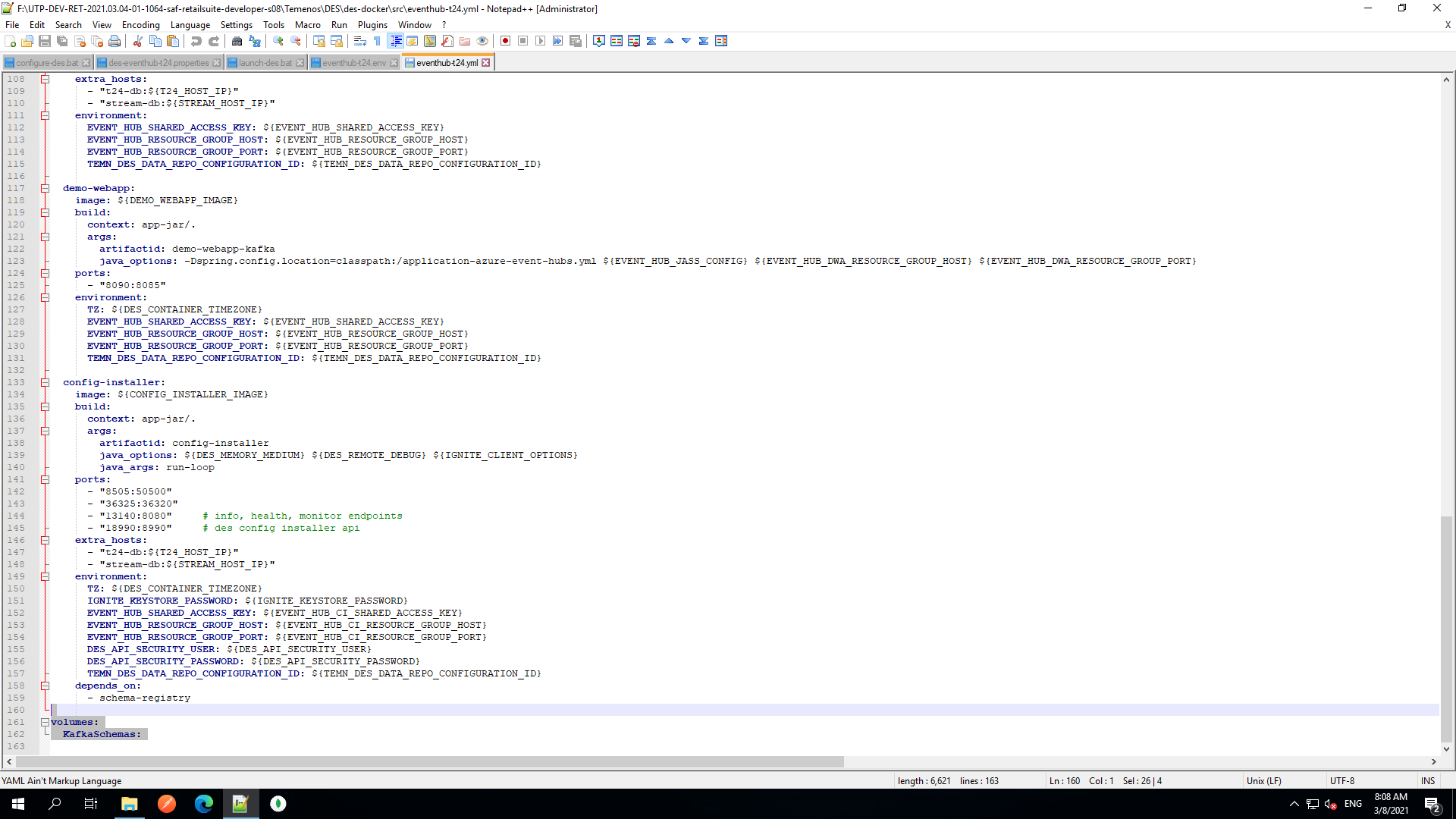
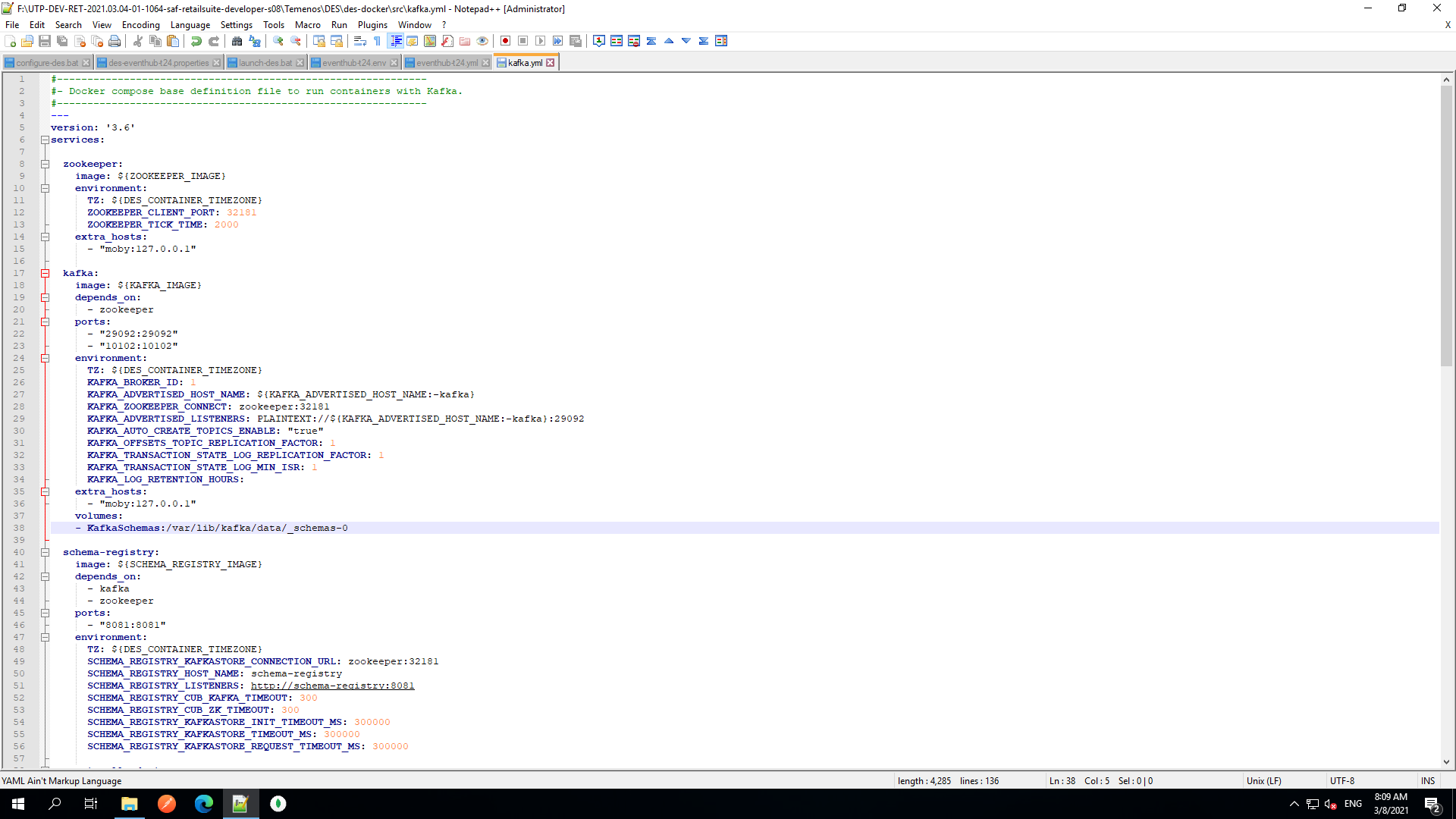
- Navigate to F:\UTP-DEV-RET-2021.03.04-01-1064-saf-retailsuite-developer-s08\Temenos\DES\des-docker\src\eventhub-t24.yml.
- Remove the volumes from eventhub-t24.yml and add to kafka.yml as shown below:
- Naviagate to F:\UTP-DEV-RET-2021.03.04-01-1064-saf-retailsuite-developer-s08\Temenos\DES\des-docker\utp\modelbank\configure-des.bat
- Update the following in
:installDesConfig
- Navigate to F:\UTP-DEV-RET-2021.03.04-01-1064-saf-retailsuite-developer-s08\Temenos\launch-des.bat.
- Set the env for eventhub as show in the image below.

Alternative to start DES:
If launch-des.bat fails to start the des or if it fails by showing an error try the alternative way:
- Navigate to F:\UTP-DEV-RET-2021.03.04-01-1064-saf-retailsuite-developer-s08\Temenos\DES\des-docker\des-tool.bat.
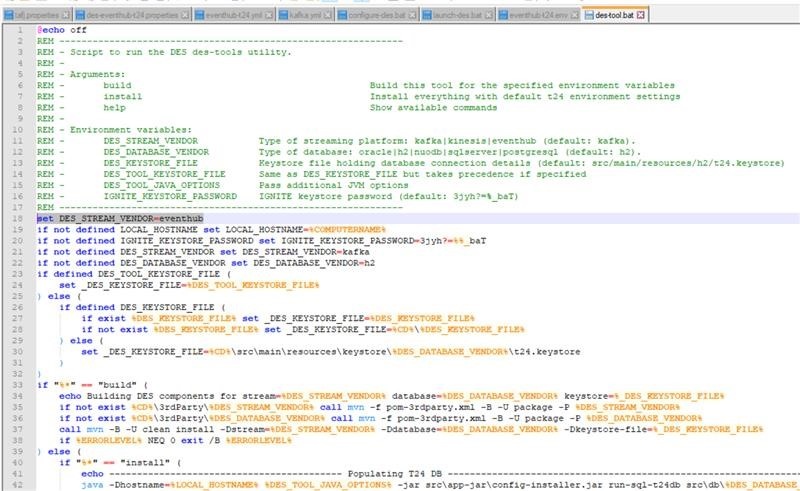
- From F:\UTP-DEV-RET-2021.03.04-01-1064-saf-retailsuite-developer-s08\Temenos\DES\des-docker\des-tool.bat, open the command prompt and execute the following commands:
des-tool.bat builddes-tool.bat install-
des-docker.bat build -
des-docker.bat up -d
To check the DES_Configuration:
- In the SQL window, execute the following command:
select * from F_EB_DES_CONFIG;
RECID | XMLRECORD
kafka | <row id='kafka'><c1 m='1'>temn.des.version</c1><c2 m='1'>2019-02-07T13:17:58.113</c2><c1 m='2'>temn.
Here, it must not be Kafka, it must be event hub. Execute the following commands:
- From F:\UTP-DEV-RET-2021.03.04-01-1064-saf-retailsuite-developer-s08\Temenos\DES\des-docker\des-tool.bat open the command prompt and execute the following command:
des-tool.bat stage-des-config F:\UTP-DEV-RET-2021.03.04-01-1064-saf-retailsuite-developer-s08\Temenos\DES\des-docker\src\main\resources\des-config\des-eventhub-t24.properties eventhub.
- From F:\UTP-DEV-RET-2021.03.04-01-1064-saf-retailsuite-developer-s08\Temenos\DES\des-docker\des-tool.bat open the command prompt and execute the following command:
- In the SQL window, execute the following command:
select * from F_EB_DES_CONFIG;
RECID | XMLRECORD
kafka | <row id='kafka'><c1 m='1'>temn.des.version</c1><c2 m='1'>2019-02-07T13:17:58.113</c2><c1 m='2'>temn.
eventhub | <row id='eventhub'><c1 m='1'>temn.des.version</c1><c2 m='1'>2019-02-07T13:17:58.113</c2><c1 m='2'>temn.
Check whether the DES is created successfully using the following commands:
- docker ps -a
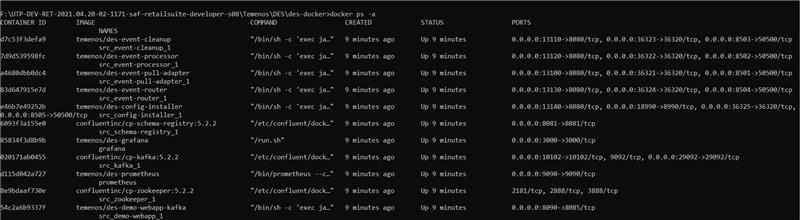
- docker logs –f src_event-processor_1
You can view the eventhub connecting to the created transactdessur.servicebus.windows.net:9093.
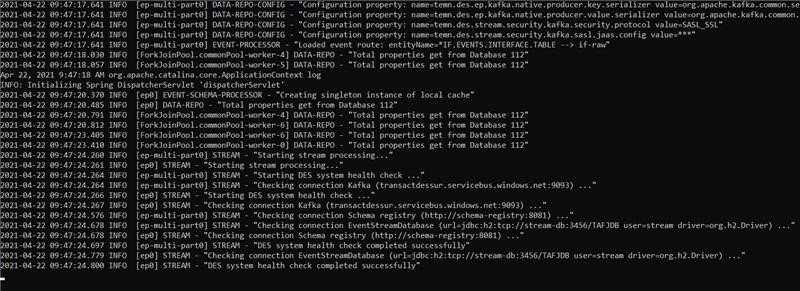
- docker ps -a
Kinesis - AWS
Ensure that you configure the EventHub Creation for Transact ingestion in AMS Configuration. For more information, refer to AMS Transact Kinesis Creation.
To configure Kinesis - AWS,
- Navigate to F:\UTP-DEV-RET-2021.03.04-01-1064-saf-retailsuite-developer-s08\Temenos\TAFJ\conf\tafj.properties.
- Set
temn.tafj.runtime.use.df.cacheto true.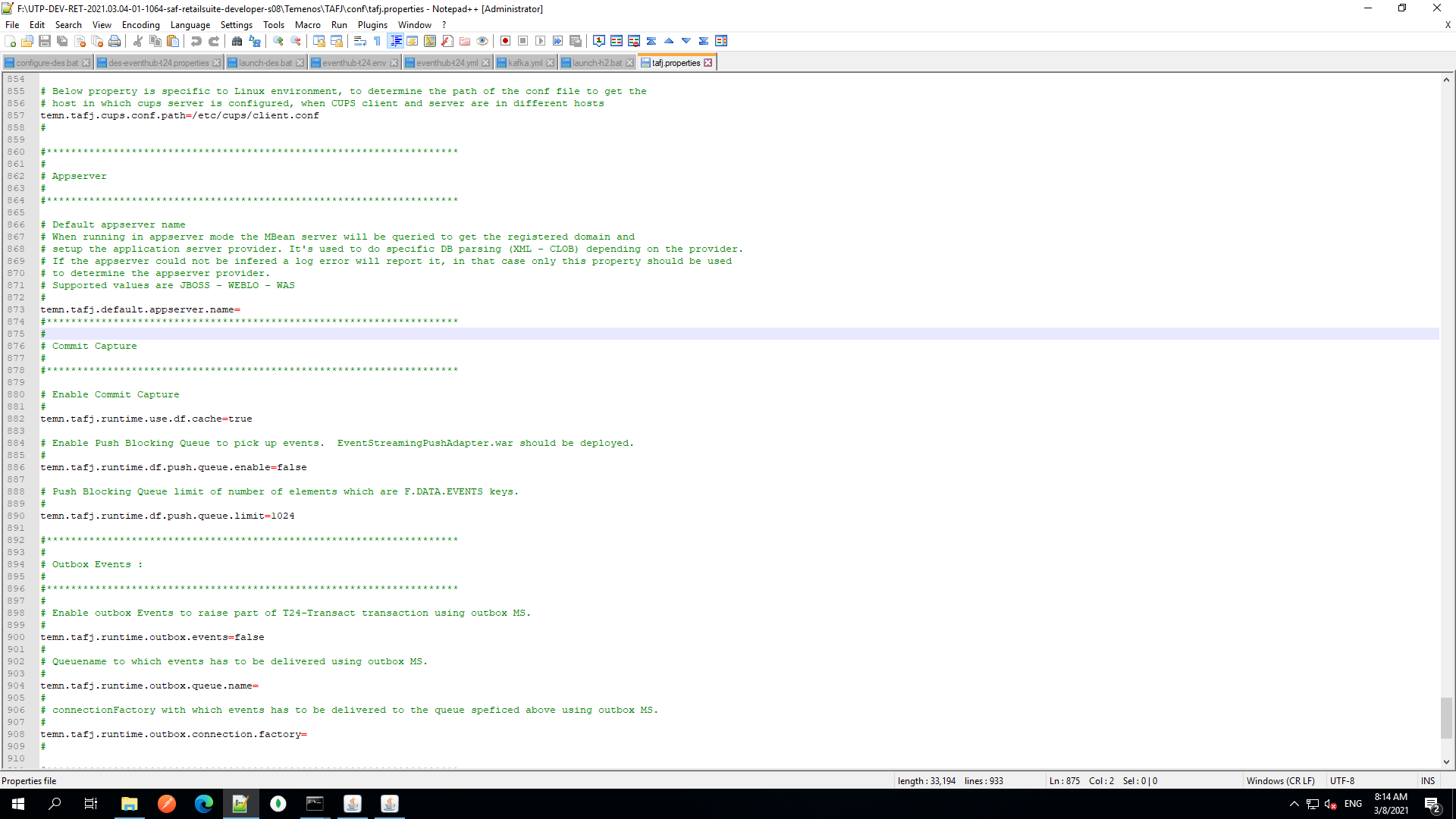
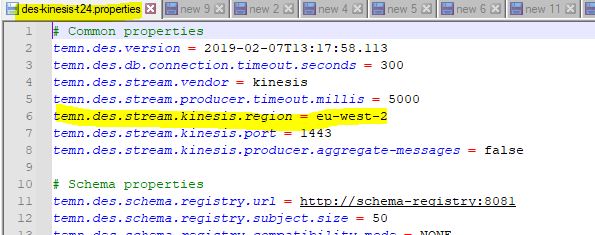
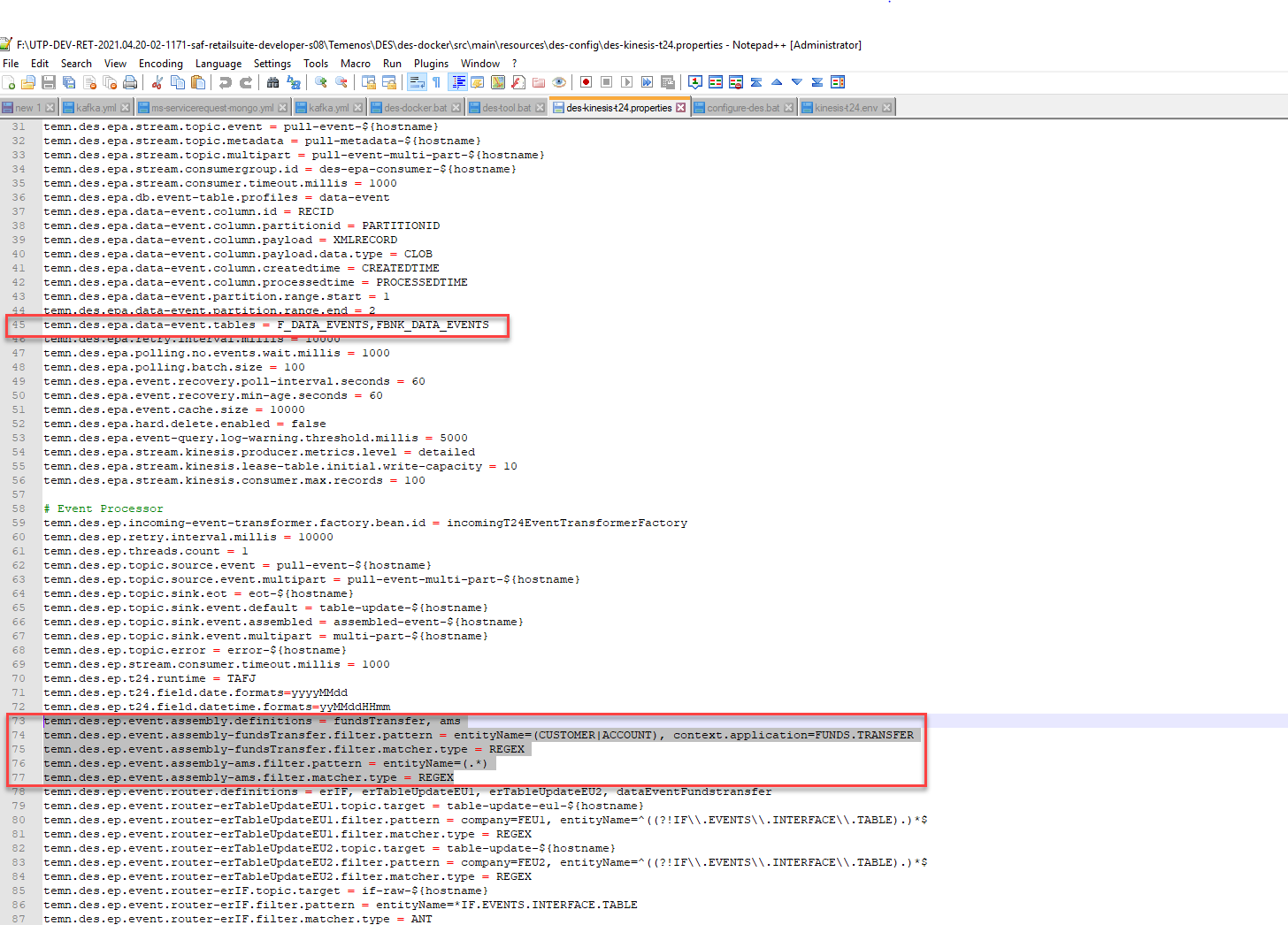
- Navigate to F:\UTP-DEV-RET-2021.03.04-01-1064-saf-retailsuite-developer-s08\Temenos\DES\des-docker\src\main\resources\des-config\des-kinesis-t24.properties.
- In the Event Processor block, make the changes as shown below highlighted in red:
- Navigate to F:\UTP-DEV-RET-2021.03.04-01-1064-saf-retailsuite-developer-s08\Temenos\DES\des-docker\config\kinesis-t24.env.
- Add the following kinesis properties as per your configuration in AWS:
AWS_REGION=eu-west-2AWS_ACCESS_KEY_ID=AKIAJ2OHEFOWXOZGBMOAAWS_SECRET_ACCESS_KEY=PxkgTRaPxrKgcXUy72befXiCXh1xeqFDfSKaKdPX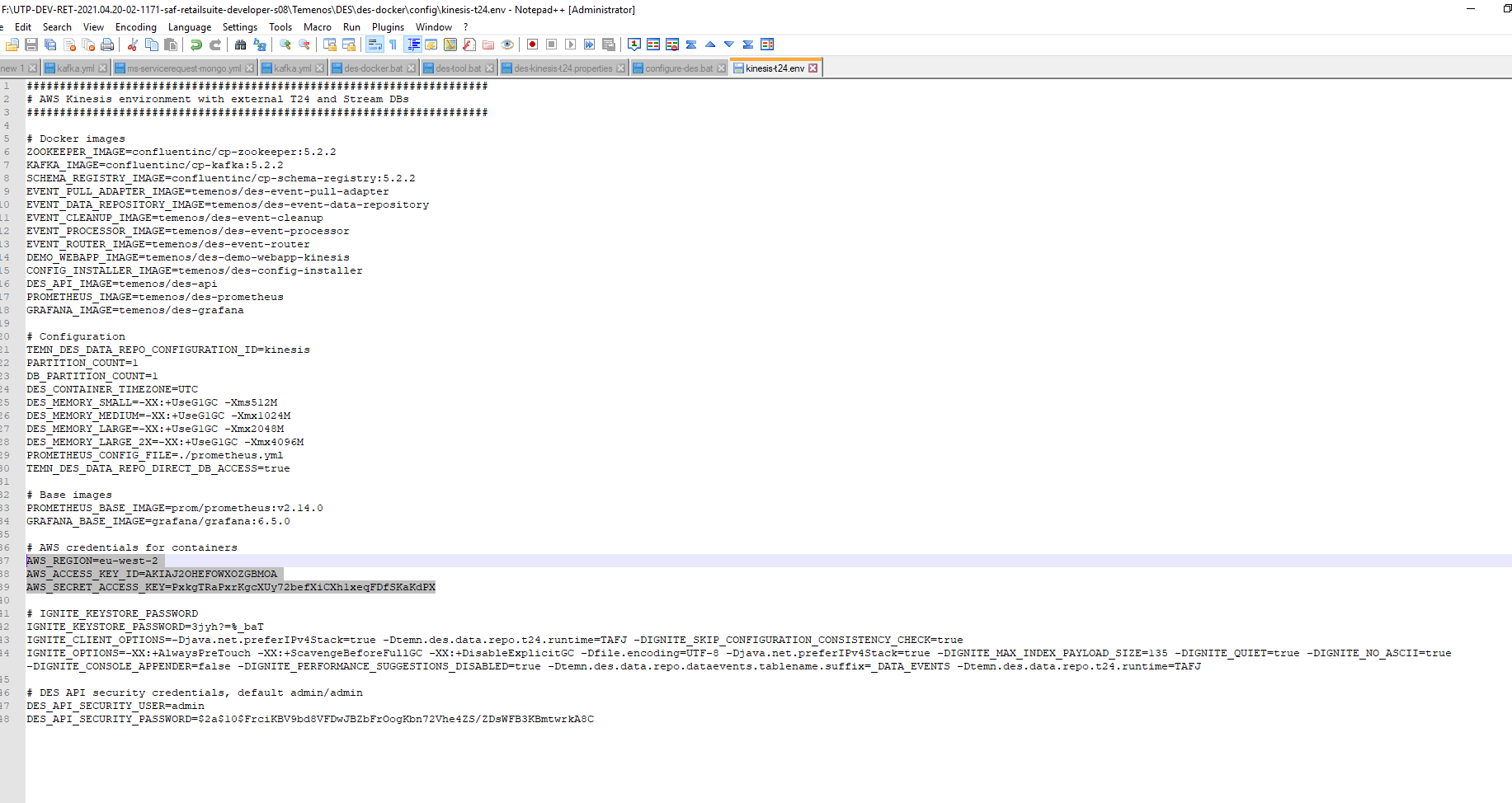
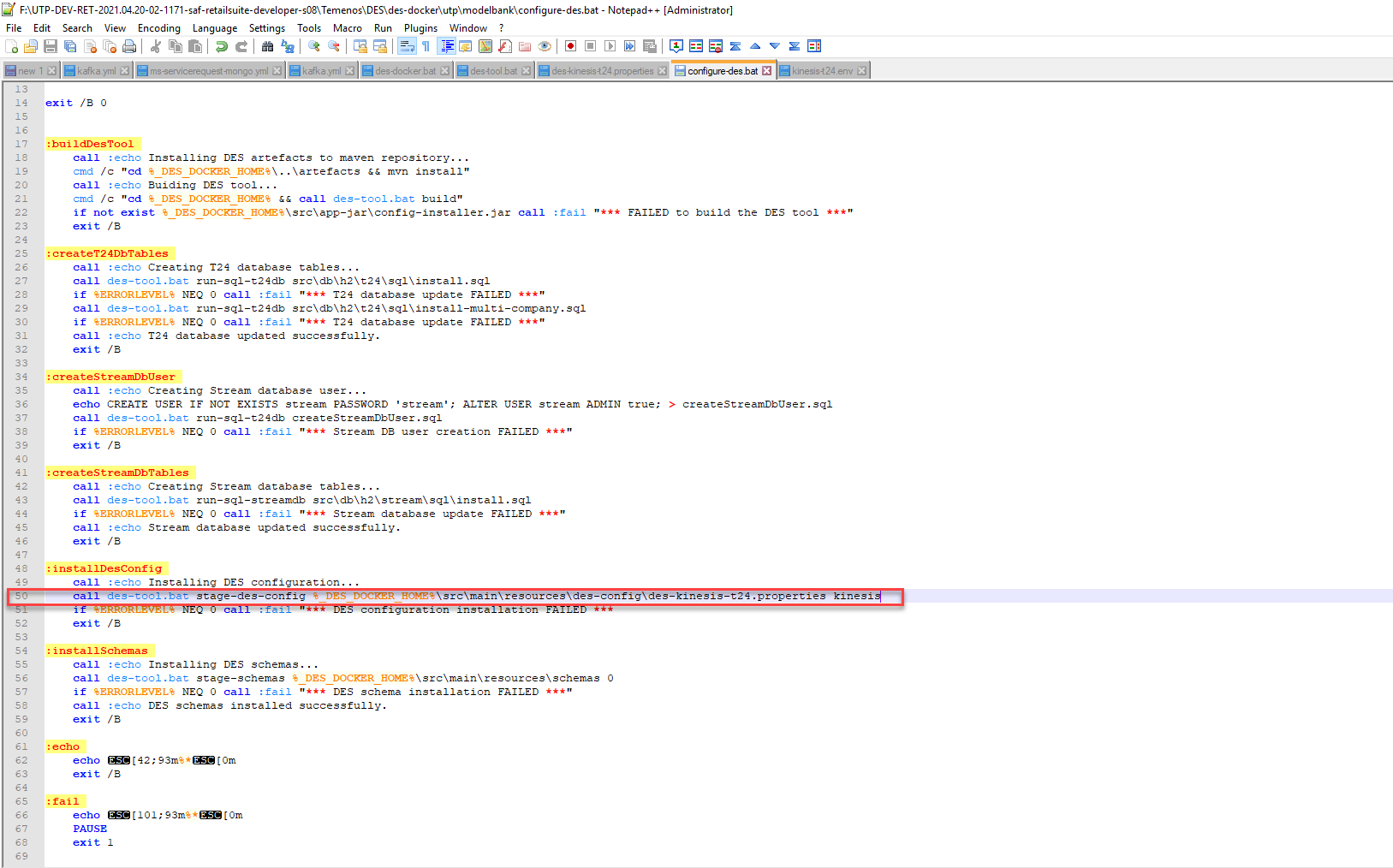
- Navigate to F:\UTP-DEV-RET-2021.03.04-01-1064-saf-retailsuite-developer-s08\Temenos\DES\des-docker\utp\modelbank\configure-des.bat. Update the des config file as shown in the below image highlighted in red:
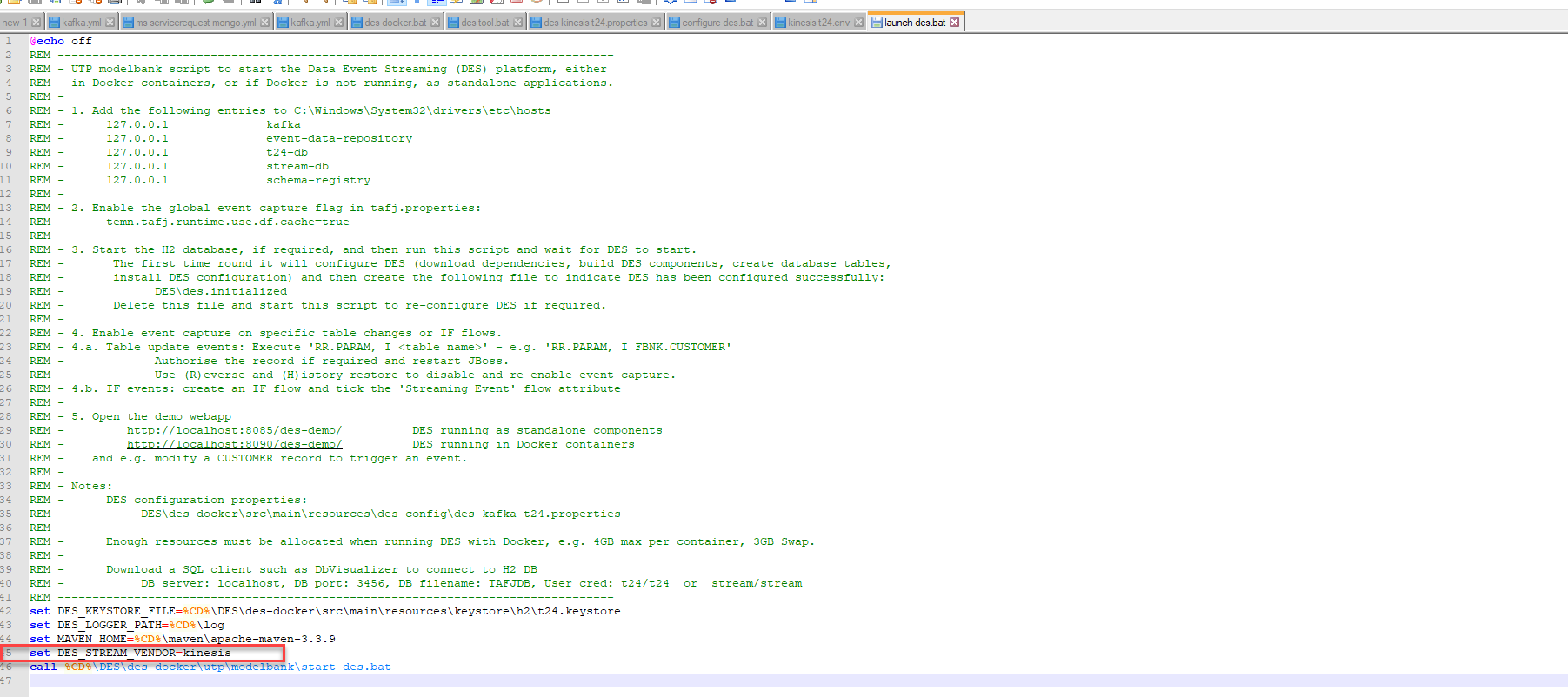
- Navigate to F:\UTP-DEV-RET-2021.03.04-01-1064-saf-retailsuite-developer-s08\Temenos\launch-des.bat. Set the env for eventhub as shown in below image highlighted in red.
Alternative to start DES:
If launch-des.bat fails to start the DES or if it fails by showing an error, try the alternative method:
- Navigate to F:\UTP-DEV-RET-2021.03.04-01-1064-saf-retailsuite-developer-s08\Temenos\DES\des-docker\des-tool.bat.
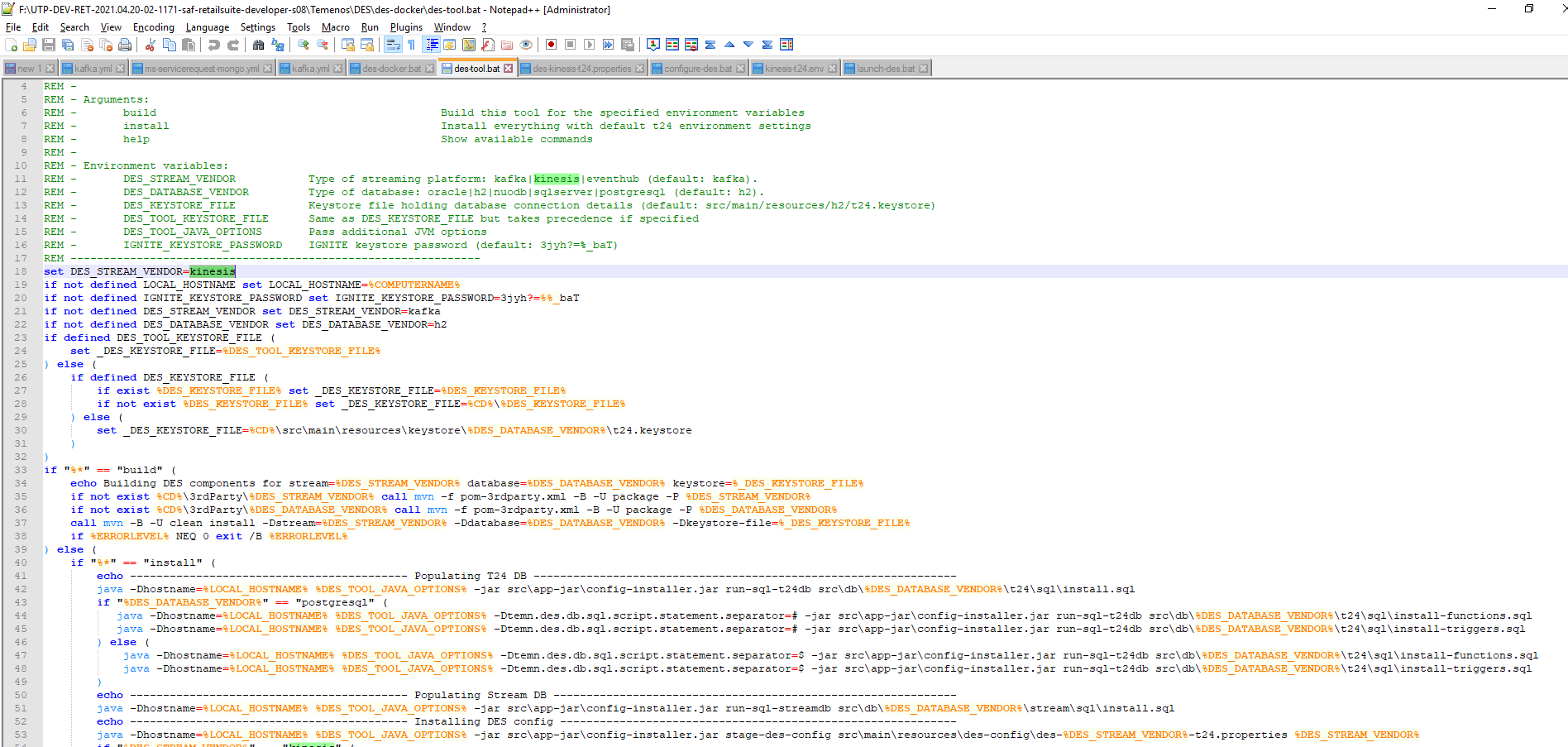
- From F:\UTP-DEV-RET-2021.03.04-01-1064-saf-retailsuite-developer-s08\Temenos\DES\des-docker\des-tool.bat open the command prompt and execute the following commands:
des-tool.bat builddes-tool.bat install-
des-docker.bat build -
des-docker.bat up -d
To check the DES_Configuration:
-
In the SQL window execute the following command:
select * from F_EB_DES_CONFIG;
RECID | XMLRECORD
kafka | <row id='kafka'><c1 m='1'>temn.des.version</c1><c2 m='1'>2019-02-07T13:17:58.113</c2><c1 m='2'>temn.
Here, it must not be kafka, it must be kinesis. Execute the following commands:
- From F:\UTP-DEV-RET-2021.03.04-01-1064-saf-retailsuite-developer-s08\Temenos\DES\des-docker\des-tool.bat open the command prompt and execute the following commands:
des-tool.bat stage-des-config F:\UTP-DEV-RET-2021.03.04-01-1064-saf-retailsuite-developer-s08\Temenos\DES\des-docker\src\main\resources\des-config\des-kinesis-t24.properties kinesis.
-
In the SQL window, execute the following command:
select * from F_EB_DES_CONFIG;
RECID | XMLRECORD
kinesis | <row id='kinesis'><c1 m='1'>temn.des.version</c1><c2 m='1'>2019-02-07T13:17:58.113</c2><c1 m='2'>tem>temn.
Check whether the des is created successfully using the following commands:
- docker ps -a
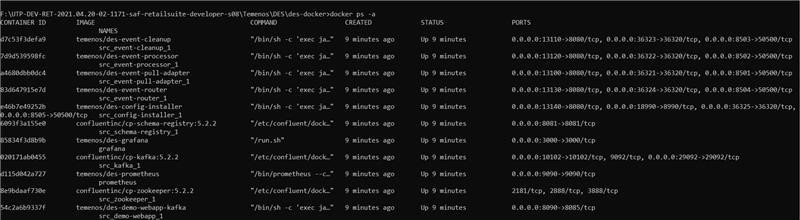
- docker logs –f src_event-processor_1
- docker ps -a
Here you can see the aws kinesis connecting to the assembled-event-MSRetail.
RR.PARAM and ILP Configuration
RR.PARAM Configuration
The following entries are to be added in the RR.PARAM application for Arrangement Microservice:
|
|
|
|
|
|
|
|
|
|
|
|
|
|
|
|
|
|
|
|
|
|
Here XXX is the company mnemonic, if Customer wants to extract the data for the financial entity (Lead company) BNK, then configure these file (Example EB.CASHLFOW) with FBNK.EB.CASHFLOW.
Here is a sample RR.PARAM record:
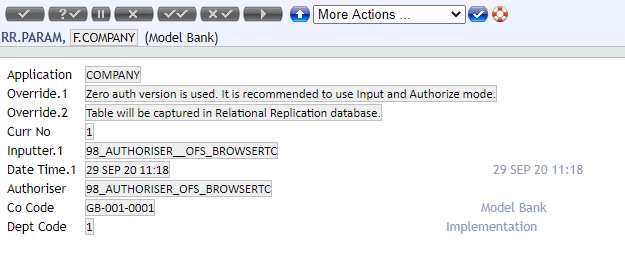
While committing the RR.PARAM record, DES creates the corresponding schema for the application. Therefore, ensure that DES is running while creating records in RR.PARAM.
ILP Configuration
ILP enables ingesting the legacy records into AMS.
Configure RR.INITIAL.LOAD.PARAMETER for applications to run ILP:
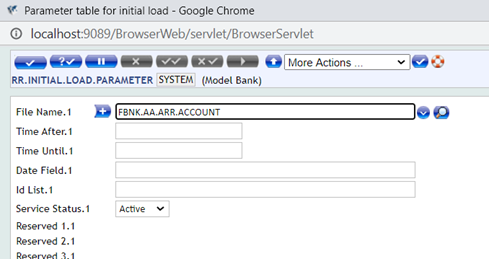
After RR.INITIAL.LOAD.PARAMETER is configured, start TSM and BNK/RR.INITIAL.LOAD.SERVICE (name of the service changes based in company). Run the service for ILP.
The following table displays the order in which the RR.PARAM must be created and ILP service must run:
| Order No | Application |
|---|---|
| 1 | F.LANGUAGE |
| 2 | F.COMPANY |
| 2 | F.POSTING.RESTRICT |
| 2 | F.DEPT.ACCT.OFFICER |
| 2 | FBNK.AA.PRODUCT |
| 2 | F.AA.CUSTOMER.ROLE |
| 2 | F.INVESTMENT.PROGRAM |
| 3 | FBNK.CUSTOMER |
| 4 | FBNK.AA.ARRANGEMENT |
| 4 | FBNK.SEC.ACC.MASTER |
| 5 | FBNK.AA.ARR.ACCOUNT |
| 5 | FBNK.AA.ARR.OFFICERS |
| 5 | FBNK.AA.ARR.CUSTOMER |
| 5 | FBNK.AA.ACCOUNT.DETAILS |
| 6 | FBNK.AA.ARR.STATEMENT |
| 6 | FBNK.AA.ARR.TERM.AMOUNT |
| 6 | FBNK.AA.ARR.INTEREST |
| 7 | FBNK.ACCOUNT.CLOSED |
| 8 | FBNK.EB.CASHFLOW |
| 9 | FBNK.AA.BILL.DETAILS |
| 9 | FBNK.AA.ARR.PAYMENT.SCHEDULE |
| 9 | FBNK.AA.INTEREST.ACCRUALS |
In this topic