Docker Deployment Artefacts
This section shows the folder structure of Marketing Catalog package. It is available as a single release bundle (For example, ms-marketingcatalog-package-docker-<release_number>.zip).
The prerequisites before you deploy Microservice in Docker are:
- Install Docker engine in the deployment environment (See Get Docker)
- Turn on Linux containers in docker
Deployment of Marketing-Catalog Microservice in Docker
Follow the steps below to deploy the Marketing Catalog in docker.
- Unzip the ms-marketingcatalog-package-docker-<release_number>.zip

- The extracted package contains the configuration files for the docker and the respective bat and sh files.
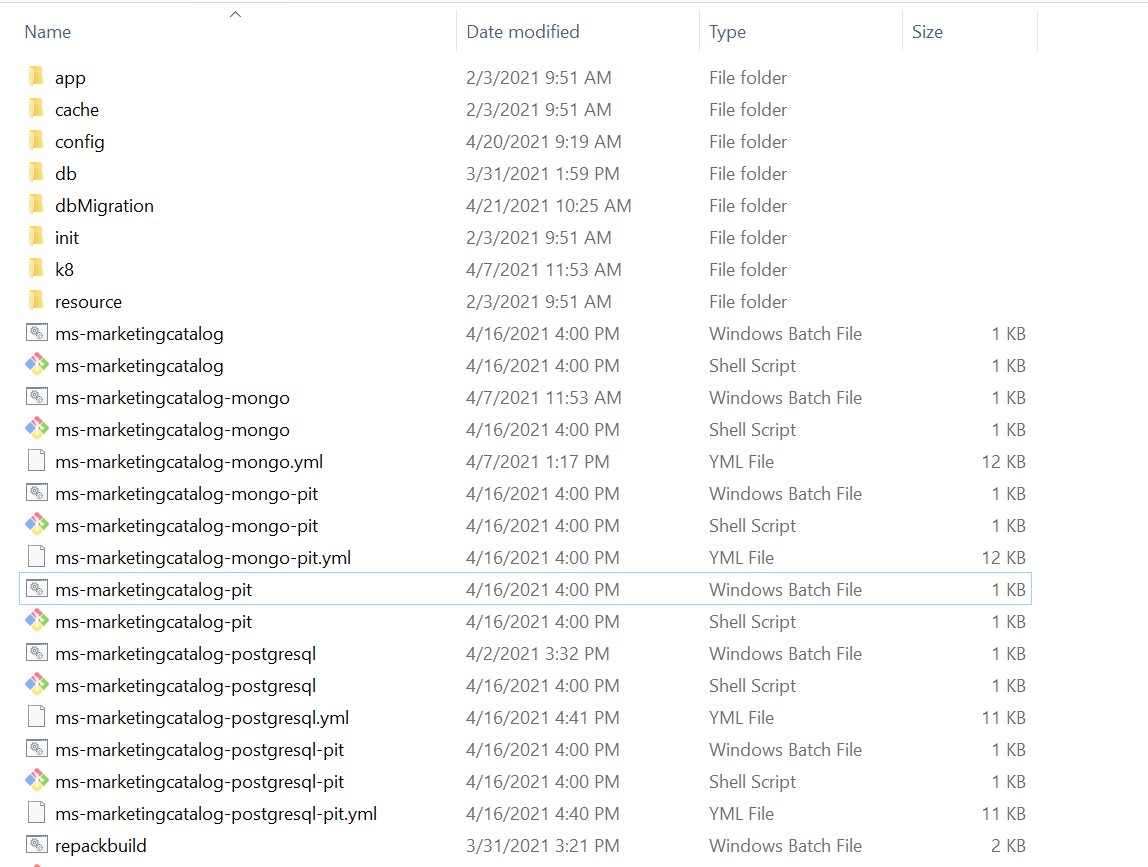
Memory Limit: Below are the list of containers with its Memory limit.
| Containers | Memory Limit |
|---|---|
| API | 812M |
| Ingester | 1G |
MongoDB
- Enable authorization and authentication for marketingcatalog Microservice by following below steps.
- To enable the in-house authentication in addition to API key, perform the JWT Authentication in ms-marketingcatalog-mongo.yml/ms-marketingcatalog-mongo-pit.yml.
- Perform the XACML configurations in ms-marketingcatalog-mongo.yml/ms-marketingcatalog-mongo-pit.yml. to enable security policies and access rights to the APIs.
- Perform Keycloak configuration in ingester container of ms-marketingcatalog-mongo.yml/ms-marketingcatalog-mongo-pit.yml to enable third party authentication.
- Navigate from the command prompt to the directory where the .bat and .sh files are available and execute the below command which creates an image and docker container for the image.
| Script | Description |
|---|---|
| ms-marketingcatalog-mongo-pit.bat / ms-marketingcatalog-mongo-pit.sh | To deploy only the components necessary for Microservice. Data Event Streaming (DES) is presumed to deployed and running already. The streaming services will not be deployed. |
| ms-marketingcatalog-mongo.bat / ms-marketingcatalog-mongo.sh | To deploy all the necessary components for a Microservice including streaming services will be deployed, in order to run the Microservice independently. |
For Windows : ms-marketingcatalog-mongo.bat/ms-marketingcatalog-mongo-pit.bat up --build -d
For Linux : ms-marketingcatalog-mongo.sh/ms-marketingcatalog-mongo-pit.sh up --build -d
- After the successful deployment, database, collections and the reference data(master data) are loaded into the mongo database for marketingcatalog Microservice.
- Once the marketingcatalog Microservice is up and running in docker, check the API's in the package.
URL of API's follows the below structure
- Base Path: http://<IP_ADDRESS>:<PORT>/<context-root>/api/<version>/ For Example: http://localhost:8002/ms-marketingcatalog-api/api/v3.0.0/
- The resource path of the endpoint can be found in the Service Document - Swagger.
- A sample endpoint of a marketingcatalog can be http://localhost:8002/ms-marketingcatalog-api/api/v3.0.0/product/marketingCatalogue/products
Alternatively, the status of Microservice can be obtained through the Health Check Marketing C.
- For BackOffice Ingestion, please refer Ingestion for more configurations.
If DES and MarketingCatalog are running in different machine
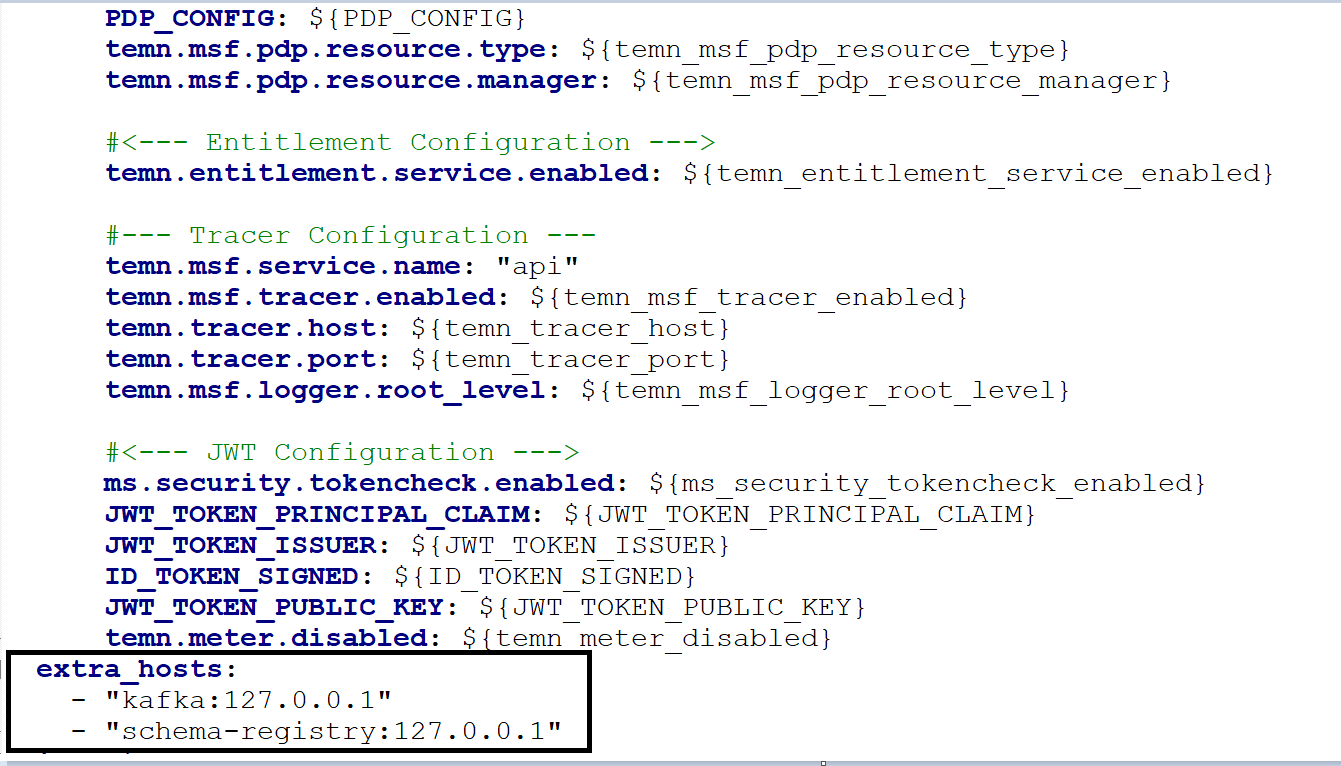
- Add extra host fields with DES IP for Kafka and Schema registry in API and Ingester container of ms-marketingcatalog-mongo-pit.yml.
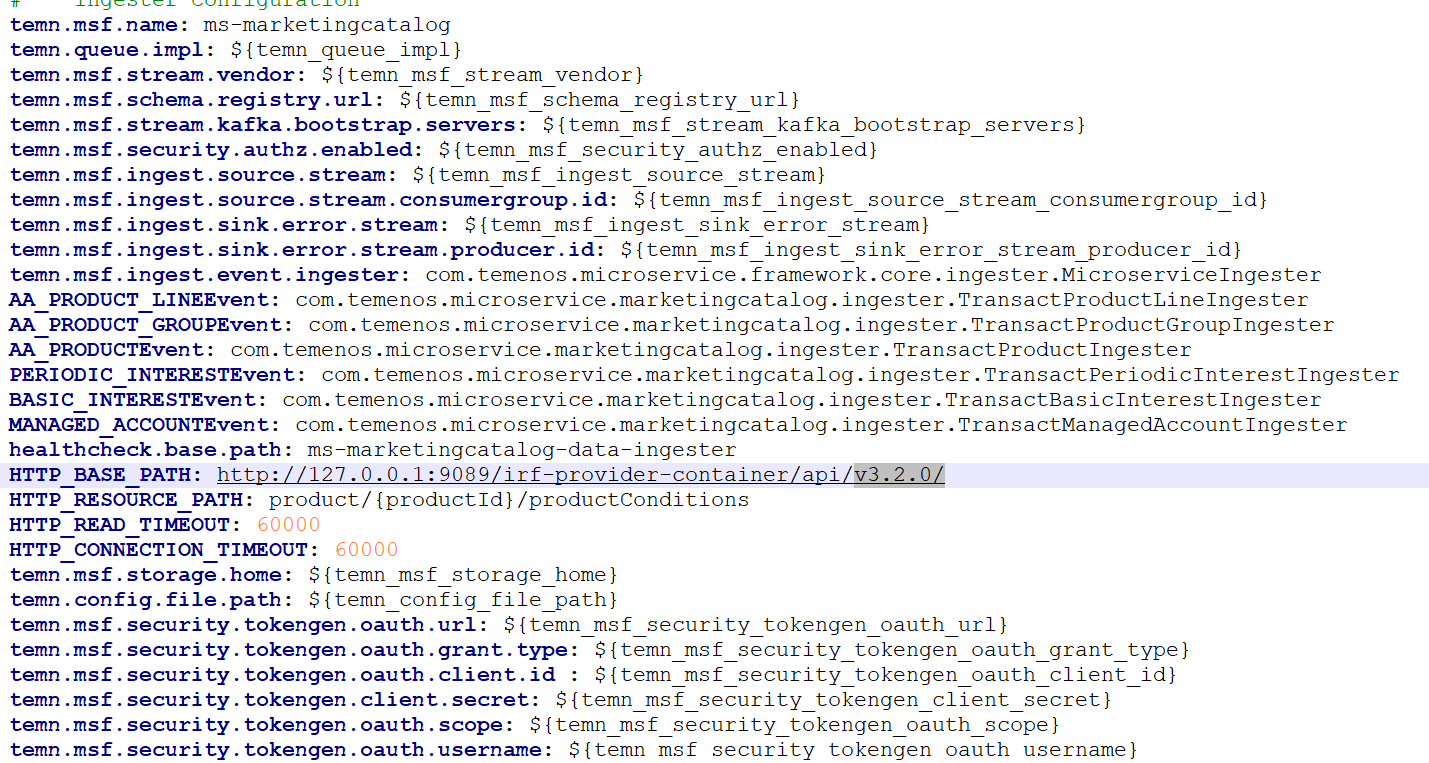
- Change it to the respective Transact IP address of HTTP_BASE_PATH url provided in ms-marketingcatalog-mongo-pit.yml.
Undeployment:
To stop and remove the existing container, execute the below command from the location where the marketingcatalog docker is started.
- For Windows : ms-marketingcatalog-mongo.bat/ms-marketingcatalog-mongo-pit.bat/ms-marketingcatalog-postgresql.bat/ms-marketingcatalog-postgresql-pit.bat down
- For Linux : ms-marketingcatalog-mongo.sh/ms-marketingcatalog-mongo-pit.sh/ms-marketingcatalog-postgresql.sh/ms-marketingcatalog-postgresql-pit.sh down
In this topic