Installing Marketing Catalog Microservice on AWS
This section helps you to install the Marketing Catalog Microservice on AWS cloud.
Procedure:
- Download the ms-marketingcatalog-package-docker-<release_number>.zip file from the target folder.
- Extract the zip file.
- To enable deployments on multiple environments such as Dev, UAT, and Prod, for the same microservices within the same account, set the DEPLOYMENT_ENVIRONMENT variable with respective value.
Dynamo DB
- To enable the internal authentication in addition to API key, perform the JWT authentication in the installation scripts.
- To enable security policies and access rights to the APIs , perform the XACML configurations in the installation scripts.
- To enable third party authentication, perform Keycloak configuration in ingester container.
- Verify the following properties related to ingestion in the install script.
Environment Variable
Description
Example
temn_msf_schema_registry_url
URL of the schema registry
http://localhost:8081
HTTP_BASE_PATH
Base path of the IRF provider container
http://<IP>:<PORT>/irf-provider-container/api/v1.0.0/
HTTP_RESOURCE_PATH
Resource path of IRIS API used by marketing catalog Microservice - "product/{productId}/productConditions"
product/{productId}/productConditions
- In AWS command line, go to the installation directory.
- Modify the region information in the install-aws.sh script as follows:
--region us-west-2
--event-source-arn arn:aws:kinesis:us-west-2
--uri arn:aws:apigateway:us-west-2:lambda:path/2015-03-31/functions/arn:aws:lambda:us-west-2
- To deploy the Microservice, execute the following shell scripts to create the resources.
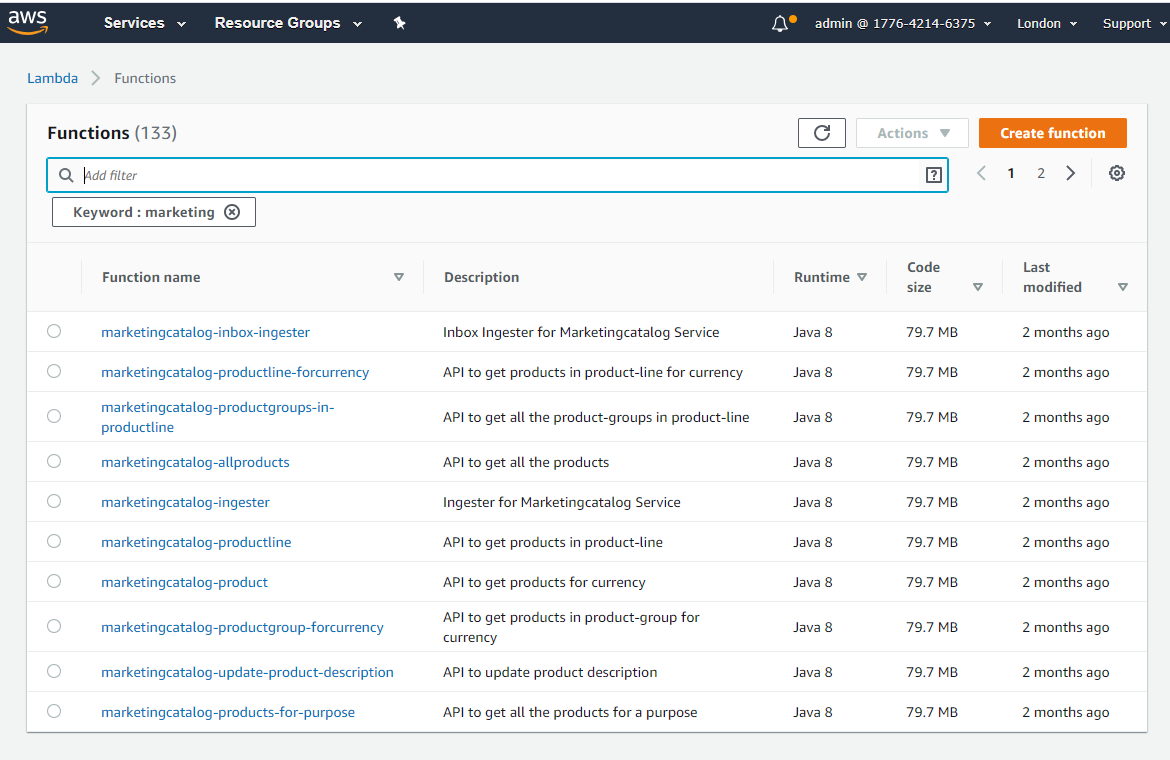
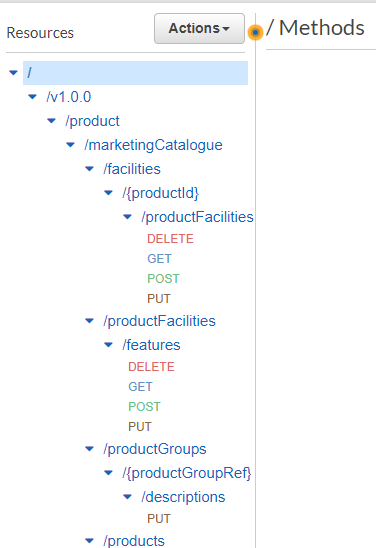
DynamoDB Script Description install-aws.sh To deploy all the necessary components for a Microservice including streaming services, in order to run the Microservice independently. install-aws-ms.sh To deploy only the components necessary for Microservice. Data Event Streaming (DES) is presumed to be deployed and running already. The streaming services are not deployed. - Log in to AWS portal and verify the following if they have been created properly.
- Lambda functions
- API Gateways
- Lambda functions
- To obtain the API key for all the endpoints in AWS, go to the API Key section under the Amazon API gateway and select the corresponding API key. Click show. The API key should be a part of header (x-api-key) in all the requests.

After the successful deployment, database, collections and the reference data (master data) are loaded into the dynamo database for the Marketing Catalog Microservice.
The Base path of the API gateway URL follows the structure below.
 Base URI
https://<REST-API-ID>.execute-api.<LOCATION>.amazonaws.com/<DEPLOYMENT_ID>
For example,
https://7061g8fb9d.execute-api.eu-west-2.amazonaws.com/ms-marketingcatalog-api
For information on the resource path of the endpoint, see the APIs section.
Below is a sample endpoint of Marketing Catalog.
https://7061g8fb9d.execute-api.eu-west-2.amazonaws.com/ms-marketingcatalog-api/v1.0.0/product/products/marketingCatalogue
You can retrieve the Rest API Id from Amazon API Gateway as shown below.
 Ensure that you replace the location and deployment Id with the appropriate values provided in the script during deployment.
Postgre SQL
- To enable the internal authentication in addition to API key, perform the JWT authentication in the installation scripts.
- To enable security policies and access rights to the APIs , perform the XACML configurations in the installation scripts.
- To enable third party authentication, perform Keycloak configuration in ingester container.
- Verify the following properties related to ingestion in the install script.
Environment Variable
Description
Example
temn_msf_schema_registry_url
URL of the schema registry
http://localhost:8081
HTTP_BASE_PATH
Base path of the IRF provider container
http://<IP>:<PORT>/irf-provider-container/api/v1.0.0/
HTTP_RESOURCE_PATH
Resource path of IRIS API used by marketing catalog Microservice - "product/{productId}/productConditions"
product/{productId}/productConditions
- In AWS command line, go to the installation directory.
- Modify the region information in the install-aws-postgresql.sh script as follows:
--region us-west-2
--event-source-arn arn:aws:kinesis:us-west-2
--uri arn:aws:apigateway:us-west-2:lambda:path/2015-03-31/functions/arn:aws:lambda:us-west-2
- To deploy the Microservice, execute the following shell scripts to create the resources.
PostgreSQL Script Description install-aws-postgresql.sh To deploy all the necessary components for a Microservice including streaming services, in order to run the Microservice independently. install-aws-postgresql-ms.sh To deploy only the components necessary for Microservice. Data Event Streaming (DES) is presumed to be deployed and running already. The streaming services are not deployed. - Log in to AWS portal and verify the following if they have been created properly.
- Lambda functions
- API Gateways
- Lambda functions
- To obtain the API key for all the endpoints in AWS, go to the API Key section under the Amazon API gateway and select the corresponding API key. Click show. The API key should be a part of header (x-api-key) in all the requests.
After the successful deployment, database, collections and the reference data (master data) are loaded into the postgresql database for the Marketing Catalog Microservice.
The Base path of the API gateway URL follows the structure below.
Base URIhttps://<REST-API-ID>.execute-api.<LOCATION>.amazonaws.com/<DEPLOYMENT_ID>
For example,
https://7061g8fb9d.execute-api.eu-west-2.amazonaws.com/ms-marketingcatalog-api
For information on the resource path of the endpoint, see the APIs section.
Below is a sample endpoint of Marketing Catalog.
https://7061g8fb9d.execute-api.eu-west-2.amazonaws.com/ms-marketingcatalog-api/v1.0.0/product/products/marketingCatalogue
You can retrieve the Rest API Id from Amazon API Gateway as shown below.
Ensure that you replace the location and deployment Id with the appropriate values provided in the script during deployment.
In this topic