K8 Deployment Artefacts
This section shows the folder structure of Marketing Catalog package. It is available as a single release bundle (For example, ms-marketingcatalog-package-docker-<release_number>.zip).
Kubernetes (k8) pack is available inside src/docker.
Prerequisites
Before deploying Marketing Catalog Microservice on K8, ensure to meet the following prerequisites:
- Install the Docker engine on your deployment environment. For more information about the installation, click here.
- Turn on the Linux containers in Docker.
Enable Kubernetes
To enable Kubernetes, follow these steps.
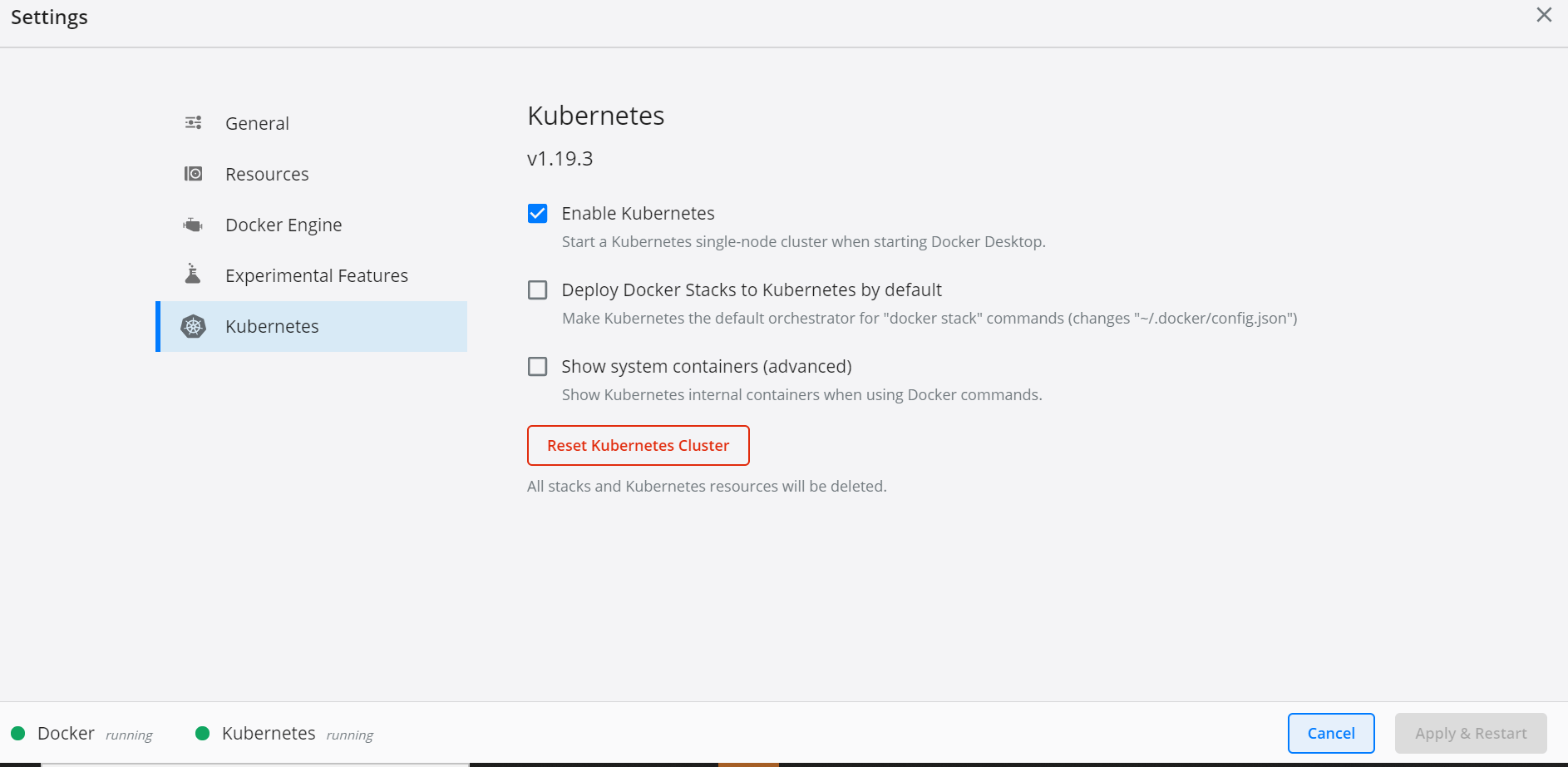
- After the Docker is installed, enable Kubernetes in the Docker Desktop app.
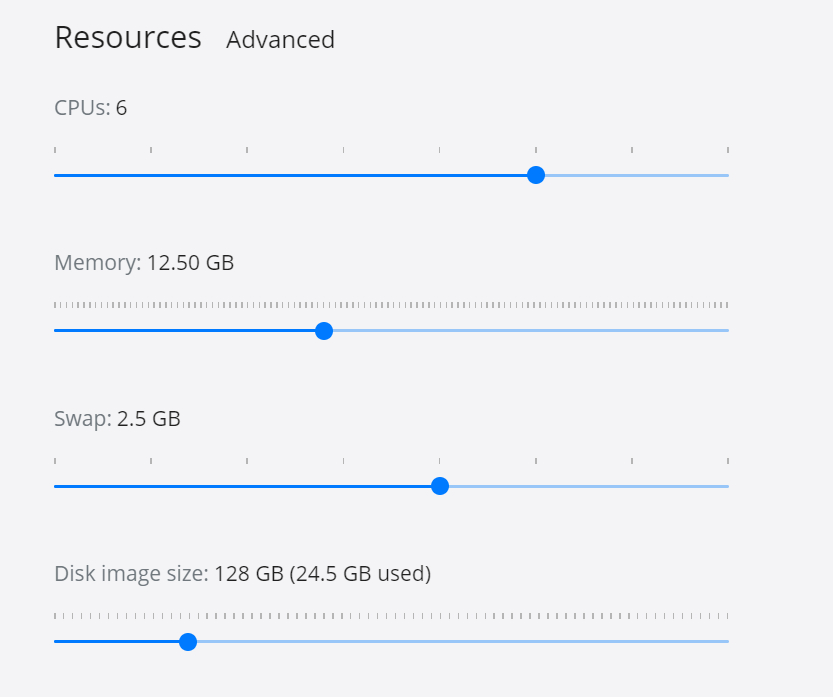
- Kubernetes requires a minimum of six CPUs to run smoothly. Go to Docker settings → Resources, and increase the CPU and Memory as shown here.
- Install Helm and set the helm path as an environment variable on the system.
Deployment of Marketing Catalog Microservice in Docker
Follow the below steps to deploy the Marketing Catalog Docker Package.
- Unzip the ms-marketingcatalog-package-docker-<release_number>.zip.
.png)
- Extracted package contains the configuration files and Navigate to k8
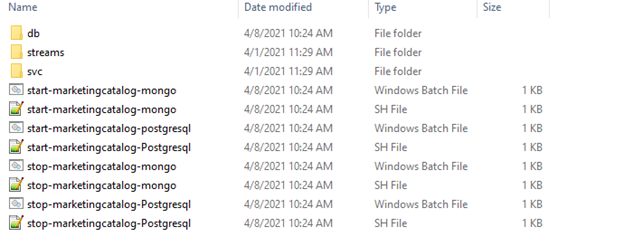
- Open a command prompt in an on-premise folder
If Strimzi is not installed in the machine, navigate into the streams folder and run ./strimzi-install.sh .This is a one-time step and should be repeated if we reset Kubernetes cluster.
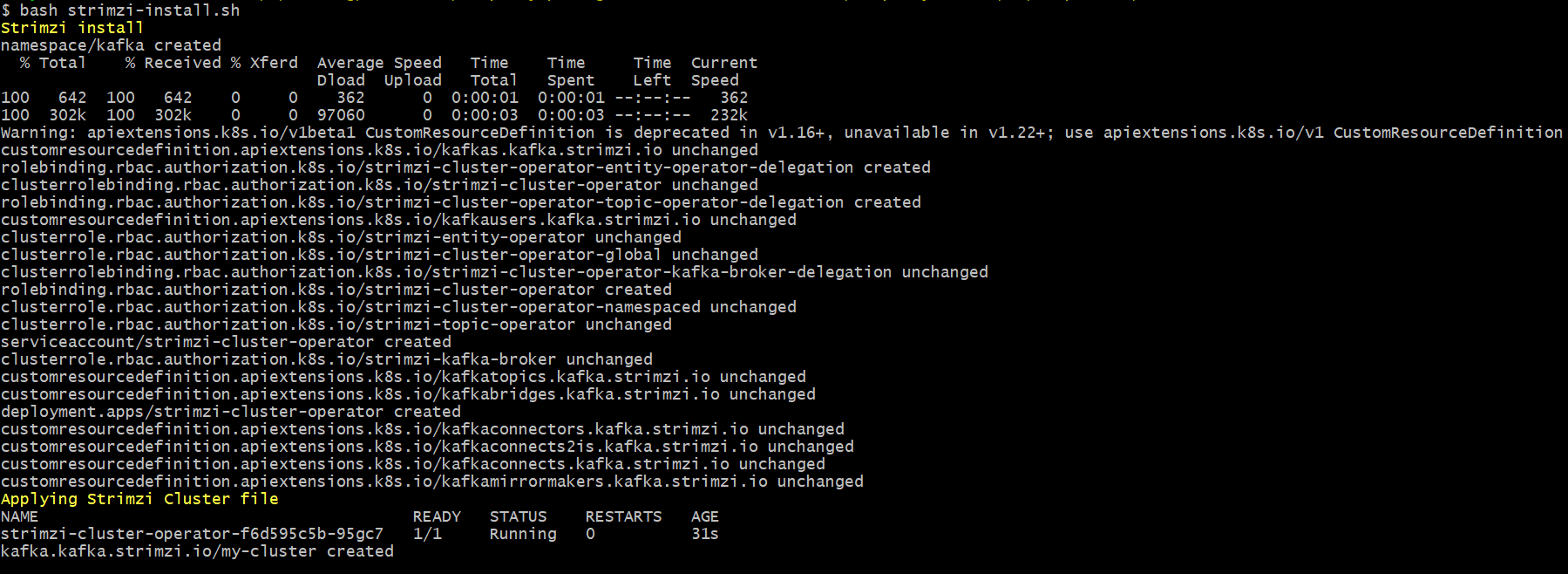
- Execute kubectl get pods -n kafka in order to check all pods are up and running.

- Enable authorization and authentication for marketingcatalog Microservice by following below steps.
a. To enable the in-house authentication in addition to API key, perform the JWT Authentication in marketingcatalog-configmap.yml.
b. To enable security policies and access rights to the APIs, perform the XACML configurations in marketingcatalog-configmap.yml.
c. To enable the third party authentication, perform Keycloak configuration in ingester container in marketingcatalog-configmap.yml.
K8
| Services | Memory Request | Memory Limit |
|---|---|---|
| API | 1G | 1.5G |
| Ingester | 1G | 1.5G |
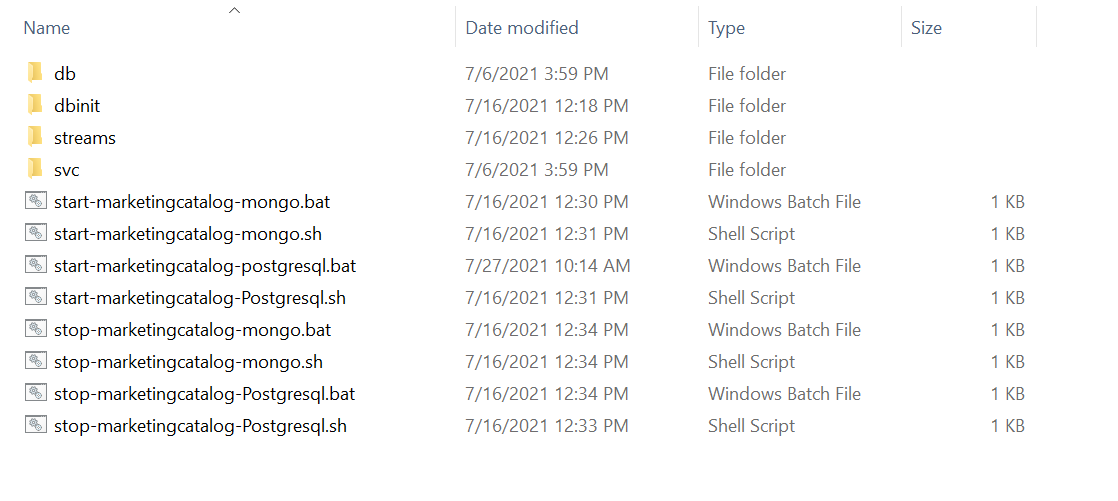
Navigate from the command prompt to the directory (ms-marketingcatalog-package-docker-<release_number>.zip\ms-marketingcatalog-docker\k8\on-premise) where the .bat and .sh files are available and execute the below command which creates an image and docker container for the image.
K8 Images
| Services | Memory Request | Memory Limit |
|---|---|---|
| API | 1G | 1.5G |
| Ingester | 1G | 1.5G |
Prior to the deployment standalone MongoDB/PostgreSQL server should be up and running.
Follow the steps below to deploy the Marketing Catalog Docker Helm package.
MongoDB
- To Execute Marketing Catalog Microservice on MongoDB, run below executable files
| Script | Description |
|---|---|
| start-marketingcatalog-mongo.bat / start-marketingcatalog-mongo.sh | To deploy all the necessary components for a Microservice including streaming services will be deployed, in order to run the Microservice independently. |
For Windows : start-marketingcatalog-mongo.bat
For Linux : start-marketingcatalog-mongo.sh
- Post successful deployment of the database, collections, and the reference data(master data) are loaded into the mongo database for marketing catalog Microservice by following the below steps.
- After the successful deployment of the marketingcatalog, execute kubectl get pods -n mongodb commands to check whether mongo pods are up and running.
.png)
- Execute the below commands to check the primary node on mongo
kubectl exec -it mongodb-0 -n mongodb -c mongod bashE
kubectl exec -it mongodb-1 -n mongodb -c mongod bash
kubectl exec -it mongodb-2 -n mongodb -c mongod bash
- In the above instance,mongodb-0 port is allocated as primary. Do the following
Copy the mongodb-0 port number from mongo_services.yaml (\..\ms-marketingcatalog-docker\k8\on- premise\db\database\mongo\rs) and replace the port number in dbconfig.conf (\..\ms-marketingcatalog-docker\dbMigration\config).
.png)
- Navigate to \ms-marketingcatalog-docker-DEV.0.0-SNAPSHOT\ms-marketingcatalog-docker\dbMigration and execute execute.bat in order to load reference data into MarketingCatalog Microservice.
.png)
- MarketingCatalog Microservice is up and running on K8, check the API's in the package.
The URL of API's follows the below structure,
- Base Path: http://<IP_ADDRESS>:<PORT>/<context-root>/api/<version>/ For Example: http://localhost:8002/ms-marketingatalog-api/api/v3.0.0/
- The resource path of the endpoint can be found in the swagger document.
- A sample endpoint of a marketingcatalog can be http://localhost:8002/ms-marketingcatalog-api/api/v3.0.0/product/marketingCatalogue/products
Alternatively, the status of the Microservice can be obtained through the health check API.
- For Back Office Ingestion, please refer Ingestion for more configurations.
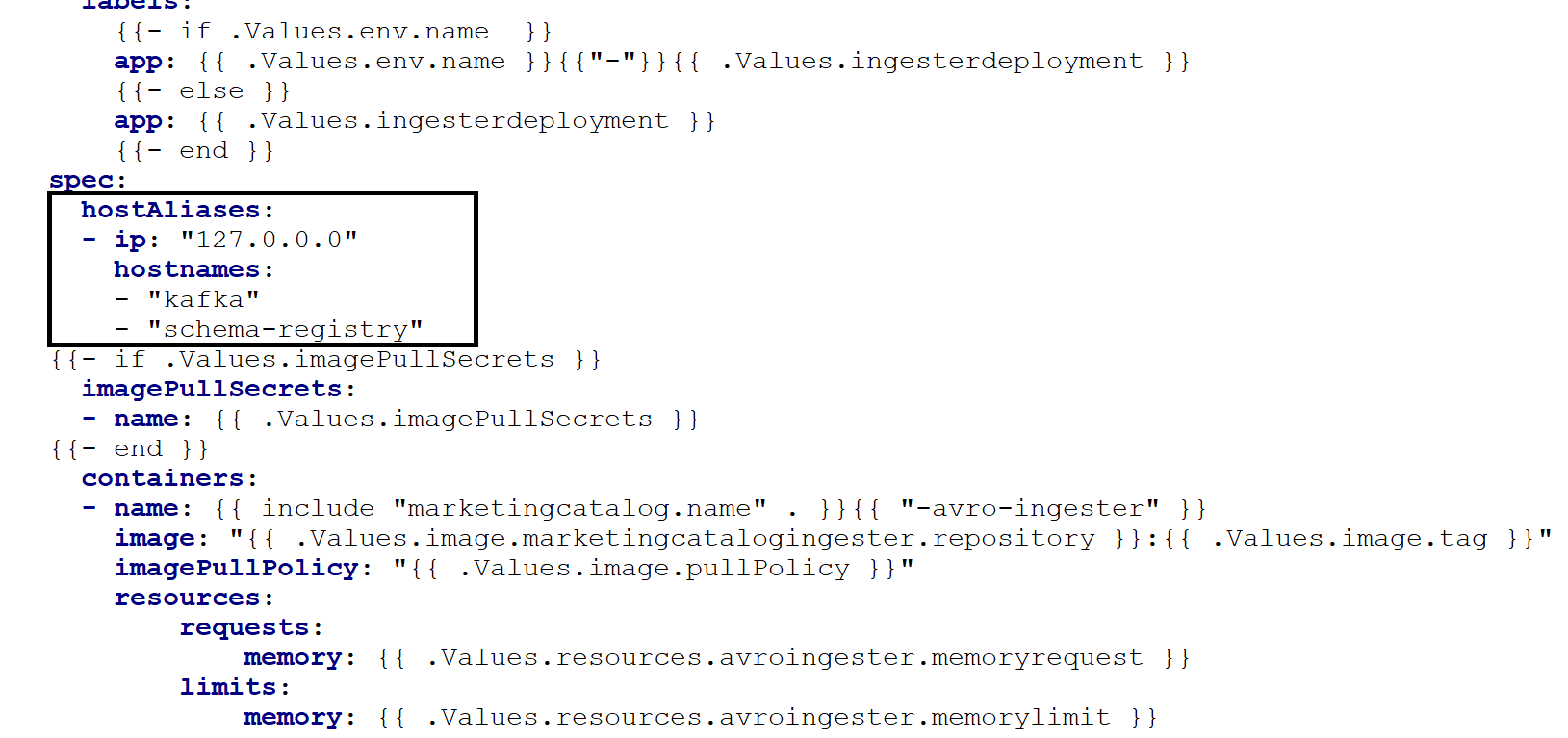
If DES and Marketing Catalog are running in different machine
- Update host aliases with DES IP for Kafka and Schema registry in marketingcatalog-ingester.yml.
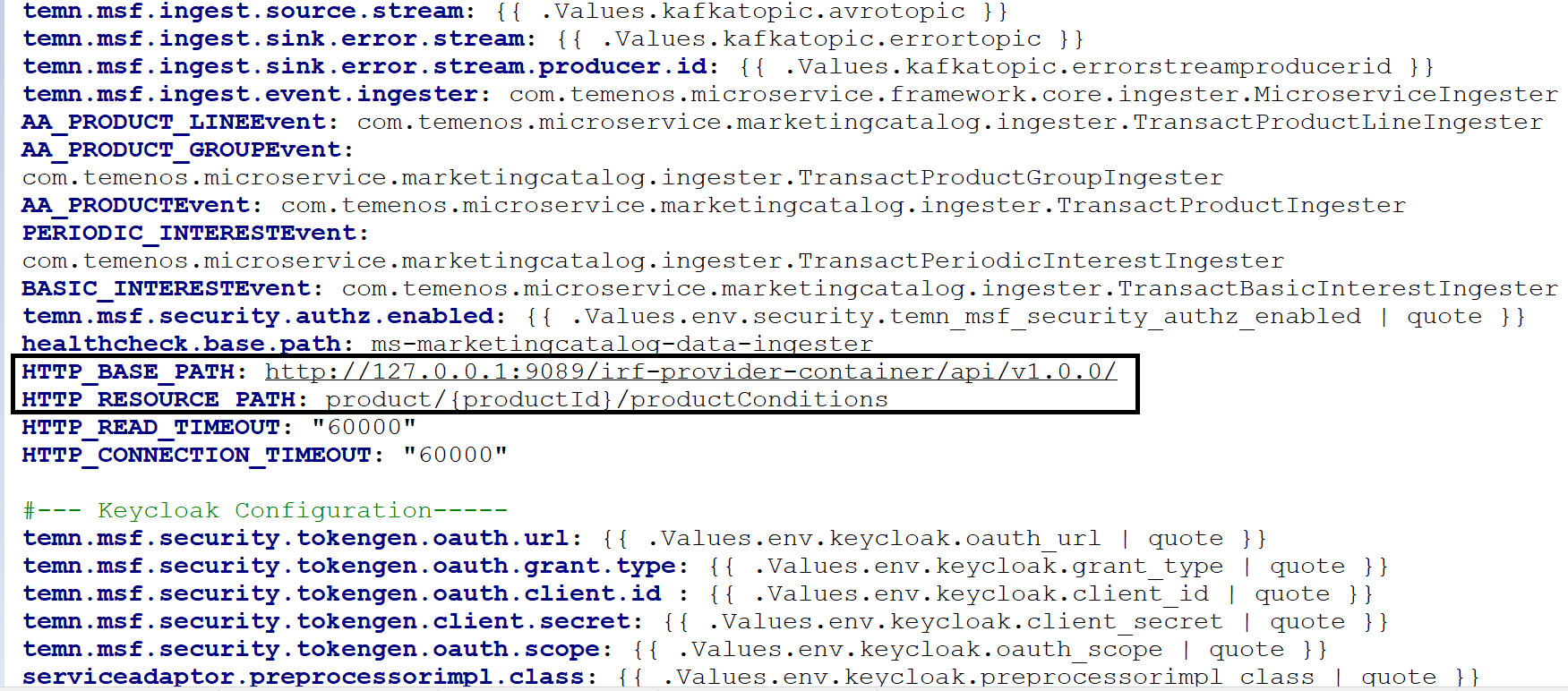
- Change it to the respective Transact IP address of HTTP_BASE_PATH url provided in marketingcatalog-configmap.yml.
Undeployment
To undeploy and remove the existing container, execute the below command from the location where the marketingcatalog docker is started.
For Windows : stop-marketingcatalog-mongo.bat
For Linux : stop-marketingcatalog-mongo.sh
PostgreSQL
- Navigate to k8\on-premise and execute MarketingCatalog Microservice on PostgresqlDB, to run the below executable files.
| Script | Description |
|---|---|
| start-marketingcatalog-postgresql.bat / start-marketingcatalog-postgresql.sh | To deploy all the necessary components for a Microservice including streaming services will be deployed, in order to run the Microservice independently. |
- For Windows : start-marketingcatalog-postgresql.bat
- For Linux : start-marketingcatalog-postgresql.sh
- After the successful deployment, the database, collections, and the reference data(master data) are loaded into the PostgreSQL database for marketingcatalog Microservice.
- Once the marketingcatalog Microservice is up and running in docker, check the API's in the package.
URL of APIs follows the below structure base path.
- http://<IP_ADDRESS>:<PORT>/<context-root>/api/<version>/ For Example: http://localhost:8002/ms-marketingatalog-api/api/v3.0.0/
- The resource path of the endpoint can be found in the swagger document.
- A sample endpoint of a marketingcatalog can be http://localhost:8002/ms-marketingcatalog-api/api/v3.0.0/product/marketingCatalogue/products
Alternatively, the status of Microservice can be obtained through the Health Check - MC.
- For BackOffice Ingestion, Please refer Ingestion for more configurations.
If DES and Marketing Catalog are running in different machine
- Update host alias with DES IP for Kafka and Schema registry in marketingcatalog-ingester.yml.
- Change it to the respective Transact IP address of HTTP_BASE_PATH url provided in marketingcatalog-configmap.yml.
Undeployment
To undeploy and remove the existing container, execute the below command from the location where the Marketingcatalog docker is started.
- For Windows : stop-marketingcatalog-postgresql.bat
- For Linux : stop-marketingcatalog-postgresql.sh
In this topic